Activation problems / not possible to verify User Account

Hello, I need help. Iam very distressed.
I recently bought Capture One 21.
I activated my licence with a new email adress on one PC.
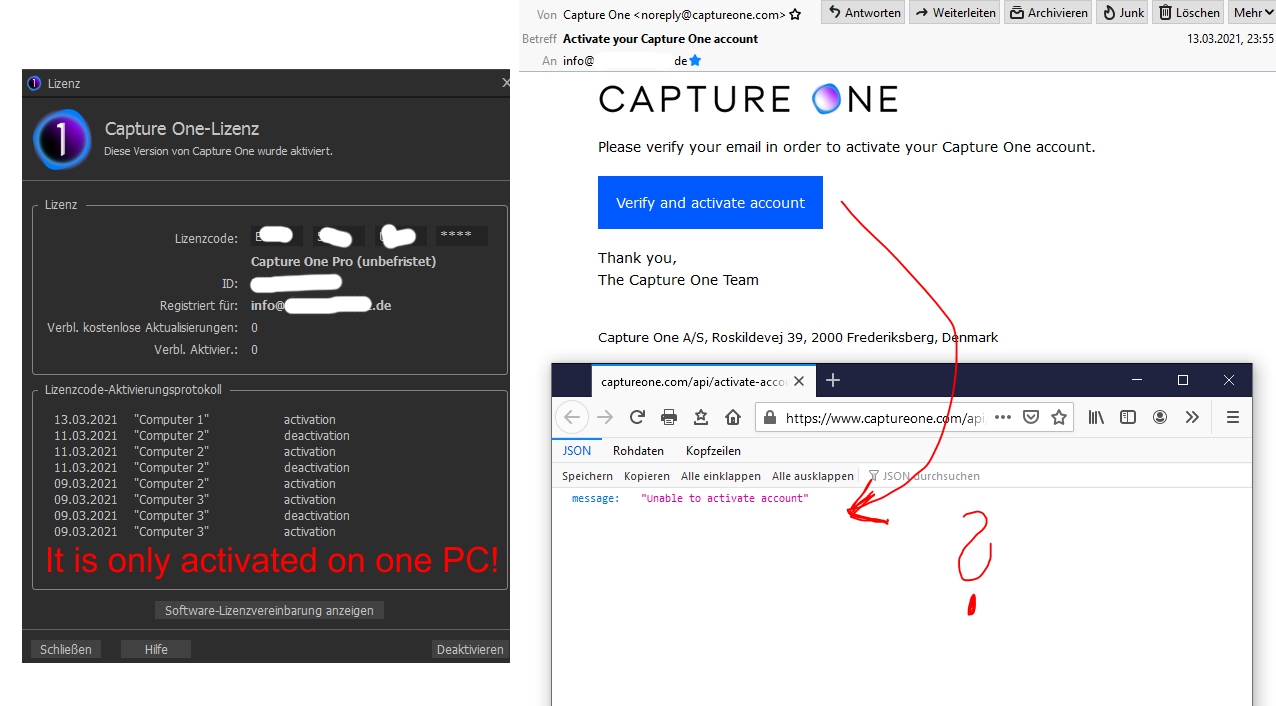
It worked, but I could not verify the User Account with this email adress. I only got an error message. Please see the screenshots in appendix.
Maybe the problem is there, because I have an old User Account with another email adress (I'm currently logged in with it). But I can not delete this User Account. The Capture One support is horrible.
Next problem: Today I restarted CO on my PC and the software asked me AGAIN for a licence activation. I did it, and it worked again, but now I can not install it to another computer, because it is activated TWO TIMES on one PC. What the hell is this?
Thank you very much!
Greetings from Germany.
Jan
-

Jan,
Does the configuration of your system somehow change between logins, in such a way that it might identify as a different device?
I suppose it is also possible that C1 licencing would also see the different user details (emails) as different "seats" in a multi-user environment. The sort of situation that might arise in a studio use situation for example.
Are you able to log in to your account using both the old and the new email address?
0 -
Thanks for your reply.
No, the configuration does not change. I just closed and opened CO within 5 minutes on my PC.
No, Iam only able to login to my old email/user acount. The licence is activated with the new email. But I can not verify this new user account (error message)... Its a tricky situation
Unfortunately the Capture One support seems to need a very long time to answer.
Hope they can reset my user accounts / licence.
:((0 -
Ok, finally the support activated my new user account. Now it works as expected. :)
0 -

I have the same problem. I deactivated version 20 first before installing version 21. The new license did not want to stick after I did the online activation. Did not see any problem until after I shut down and reopened capture one. It wanted the license again so I repeated process and it was fine. Then I went to help, check license and saw all the computer 1 and computer 2 activations and deactivations. Yes, I still have 2 activations left but not the point! I want this neat and clean. Show my one computer with the one activation. Sent them the support request today. I have updated prior versions of capture and never seen this before.
0
Post is closed for comments.
Comments
4 comments