Is it possible to apply a heal layer only to multiple files?

I have a shoot I'm working on that's going to create a stop-motion animation. So there's multiple things happening across files, but one remains the same throughout, the imperfections on the set itself. I have 2 masks already that are unique to each file (because of the moving elements in the frame). How can I create a heal layer and apply ONLY THAT layer across my files without undoing all my other work? Is this even possible?
Thanks in advance to anyone who ends up being my hero in this situation. :)
0
-
Yes.
- Create the heal layer on the first file.
- Select all the files you want to apply it to, making sure that the one with the heal layer is still the main variant (the one with the wider white border). Make sure the Edit All button is on.
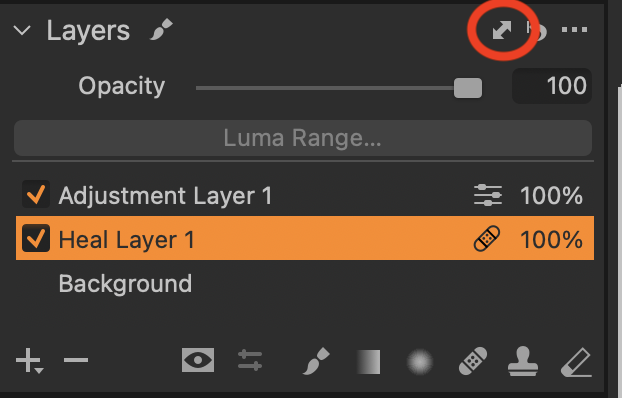
- Click the double headed arrow symbol on the layers tool.
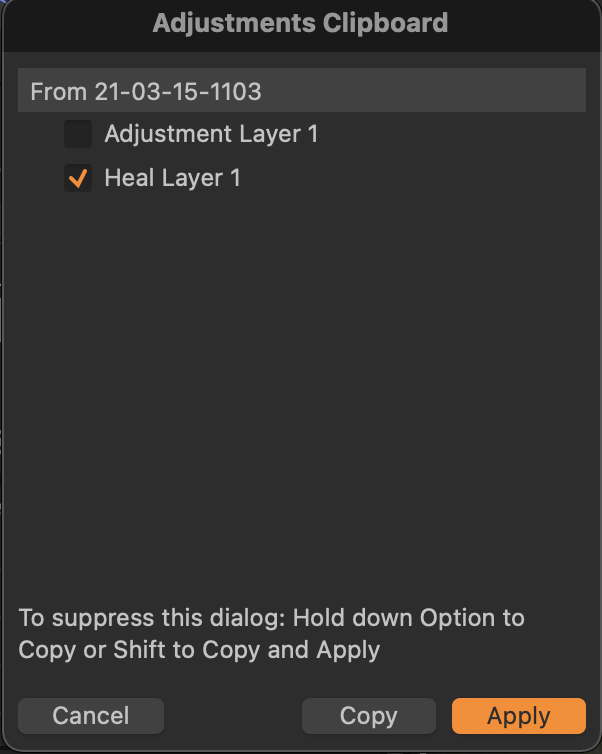
- In the dialog box clear all the check boxes except the one for that layer, and then click Apply..
Ian
0 -
YESSS! Thank you! So simple :)
0

Post is closed for comments.
Comments
2 comments