Image Import Not Working Properly

I've been doing this with C1 for years and this is the first time I've had problems. I select my images in Photomechanic, give images 2 stars for bringing into C1. In PM I select all my 2 stars, and then send them from there to C1. That's always worked smooth. With C1 21 it's giving me all kinds of problems. It'll import the whole folder and not just the images I want, but it'll import the images I want first. Sometimes I'll send over the new images and it'll show me the last set of images I imported. The new import setup looks nice for those who need it, but it's making it nearly unworkable for me. If I can't get the images I want into C1, it can't do the rest of the work.
Josh Hawkins
-
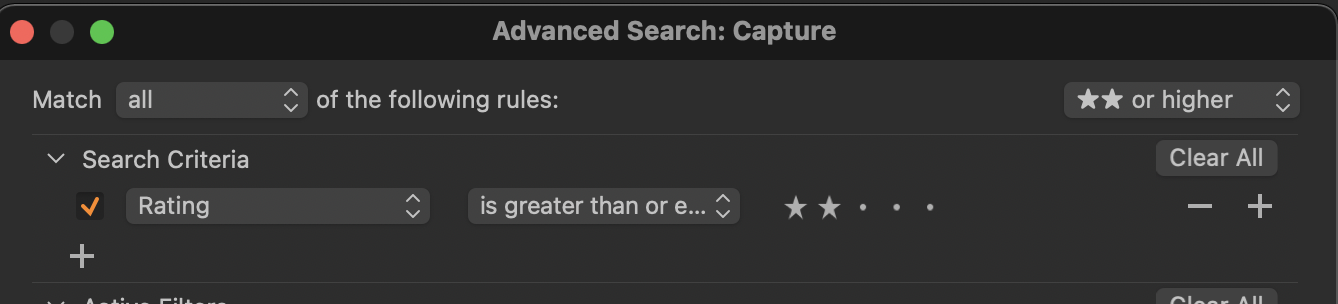
In the new import dialog box, you can select (in the sense of highlighting them) just some of the images, but if the others are all checked, they will be imported too. You can deselect them for import with the check box or the space bar as a keyboard shortcut. You could also use the search function on the ... menu at the top right of the import dialog box. Rating is one of the presets on offer, so you could perhaps choose to have just the images with a rating of two stars or higher. Then you would only see the 2* and above images in the import dialog.
Ian
0 -

Josh,
What, precisely, are you doing when you "send over the new images"?
Does that process differ from how you have used it previously either in the Photo Mechanic aspects or the C1 side of things?
0 -
Thanks Ian. That did it. I still dislike that it tries to import the whole folder, and that I have to choose the folder, but that's a big step in the right direction. Very big.
0 -
SFA, Photomechanic has an export option. It sends, I don't know how, the images to be opened by the selected program. In my case, I send them to C1. I can also drag and drop them on any program I want the images to open in, like Photoshop, those rare times I use it. Previously it took those images and imported them. I only saw those images from the folder. It was fast and efficient, two of my favorite things. The current import just adds layers of work for me. I'll make it work, C1 is just too nice of a photo editor, I won't give it up, but it's made a simple process into many more steps. I'll live, I'll just curse more. No biggie. Especially once my kids go back to school and I can go back into the office. ;)
0

Post is closed for comments.
Comments
4 comments