What is CaptueOne doing when it says "Setting up hardware acceleration"?

I understand what hardware acceleration and OpenCL are so please do not refer me to those articles. I want to know what is actually happening when CaptureOne shows that is "Setting up hardware acceleration" and runs my CPU at 100% for 30 minutes continuously. Is it downloading and installing more software? If so, what, where and how much additional disk space is it using? Is it running some kind of system load test? How often will this occur?
-
I can't fully answer the question about what exactly it is doing but I can say 2 or 3 things that may help.
- Running for 30 minutes continuously is not normal - typically, in my experience, it says it will take 2 minutes, and actually takes 3 or 4. (But then computer things generally are often like that - it says it will take x more minutes to move some files, or to complete an update, or whatever, and it actually takes longer.) I would contact Support and see whether they can help, because it's not normal.
- It usually sets up hardware acceleration once after either (a) an update to the Capture One software, or (b) an update to the operating system. It shouldn't do it every time you start Capture One.
- As far as I know, it does not involve it downloading and installing anything.
I'm sorry that I don't have the definitive answer, but I hope that is some help.
Ian
0 -

I can provide a definitive answer for NVIDIA cards: it is updating the compute cache. See e.g. https://developer.nvidia.com/blog/cuda-pro-tip-understand-fat-binaries-jit-caching/
The cache—referred to as the compute cache—is automatically invalidated when the device driver is upgraded, so that applications can benefit from improvements in the just-in-time compiler built into the device driver.
You can verify this by running Resource Monitor looking at disk activity - you will see writing many files with suggestive names (containing both "nvidia" and "cache")
This takes about 2-3 minutes on my PC every time after Nvidia driver update.
Alex
1 -

There is a specific log file that records all of the activity involved during a GPU kernel setup process.
In my experiences when C1 identifies the availability of an Intel software-based GPU as included with a processor, the analysis of that device can take quite some time compared to a hardware GPU card. Not as long as 30 minutes though.
I do not know why it should take so long but it seems that it can. It may also hang or fail if the data required by the process to build the operating kernel is in some way deficient.
Having the C1 Activities Monitor open may help to see what is happening during the start-up checking process if C1 finds a need to recreate the operating kernels for the available GPU options.
0 -
Today when I start Capture One I do not see anything reported in the Activities monitor. Yet the app is using 25+% of my CPU just sitting idle. I am not doing anything in the app. All I did was open it. It has remained constantly consuming 25+% CPU time for over 10 minutes now without reporting any activity and without me actually using the app to do anything. It is just sitting idle on my desktop. Seems that the "Activities monitor" does not report everything that is going on.

Also, when I exit Capture One I still have a process running in the background consuming resources.

If I try to open the app again I get an error
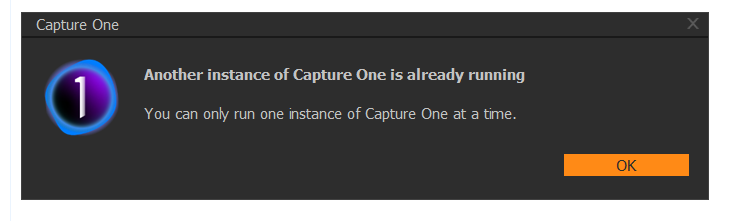
This app is a bugfest. Is this seriously version 21? It's more like beta.
0 -
Jeff,
You are not having the experience that most users have.
The activities monitor in C1 will only report on specific activities not everything that is happening.
The current status of your Windows installation and GPU drivers can have an evident influence.
Other applications may, from time to time, result in conflicts with C1. Anti-virus software or settings may compromise functionality.
Ian and Alexandre provided answers to your original question some days ago.
If you are still struggling then it seems that the User base has not been able to answer your questions so I would suggest creating a Support Case and having the Support Team assess the log files to see if they can identify the source of the problems.
0 -

I am having a similar problem on my Dell XPS 15 9550 w/ NVIDIA GTX 960m graphics card and Capture One 20 Pro with lucky build number 13.1.3.13. It takes 15+ minutes to complete this "setting up hardware acceleration" and it does it every time even with no driver change. During this time, it is using about 40% of my four core CPU.
1 -
You probably need to take a look at the log file to get some idea about what is happening.
Which Intel CPU does your system have?
It may be that its internal Intel software GPU is being tested and I have seen problems with that from time to time. Until Intel (and Dell) release an update.
In my case for some time the assessment process would get to 48% complete (93% of the Intel GPU kernel build) and stall, going nowhere until I killed the process.
I would expect the log file to show you if you were experiencing the same problem. So it is worth looking at that before trying anything else.
0 -
I have to apologize. I restarted Capture One and found that this time it did not do the hardware acceleration setup. I will keep an eye on it. I guess a driver change snuck in on me.
0 -
One possibility is that you had the same sort of problem with the Intel GPU analysis that I had.
More often than not such a problem is "recorded" in one of the setup files as a failure of the device to be usable. So the restart may see that, skip the device and process the second device successfully.
You may still see this again at some point in the future for a number of reasons that cause C1 to not just check whether the devices it has found on start up are known but decide to re-analyse the system as well.
The same stop of the "hung" application followed by a successful restart should work again.
FWIW using WIN 10 on a new machine and after a recent Intel driver update, this machine seems to work well, used both available GPUs and seems to get the assessment right, even though the Intel kernel build takes very much longer than anything else.
0

Post is closed for comments.
Comments
9 comments