Capture on 21 SLOW and constant "Events" messages on open

I am running Capture One 21 on a MacBook Pro with 32gb memory and the 2.6 GHz 6-core i7.
I also use a Egpu with a Radeon RC 5700XT.
When I open Capture One (14.1.0.220)
I keep my sessions on a external drive (Samsung t7's for editing)
My main editing monitor is the LG HDR 4k
The moment I start adding layers, or using a brush things start getting slow.
When I open C1 I am getting "Event" logs saying "Could not fin ICC profile for process recipe."
I'm thinking that this is related to the slowdowns. How can I fix this. It is taking me 4 or 5 hours to do what took me 1-2 a few months ago!
-
What happens if you use one of the built-in process recipes, or if you create a new process recipe and use that. Is there still the same problem?
Ian
0 -
I do use these sometimes, but am always making tweaks and adjustments.
What would could cause the ICC Profile to become "missing?"
Jake
0 -
But when you use a recipe without any tweaks or adjustments at all, does it still say that ICC profile is missing?
Also what ICC profile does the recipe use that says the profile is missing?
If you click on the profile in a recipe, and let the pointer hover for a moment, a tool-tip comes up showing where that profile is stored. For example:
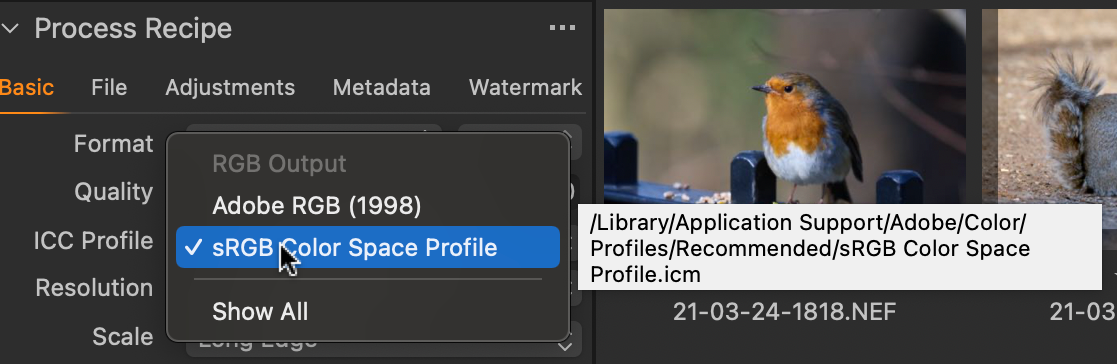
Or here's another one. (Note that the profile is in a different place.)
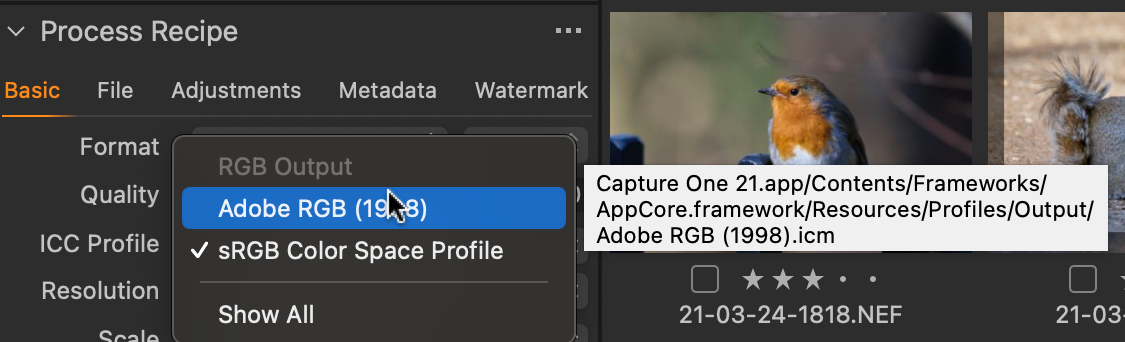
Can you try that, note where the profile is supposed to be, and go there to see whether it really is there?
if you click on Show All on the profiles list, you can see that there may be more than one version of a profile: for instance, here are two sRGB profiles in different places.


You could try changing to one of the others and seeing whether you are then OK.
If you find that the profile that should be there isn't, it may be that you could restore it to the location shown from a Time Machine backup, too.
Ian
Ian
0

Post is closed for comments.
Comments
3 comments