2 process recepies in 2 folders on Mac book pro M1

I try endlesly to save 2 process recepies in 2 folders one for web in one folder and other full resolution in separate folder but it's immposiible.I looked C1 instruction videos 10 times but it doesn't work on M1 .It always save as name .jpg and name1.jpg in same folder.Any ideas...
-
Yes. You need to understand that there are two places where you set an output location.
Here is the first one.
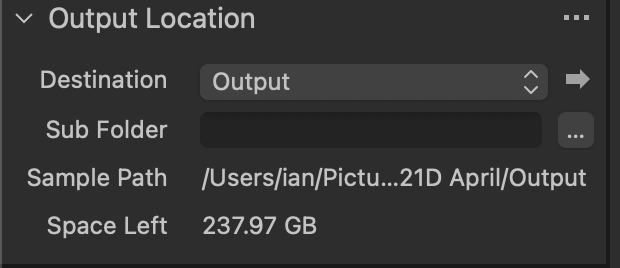
There is only one "Output Location" at any one time. If you change it when you set up your second process recipe, it will change for every recipe.
if you want a recipe to export to somewhere else, there is another setting you need in the File tab here.
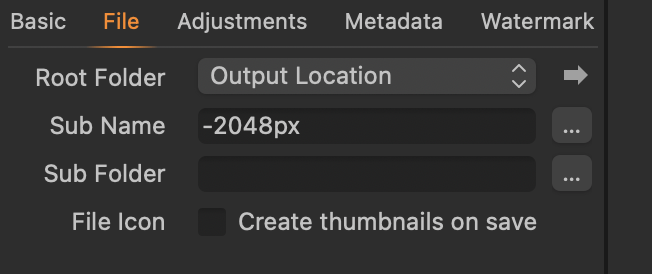
If you leave that set on Output Location, the output will go to the location set in the first screenshot above. But you can use the drop-down list there to change THIS RECIPE to go to somewhere else.
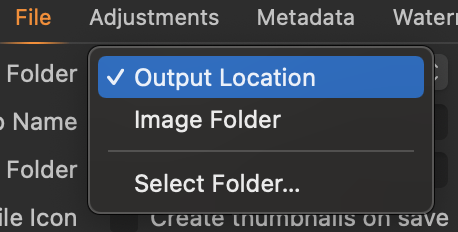
Choose the Select Folder... option, and then this recipe can be set to over-ride the default Output Location, and go wherever you want. It won't affect any other recipe.
You could also look at the Capture One YouTube channel to find tutorials that help explain the powerful ways these features can be used. Try this one - you don't have to watch the whole thing (though it is very informative) if you don't want. There are links in the description to sections of the webinar including one early on to setting the output location. https://youtu.be/yVnlkTpDGfk It doesn't matter that it is based on an earlier version of Capture One - the principles of this feature haven't changed.
Ian
0

Post is closed for comments.
Comments
1 comment