Display number of images tagged with a keyword

The tutorial on You Tube entitled "Working with Keywords and Metadata" recorded Aug 3, 2017 shows a hierarchy (parent/child) structure of keywords. Each keyword shows the number of images tagged with that keyword.
I have that type of structure but the number of imaged with each keyword is not being displayed.
How do I get the number of images tagged with a keyword to be displayed?
-
He's looking at the Filters tool. Confusingly, you can add keywords with the Keywords tool, but to find images with those keywords you need to use the Filters tool, or the Search facility.
Find the Filters tool (on the Library tab in the default workspace). Click the > symbol to open up the list of available filters. You may or may not find Keywords there - but you can add or remove Filters by clicking the ... a the top of the Filters tool and going for Show/Hide filters. (For example you'll see that it suits me to be able to filter by camera serial number, but I had to add that one.)
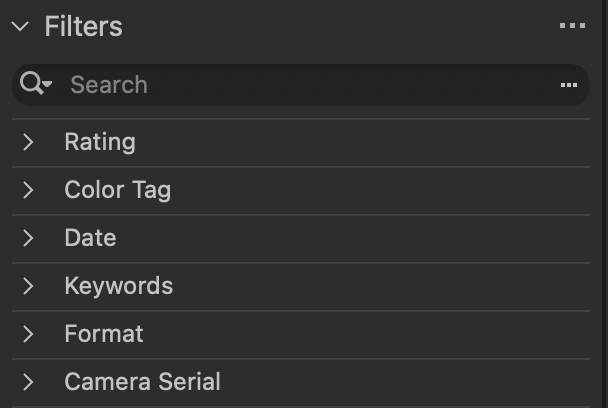
Assuming you have the Keywords filter, click the > next to it and you should see a list like this.
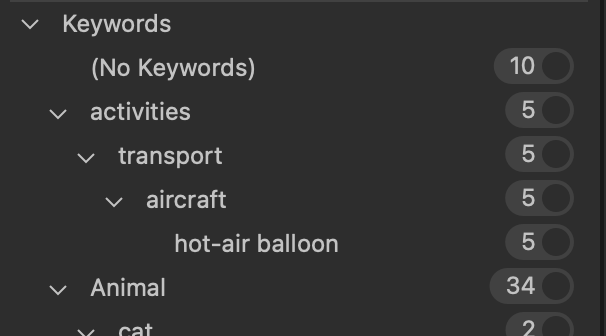
Does that help?
Ian
0 -
Thanks Ian! I did find it under the Filters. Certainly not very intuitive.
It begs the question, "Why doesn't the number of images with a specific keyword show up in the keyword library?" It would be a nice improvement in a future update.
0 -

Timothy,
Because it's a dynamic count that takes into account any other filters and selections that you might be using as well as where the keywords are in use.
And with hierarchical keywords and dependencies things might get unnecessarily complicated trying to maintain count data compared to the benefit it might offer. (unless some very strict usage rules were implemented.)
0 -
SFA- Thanks for the additional info. It helps in understanding the location in Filters. I'm a former Lightroom user and liked seeing the number of images tagged in the the keyword list. Its the old dogs, new tricks issue...
Tim
0

Post is closed for comments.
Comments
4 comments