View entire Pictures folder like in C1 12?

I'm switching to C1 21 but I see some changes that don't fit my current workflow. I frequently take in images from clients, output and retouch. No need for a catalog. In C1 12 the contents of the entire Pictures folder is available in the Library tab for me to select the "Capture Folder" (the images I've been sent) as well as all the other subfolders including output. Is there a way to see these folders in 21? Even after importing images only the one Capture folder is visible.
Also, is there a "switching from C1 12 to 20/21" resource? I see lots of videos on using C1 20/21 but not ones that address the specific differences.
Thanks!
-
Ric - I don't know of any changes in the way the Library tool works from version 12 to 20/21. To be certain - you are in a session, not a catalog, aren't you? If that is right, then you should be able to see any folder you want in the System Folders section of the Library tool. Like this.
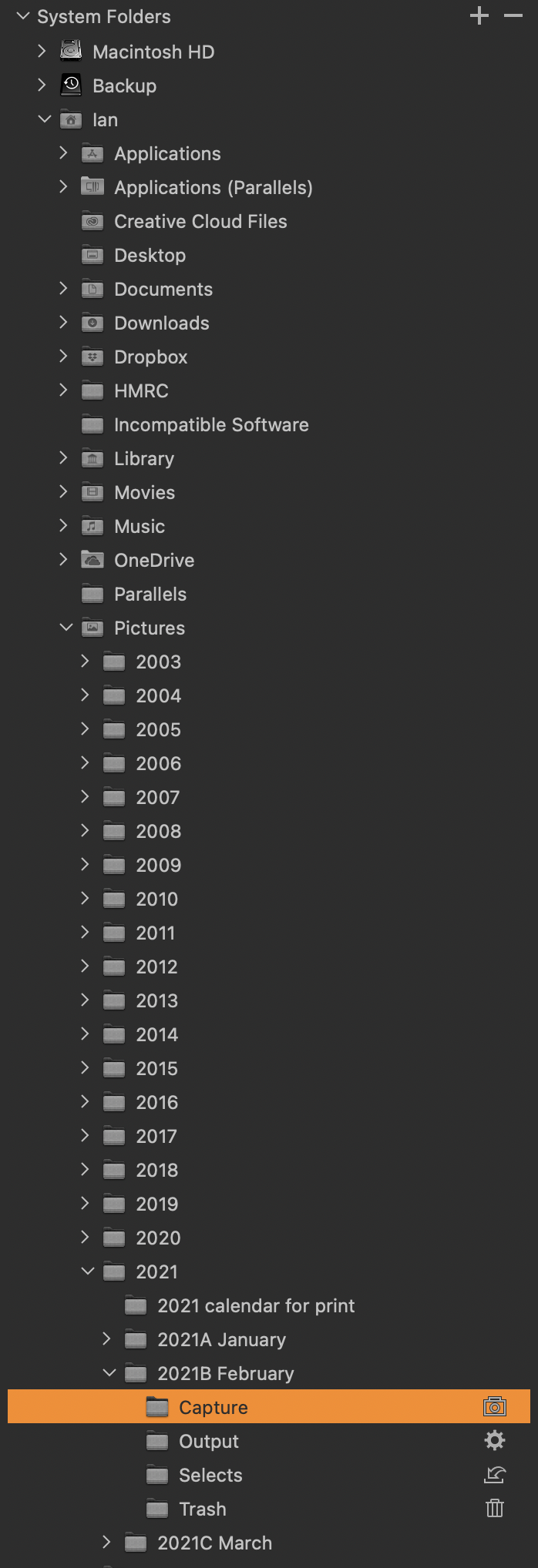
(If in fact you are in a catalog, then different ways of working apply.)
Ian
0 -
As to resources for switching from 12 to 20 and 21, you could look on the Learning Hub, or on the Capture One YouTube channel, for the videos that David Grover always does when a new version comes out.
Ian
0 -
Ian, thank you so much for your replies! Knowing this view is still possible and being specific about being in sessions did the trick. I'd been searching for a way to get to this view and I finally tried the simple act of creating one session. Like magic the rest of the computer's folder hierarchy appeared!
I'll check out David Grover's videos.
Ric
0

Post is closed for comments.
Comments
3 comments