Blurry preview images

Hello all,
I know, that this question comes up often here, but I can not find a solution.
If I want to develop images on one of my external monitors, the preview images get very blurry, to an extend that I cannot correctly see the changes I've made.
The issue is the same on my laptop (XPS 13, 4k display, 16GB, i7 1165G7) and desktop PC (Ryzen 5 3600, 48GB, gtx 1660 super) if I edit on the external montiors (BenQ PD2500Q, Dell U2520D). I do not have the issue if I edit on my Laptop on the internal 4k display.
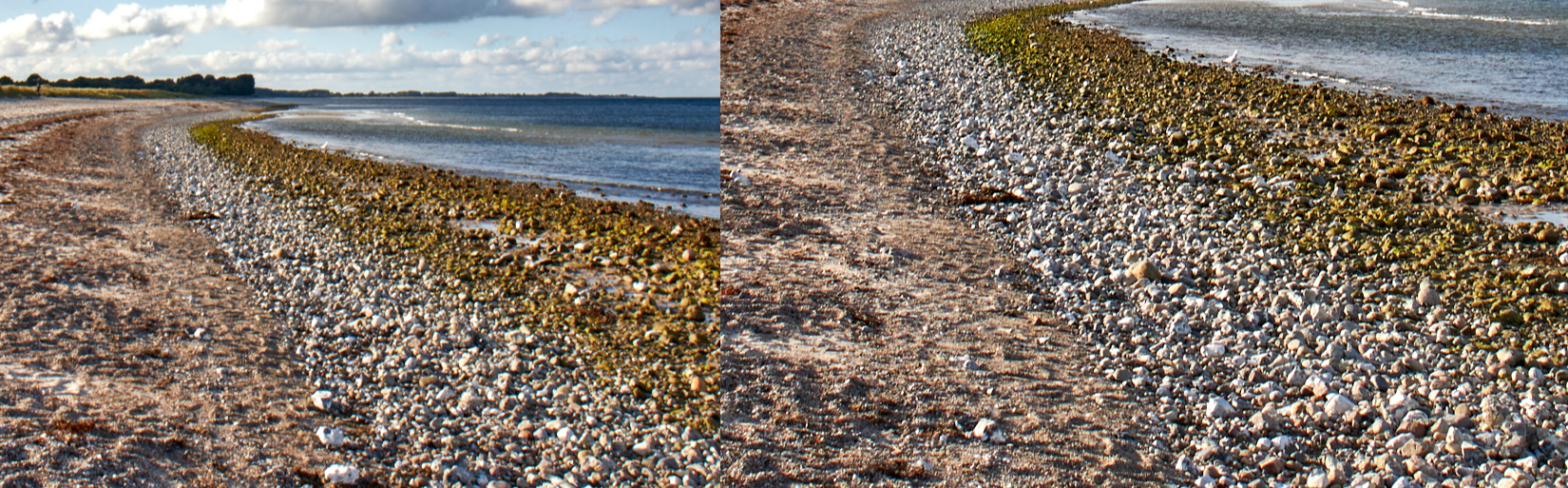
As soon as I zoom in to 50%, the pictures are perfectly clear and sharp. The bigest issue for me is, that the color seem to shift because of the missing details (see image below).
What I've tried:
- Change the preview image size and recreated the preview images (I've tried 3840, 2560, 1920, 1280)
- Disabled and enabled hardware acceleration
- Created new catalogs
I don't really know what to do. Depending on the picture it is impossible to properly edit the picture. It is the first time I've used CO20 on an external monitor after I've purchased it and I am extremely dissapointed considering the price tag.
I do not have the issue using LR6. But I wanted to move to CO...
Does anyone have an idea?
Just have a look at the details on the beach...
Left: 33% (blurry), right: 50% (not blurry), see the details and also the color shift in the greens/browns and the blues of the sea:
-
Ok, as the image gets scaled down here, the difference is hard to see. I've uploaded the original image here:
https://1drv.ms/u/s!AgyIEcRUU6OZhBg-UQhs-57Uc-yy?e=HC0gtM
Many thanks
Marcus
0 -

Hi,
I have the exact same problem.
Have you figured out a solution that works for you?
0
Post is closed for comments.
Comments
2 comments