Numerous Errors. Lost Work -- Class Action Suit Warning

Version 21 loses track of files in session and all associated work. It repeatedly fails to properly export files, sometimes hanging and other times exporting with lost settings.
Respond publicly with solutions for recovering lost work within 48 hours or I will take appropriate legal action.
Gerard Harrison (retired attorney)
-

...retired...
and barking so loud up the wrong tree. This is a user to user forum.
1 -
Gerard
This is a forum of your fellow users of the software. We are unable to respond to you on Capture One's behalf. If you want Capture One to respond, the channel they have provided for contacting them is to raise a support case - you can use the Submit a Request link at the top right of this page. And you'll need to give them more details than you have stated - how is anyone to tell you how to recover lost work without more information?
Or if you would like your fellow users to put their heads together and see whether they can help you figure out what is going wrong for you (which doesn't happen for most of us most of the time) you could share more details in this thread and we'll see if we can help you solve it.
Ian
0 -

I can' import files witzh the new version. I've deinstalled and installed, nothing helps :(
0 -
Anna - are you trying to import from a memory card, or from a folder on the computer? Has it worked OK for you before? When you say you can't import files, what procedure are you following, and what happens? Do you get any error messages? Are you working in a session or a catalog? And what version of Capture One are you on (Pro, a dedicated brand version such as Nikon, Sony, etc, Express)?
Ian
0 -
Permanently deleted user
Nice confirmation of pompous Americans' obsession with baseless, frivolous litigation there, Gerard...
What - exactly - do you imagine your legal rights to be here? Have you even LOOKED at your license agreement?
Especially sections 5 and 6, which contain such juicy phrases as:
The Software is provided “AS IS” and without warranty of any kind and Capture One expressly disclaims all representations and warranties, express or implied, including, but not limited to, the implied warranties of merchantability and fitness for a particular purpose
Capture One disclaims and shall not be liable for any indirect loss including without limitation any loss of goodwill, consequent losses, business interruption, loss of data, loss caused by non-availability of the Software or incorrect information in the Software, operating loss, loss of profits or any other indirect economic losses and irrespective of the basis and nature of the liability.
and:
BY INSTALLING AND/OR USING THE SOFTWARE, YOU AGREE TO BE BOUND BY THE TERMS OF THIS LICENSE.
Now, you might be in a jurisdiction which disapplies these terms - but I doubt it: and then there's this:
This License shall be governed by the laws of the Kingdom of Denmark
and:
Any dispute arising out of or related to this License shall be subject to the exclusive jurisdiction of the ordinary Danish courts.
I've grabbed some popcorn - off you go. I hear that Denmark is very nice at this time of year...
Oh - and what kind of "attorney" thinks a single potential litigant creates a Class action?
Are you also threatening Microsoft? Intel? AMD? Kingston? or God knows who else has made the software and hardware that you're using, and which might be the actual cause of your problems?
0 -
@Ian Wilson
Good morning!
The 14.1.0 for Sony ran fine for me.
Yesterday at one time is the loading of images has become very slow, then
previews were not created or
instead of images only rhombus or
images, when displayed, not fully loaded and not sharp and
export not completed.
C1 did not close cleanly, I had to remove in TaskManager to start again.
Uninstalling and reinstalling did nothing.
I have Windows 10 Pro OS build 19042.867
Windows Feature Experience Pack 120.2212.551.0
AntiVirus Bitdefender
At the moment I have C1 13 installed.
This is unsatisfactory. Especially the already updated catalogs do not work anymore.
Please help!
Kind regards
Anna0 -
Hi Anna
Has there been anything like an update to Windows between when it was working OK and now? Do you have any other software that is running at the same time as Capture One? When you import, are you using the Exclude Duplicates feature? (That can slow things down considerably.) Have you tried with and without hardware acceleration enabled? Are you importing from and to the same locations as before? If you are importing to an external drive, do you have the same problem when you import to an internal drive? If you create a new session or a new catalog, is it still slow? (If a new session or catalog is OK, perhaps there is some corruption in your existing one, which could perhaps be repaired.)
Those are a few of things I can think of to consider. Otherwise you could ask the Capture One techs to help by submitting a support case (using the Submit a Request link at the top right of this page).
Ian
0 -
Hi Ian,
as there been anything like an update to Windows between when it was working OK and now?
-> I mean - noDo you have any other software that is running at the same time as Capture One?
-> I have restart my PC
When you import, are you using the Exclude Duplicates feature? (That can slow things down considerably.)
-> Yes
Have you tried with and without hardware acceleration enabled?
-> I dont' know
Are you importing from and to the same locations as before?
-> Yes and no,
it's not about "offline"
If you are importing to an external drive, do you have the same problem when you import to an internal drive?
-> yes, and I've loaded from internal drive
If you create a new session or a new catalog, is it still slow? (If a new session or catalog is OK, perhaps there is some corruption in your existing one, which could perhaps be repaired.)
-> yes, new catalog, new installation of C1, PC restart0 -
Anna
Exclude Duplicates can slow things down. Is it possible to avoid using it? For instance, when you import from a folder, or from a memory card you can alternatively use the Search facility in the import dialog box. See this screenshot.
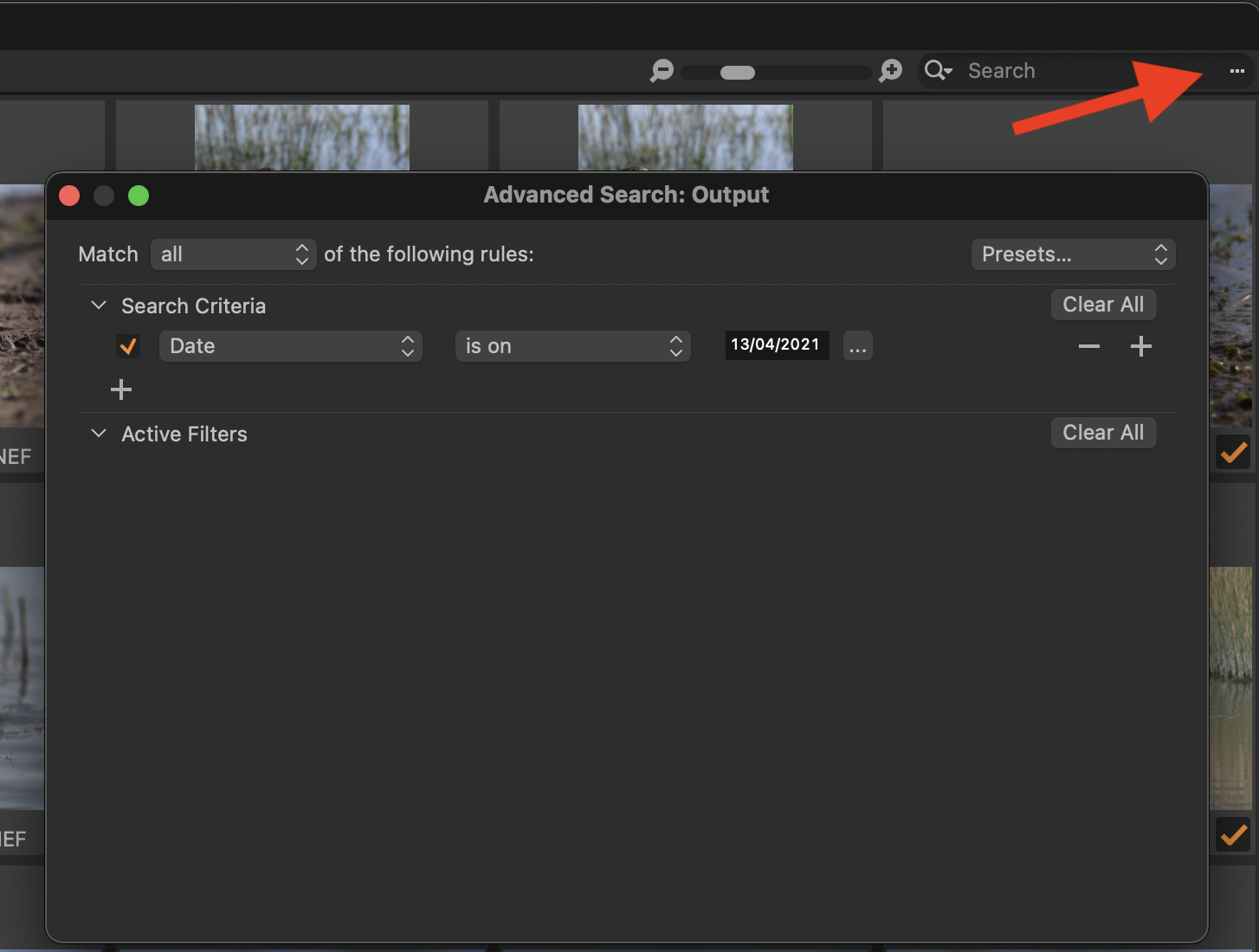
If you click the ... I have pointed to, you get a dialog box as shown. I have chosen to select to see only images with today's date, but you could change that to any date, or perhaps to show images after a certain date (perhaps the last date you imported). You can then turn off Exclude Duplicates and the import should run much faster, because Capture One doesn't have to compare each image with its database before importing it.
Hardware acceleration - in Preferences, on the General tab, try setting both of these choices to Never instead of Auto. (If it doesn't make a difference you can turn them back on again - Capture One will then take a few minutes to set up hardware acceleration - just be patient while it does.)

Ian
0 -
Thank you Ian,
I have turned off hardware acceleration.
Except I uninstalled C1 14.1 again, removed my settings under Users\<user>\Local, then reinstalled.
Now looks better.
By the way, you do not uninstall "cleanly", because entries in registry remain and installation folder with dlls is not removed after uninstalling0 -
Yes, I am sorry that I can't suggest anything about "clean" uninstall on Windows, as I am a mac user.
Ian
0 -

Anna,
If you had a Windows 10 update installed 2 or 3 days ago there may be some issues.
I thought I had auto updates turned off but something updated and I ended up with a black screen and now response to commands when I tried to start it out of hibernation. The only way I knew it was alive was that the illuminated keyboard was active. I had no obvious way to reboot or shut off. This machine has a battery that requires disassembly to access it.
The Windows even log suggests that about 2 hours after the unexpected update during hibernation (which was at about 9:45 am UK time from memory) another auto update was applied and after that the system came back to life.
BTW, I'm not at all sure that Gerard's thread is a useful place to add your request for help but since it is here ... I hope my observations help in some way.
0 -

If all the usual fails try a Windows clean reinstall. And I mean clean NOT a recent backup of e.g. Acronis because you may simply be reinstalling corrupted files or missing files.
It is now possible to download a completely clean and fully functional bang up to date copy of Windows from the Cloud. You will no longer have to dig out old physical media and update in stages.
It is a very quick procedure and it will recognise your Windows license so you don't need to dig that out.
It is described here:
https://richardtech.net/how-to-reinstall-windows-10-cloud-recovery/
It is less quick and easy to then reinstall all your preferences etc for all your software obviously, but it will be like a new machine.
Before going ahead save as many prefs etc as you can find e.g. for Capture One 21 go to c > users > user name > appdata > local > captureone where you'll find workspaces recipes etc
Then deactivate Capture One, same with any other software that uses the same licensing methodology.
I am on Capture One 21 14.1.0.74 without any issues. Haven't had any other issues in past two decades with C1 - though my usage is probably mainstream rather than niche of any kind. The current cams are two 5D-IV's a 5DS-R and a 6D-II. I still use a lot of old 5D-II files as well.
I'm on Windows 10 Pro 64 bit 20H2, updated always on time including today.
I did have to go through this cloud reinstall process recently as my MS Outlook 2016 Exchange failed to load repeatedly on my main desktop but was fine on my laptop two android phones an ipad and two old 32 bit desktops. This solved the problem and it must have been a corruption in the system as no other solution - of which there were many suggestions - had solved it.0

Post is closed for comments.
Comments
13 comments