Marks on all of my exported images.

These marks are on all my images, but when I created a reduced size image to send you, I don't see these marks on it. Perhaps if you extract this image and enlarge it the marks will become evident. Marks show on all of the images I made using Cap 1 when exported as Tiff or jpg. Marks look like failure to record some of the pixels and seem to be following the line scan on the image., They run horizontally across the image. They seem to cluster across the middle of the image. They seem to taper off as you look at the top or bottom of the image.
Please let me know if I have a defective copy of the program or if I might have done something to generate this kind of problem.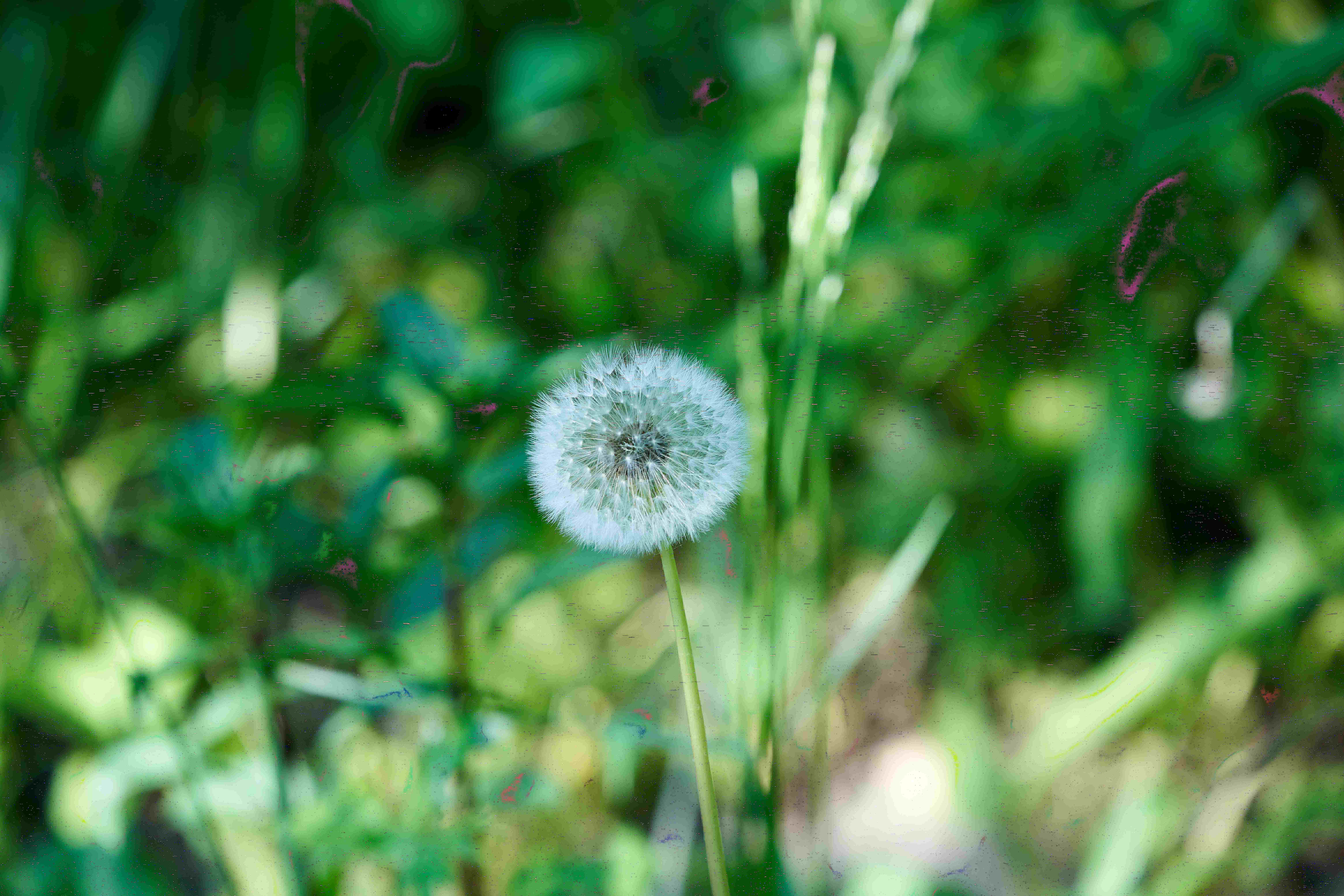
-

Paul,
This is primarily a User to User forum.
Your post reads like you want to address the Capture One Team directly so you may wish to start a Support Case for personalised attention. To do so use the "Submit a request" link.
Meanwhile you could try a simple experiment and turn off "Use Hardware Acceleration" in the Preferences file. (General tab). If that makes a difference it would suggest there may be some compatibility issues with the driver software for whatever Graphics Processing Unit (GPU) you have in the Mac.
Alternatively, and assuming you are talking about the slightly Pink marks in the dark areas of the example you have posted, how are you viewing the exported files? In a browser/viewer or back in Capture One?
Also, which method are you using to produce the jpg or tiff outputs?
0
Post is closed for comments.
Comments
1 comment