JPEG Export File Size

Any TIFF file I import into Capture One (even >100 MB files) only export as a 6.2 MB file. I tried process receipts - 100 percent, fixed, everything I can think of. I need much larger JPEG exports - I do some printing and my LAB only accepts JPEG files. Okay - export as a TIFF and change file size with Photoshop to JPG, right? No. Newest Photoshop will only save as a JPEG 200 (JPF file) which is the most current and supposedly better file format, but my LAB will not accept JPF files. {Do not know why Photoshop did not also keep legacy JPG?} I do not want to run files through a converter program and possibly deteriorate image quality. Please help. Thank you.
Kerry 805-723-4833
-
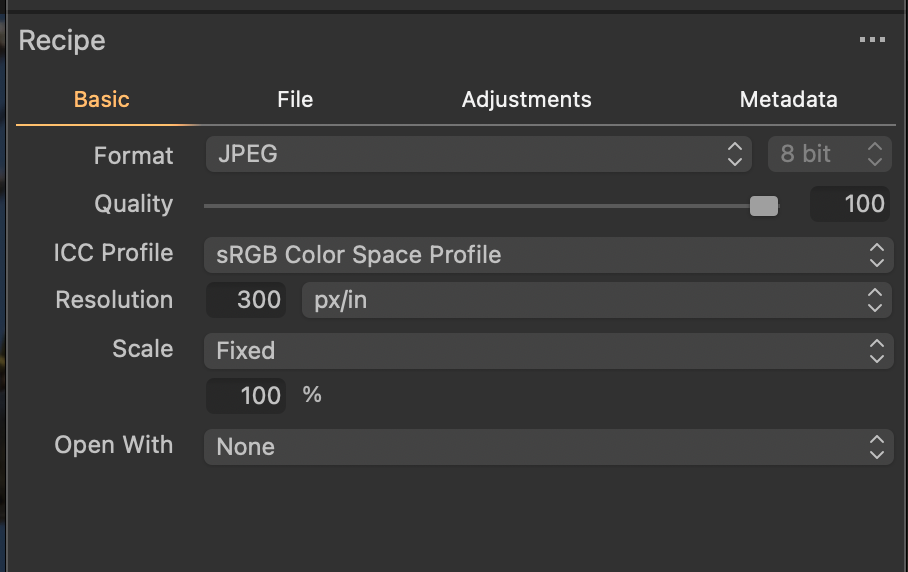
JPEG file sizes depend upon the amount of compression and the content of the file. You can not compare JPEG to TIFF by file size. Open each in a preview window and compare portions of the two image files side by side at 100%. Can you notice a difference? If not "more bytes" will not gain you anything. Also, do you have the jpeg quality slider set to 100 in your export recipe?
Example: I've an image that is 4742x3437 pixels -- about 16 megapixels.
- The tiff file is 95 MB in size.
- An exported jpeg created from the tiff file with the quality slider set to 100 is 16 MB.
- If I drop the quality to 85 (I think that is the default value) the image is only 5.2 MB.
I can barely tell the difference between the 16MB version and the 5.2MB version. I can not tell any difference between the 16 MB jpeg and the 95 MB tiff.
Just to play a bit I also saved a jpeg image with the quality slider set to 100%, but used JPEGmini to optimize the output. The JPEGmini version is only 2.9 MB in size. I can't tell any difference between the 95 MB tiff and the 2.9 MB JPEG images looking at them side by side. That is not true of every image, but I've found it to be true of most.
Anyway, make sure you are exporting at 100% quality with a fixed image scale and you will get the best possible output. Ignore the resulting file size.
 2
2 -
It is out of the scope here, but my newest Photoshop version exports JPEG files from any image format.
1 -
Kerry,
I am surprised : I have, as an example, a TIFF file that takes 300 MB and when I export it as a JPEG 100% using C1, its size is 18 MB.
1 -
Thank you all for the answers and help. Okay, I discovered I can only save a TIFF to a JPEG in the newest photoshop IF I go to "mode" in menu and change file from a 16bit to 8 bit file first. Then I can save as a JPEG. Marco helped with his answer of ensuring quality of file was set at 100% - doubles file size from quality of 85%. Thank you so much! So, is it true that in order to get the highest quality JPEG for a large print that I should shoot a JPEG in camera (along with a RAW of course). Then I could get a 24MB file? (I shoot with a Sony A7RIII). Thanks again!
0 -
So, is it true that in order to get the highest quality JPEG for a large print that I should shoot a JPEG in camera (along with a RAW of course).
Yes, but.... Only if you are going to use the out-of-camera jpeg without editing. If you edit the file and then export you are still going to get the version Capture One created which may or may not be the size you are looking for.
I still want to emphasize that bigger is not always better. Sometimes it is. Sometimes you can not tell the difference.
0 -

Kerry,
What size print are you referring to as "large"?
What level of dpi will the printer be using and what are the expectations of the printer device (or print service) to get the size of output you require on the print media you wish to use?
What viewing distance are you anticipating for people looking at the resulting image?
0
Post is closed for comments.
Comments
6 comments