How to display the Brush Settings panel?

First, I'm a new Capture One user.
Second, I'm using Capture One 14.1.1.63 for the Mac.
Issue: I cannot display the Brush Settings panel.
With the Draw Mask tool selected, right clicking in the image does not display the Brush Settings panel. Neither does a Ctrl+Right Click in the image. In fact, pressing the Brush Settings icon in the Layers tool does not display the brush settings tool. The button changes color when pressed and returns to its original color when released.
Capture One behaves like the Brush Settings option is disabled. However, I can change the hardness and size of the brush with the Shift+Ctrl+Option plus Left Click option and sliding up and down or left and right. I just can't get the Brush Settings panel to display. And, FWIW, the Always Display Mask is also selected.
Any ideas as to how I can get the Brush Settings panel to display?
Thanks, Jack
-

Jack
I think you're over-complicating this. :-)
1. Create a layer. (NB: I'm using a customised workspace)
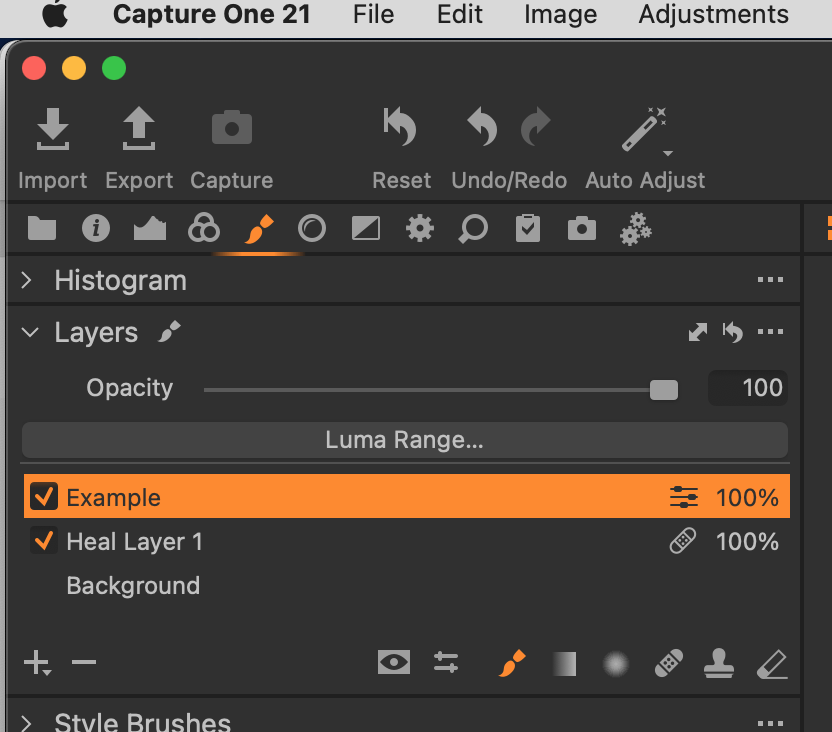
2. Select a brush and then use the sliders to the left of the brush icon to modify your settings:
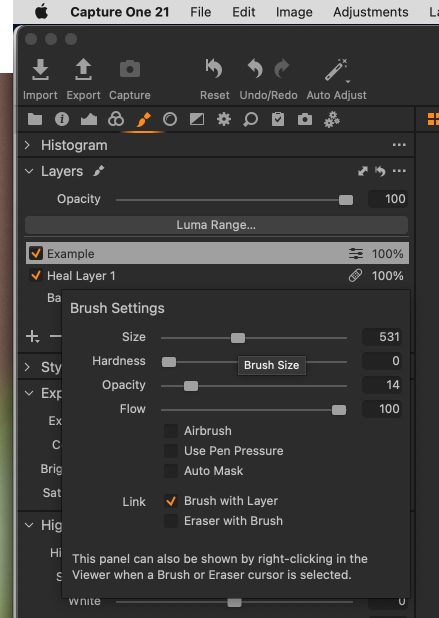
QED!
All the best
0 -
Hi Shane,
I'm hopin that this is a matter of me overthinking something. I do tend to do that. And thanks for sharing your time with me on this issue.
I can add a new layer by pressing the + button in the layers tool. I can select the brush in the tool's bottom row. But when I do, I don't get the Brush Settings panel like you do.
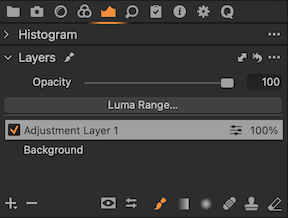
I don't have the brush icon in the Tool Tab area like you do. So, when you say "Select the brush", I may not be doing the obvious.
If I click on the Sliders button just left of the Brush button, the Sliders button and the Adjustment button turn orange. When I release the mouse, they return back to the gray color. No controls pop up.
I initially installed Capture One using a demo license and upgraded it yesterday with a paid license. I'm wondering if something didn't get activated because of the transition. This should be, as you point out, a very simple thing to work with.
Maybe I'll uninstall Capture One and Reinstall.
Thanks again for your time!!
Jack
<><>0 -
Before uninstall/reinstall use the menu item Window -> Workspace -> Default to load the default workspace. If that resolves the issue re-customize the default workspace as you like and save it as a new workspace.
Capture One remembers your workspace changes, but I think that it memory sometimes gets corrupted.
0 -
Marco, I didn't see your post until after completing the uninstall/reinstall which worked. I now have access to the Brush Settings panel.
Good tip on the Workspace option. I'll keep that piece of wisdom tucked away in case I see another anomaly in my Capture One journey. I can certainly see how this could have resolved my issue.
Thanks for the tip!
0
Post is closed for comments.
Comments
4 comments