Importing Photos into catalog always copies my raw files to the catalog location filling up my main drive.

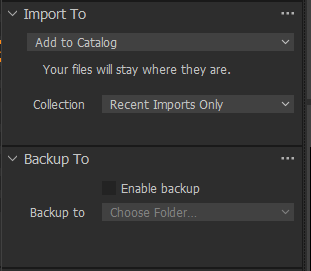
I cant seem to get capture one pro to only link to the images or use the location i have my raw files stored like how lightroom works. When in the import files panel, and under the Import To i have it set to add to catalog and the menu below says the photos will stay where they are which is only partially correct as the photos do stay in their original place but then they are copied to my main drive which I absolutely do not want to happen and should not be happening, it should be linking to the photo location instead of copying to current catalog file location, if I wanted the photos copied to my catalog location, I would select the copy into catalog option so it really needs to be fixed. Right now both options do the exact same thing of copying my raw files into my main drive, which is absolutely unacceptable.
I want to use this program but it is impossible to use right now due to this stupid bug or lack of functionality.
-

Make sure you don't have "Enable backup" selected on import. The panels import and backup should look like this:
 0
0 -
The backup is disabled and still copies.
0
Post is closed for comments.
Comments
2 comments