How do I get "my Computer" in Library. That's how i used to have it before i had to rebuild my computer

-
I think you will have to tell us a bit more, such as are we dealing with a session or a catalog?
But guessing at what you mean, try the ... menu at the top of the Library tool and toggle the Show Folders Hierarchy setting.
Ian
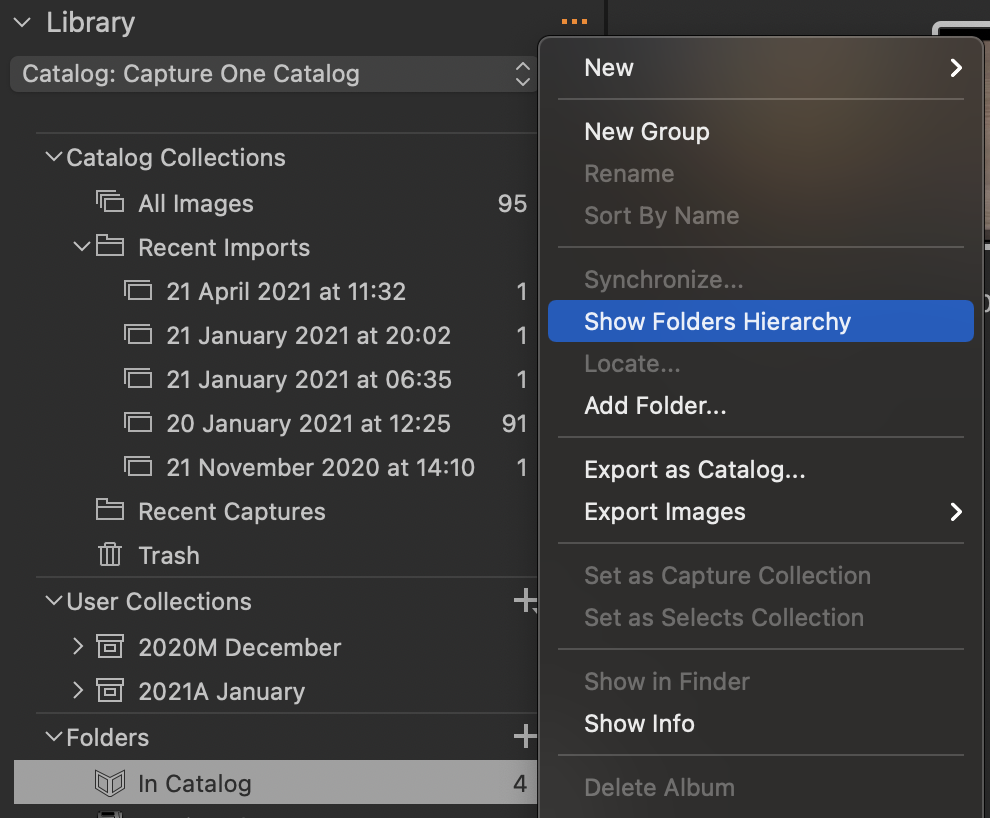 0
0 -

David,
"My Computer" is (or was) a Windows information grouping concept to provide some sort of summarise "Easy access" to some parts of the file system.
I don't see it by that name, even within Windows explorer, on either of my old Windows 7 machines (Win 7 Pro) or my more recent Win 10 system. (Win 10 Pro)
Do you still see My Computer on your rebuilt system? If so are you using Win 10 and which version is it?
I assume you are using Win 10 if you have C1 V21 installed. And I have Assumed that (for now) as this post is in the Version 21 section of the forum.
If that is not the case then things may be different for your system. I'm not sure if, for example, the Win 10 Home version has some differences that might influence how Windows presents information to users.
0 -

> SFA: I don't see it by that name
Judging from my Win 10 I believe "My Computer" must have changed to "This PC" at some point. "This PC" does appear under System Folders in my C1 Pro 20.
0

Post is closed for comments.
Comments
3 comments