Folder not showing images

I am in the Library/Folders panel and all the folders list are showing counts of between 10 and several hundred.
However when I click most folders no images are displayed (No images in Collection). About 5% of the folders actually show the expected images. If I click on Show In Finder, the correct folder with images is shown.
I have tried to re import and synchronize.
How do I make the images appear?
-
Two quick questions:
- what type of images are in these folders? ie: raw, JPEG, TIFF - or whatever?
- could you see them previously?
0 -
A mixture of images ... dng, tif , jpg
yes, i could see ALL my images previously.
I validated the catalogue - no errors.
I think I fixed it by creating a new catalog and then importing the original catalog.
0 -
Hi Michael
Glad to hear it's working again - sort of.
My only thought is, did you have any of these global filters selected?
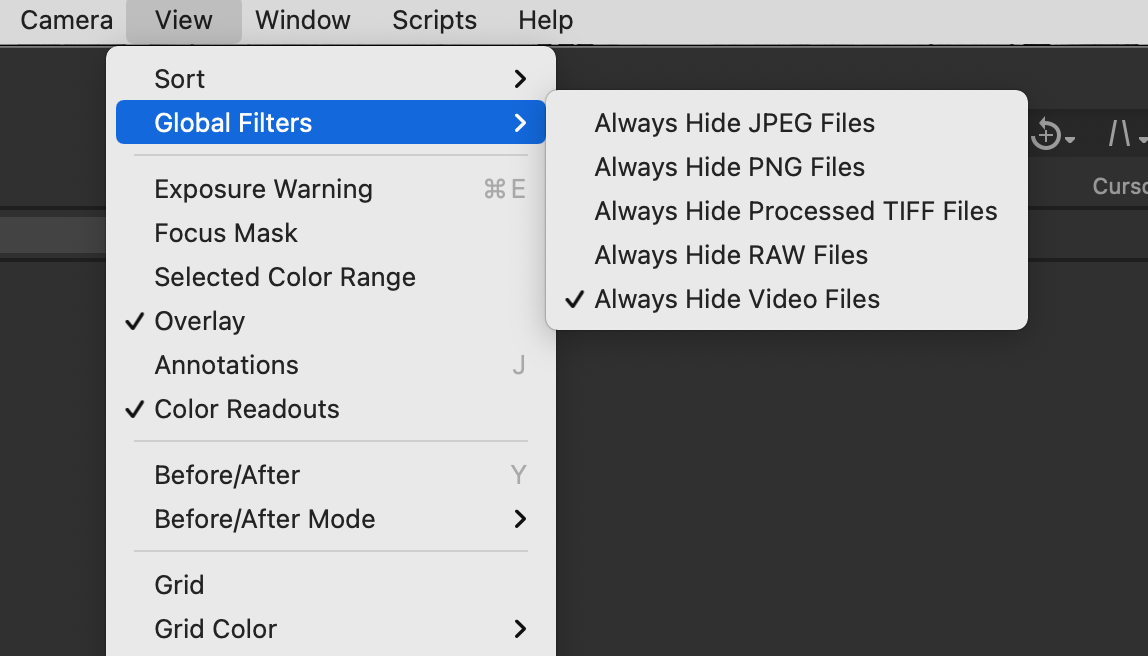
Regards
Shane
0
Post is closed for comments.
Comments
3 comments