BLACK SQUARES upon export with ANY process recipe

Doesn't happen if I go to File > Export Images > Variants.
But ANY recipe (I even created brand new ones) I get this: 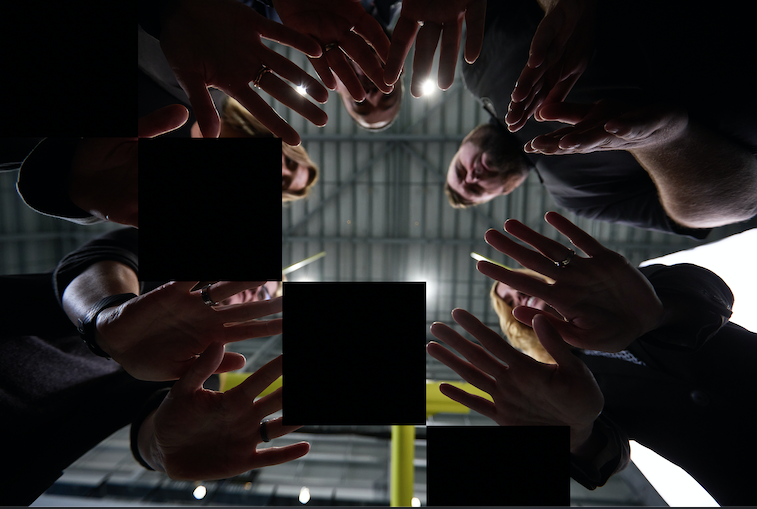
-
***Using latest Capture One and Catalina 10.15.7 on a 2019 MacBook Pro 2.4 GHz 8-Core Intel Core i( 64GB 2667 MHz DDR4
0 -

This is also happening to me on PC running Windows 10? during editing?
Please don't make me go back to Adobe!!!
0 -
Try disable hardware acceleration to see if it helps.
0 -
Got this info back from Support.
I had already restarted which seemed to work, but this could be useful in the future:
It appears that there may be an issue with the OpenCL pipeline in Capture One, so try disabling Hardware Acceleration:
- go to Preferences - General tab;
- scroll down to Hardware Acceleration;
- set Display/Processing to Never;
- restart Capture One;
- after restarting, see if you face the same issue.
This will force Capture One not to use OpenCL when processing, generating previews and interacting with the UI.
If it works fine with Hardware Acceleration disabled, try to rebuild OpenCL kernels as described in this article, (https://support.captureone.com/hc/en-us/articles/360002404937) enable Hardware Acceleration in preferences and restart Capture One.
For Windows users who may have recently installed driver updates, we recommend reverting to the version prior to this update to avoid driver compatibility issues.
You can find the driver versions for AMD here and NVIDIA's drivers can be found here.0 -
Permanently deleted user
So - basically - exactly what Robert was kind enough to suggest in the post directly above yours, Michael...
0
Post is closed for comments.
Comments
5 comments