Image mismatch when using "Edit With -> Photoshop"

I've been using Capture One for a few weeks now. My general workflow is to edit the image for the most part within capture one. Once I'm happy with it, I make the decision whether or not to perform some more detailed editing inside photoshop.
If I make this decision (which is about 50% of the time) I right click the image in the browser, select "Edit With", choose Photoshop then click "Edit Variants".
I have noticed that the psd file generated does not actually match the image as I see it in capture one. Here is a screenshot from Capture One. The image on the left is my image edited with Capture One, the image on the right is the psd generated after choosing to edit with Photoshop. I have made no additional changes inside Photoshop, for this example.
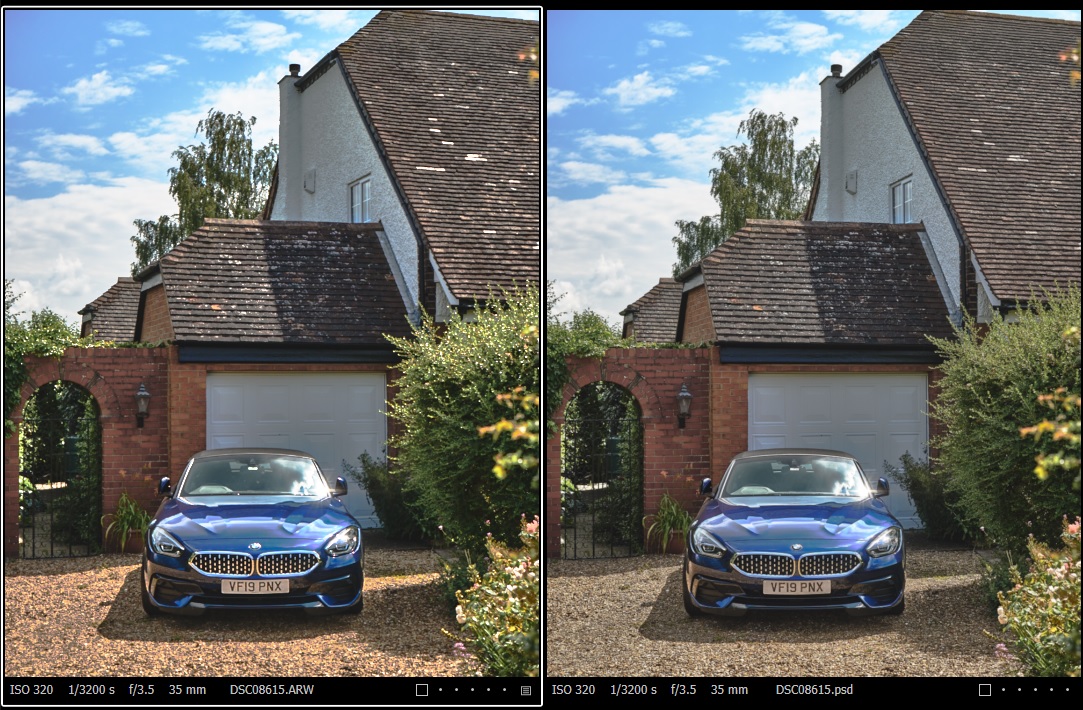
The gravel is clearly different in the psd and some of the brightness on the bushes (along with some other minor details) has also been lost.
I wondered if someone else had noticed this or knew of something I may be doing wrong? I have checked the settings in the 'Edit With' panel and all seems correct.
I wondered about the ICC profile, but I checked and it is set to use From File (for the psd) The "Edit With" dialog is set to use "Adobe RGB (1998)" which I think is the default.
It is very important to me that when I edit in photoshop, I am provided with an image that appears exactly as I edited it, regardless of my [lack of] editing skills :). So any suggestions on what might be wrong are welcome.
Post is closed for comments.
Comments
0 comments