Capture One Import Lightroom Catalog missing folder structure

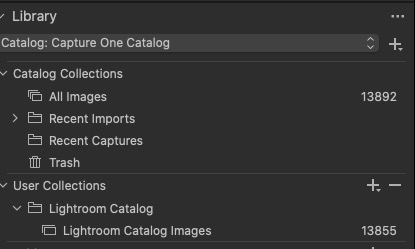
I must have done something wrong. After importing 7000 photos from Lightroom Classic, the folder structure is gone. All the photos were put into a "User Collection" folder named "Lightroom Catalog". How do you import from Lightroom and maintain the folder structure? TIA
-

Instead of importing images directly, use File...Import Catalog, and then select "Lightroom Catalog".
0 -
Thanks for the reply Abbott. That is what I did. All 13K photos were placed in one C1 album.
 0
0 -
Leslie
Did you import the images into C1 ("managed") or create a referenced catalogue?
The location of the original images (sometimes called source files) can be on any disk (local or external) and their location is referenced by the Catalog and recorded by the Library. As an option, the original image files can be stored physically inside the Catalog file. This is referred to as a managed workflow.
If you created a referenced catalogue, your images will still be on your drive in folders as in LR.
0
Post is closed for comments.
Comments
3 comments