14.3 upgrade on windows doesn't seem to upgrade cleanly.

Hi. I upgraded to 14.3 and the tabs are all a bit not right and it's looking different on my Windows 10 version to all the videos (basically all MAC versions).
I have no export button next to the Import button. I have 3 tabs at the end of the tabls with the same icond, a circle with a number 1 in it. First one is Metadata, the second is output and the third is batch. The last 2 shouldn't be there, since they have been moved into the new Export popup. I can go File | Export | Export and the new export window pops up, so it's definetly been upgraded, but it just seems to have not upgraded it self properly.
I've done an uninstall and reinstall and same thing. I haven't tried wiping any registry settings, I didn't want to go down that path yet.
Is anyone else on Windows getting this?
Thanks
David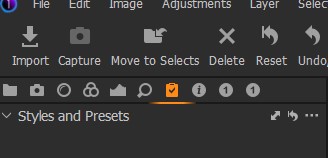
-

https://www.captureone.com/ja/account/download/previous
You can drop it from the Previous tab.
This is the latest version of the last time.
I got xx.xx.xx.48 from here and solved it.
Don't forget to rewrite the catalog.0 -

Click on Windows > Workspace and try the various options including ones which you may have saved for yourself. For example try Windows > Workspace > Default and you should find the Export button appearing next to the Import button in the top left and your three "1" tabs disappeared.
In order to add the Export button to one of your existing Workspaces right click on a blank area near the top in the same area as the various buttons such as Import and select Customise. Then you can drag and drop any of the options including Export. Then click on Done.
Remember to then save your amended Workspace under Windows > Workspace > Save Workspace
You can save a lot of your various settings for future use or to add to a 2nd PC by going:
C > Users > YourName > AppData > Local > CaptureOne and either save them all or just the ones you want e.g. Workspaces, Recipes, Presets, etc1 -
Thanks Peter. Choosing the Default workspace did the trick. Recreated my workspace and saved and all good. Appreciate the help, I don't think I would have thought to try workspace.
0
Post is closed for comments.
Comments
3 comments