RAW files processing speed in C1-22: Fuji X vs Panasonic S1H - what is going on here?

Both cameras 24MP RAWs, ok my iMac is 6 years old but - Fuji X needs half second of processing, Panasonic S1H 3 seconds (going up to 6 seconds sometimes), on average.
What is going on here? Is Panasonic supposed to heavily invest in C1 before Lumix files are properly supported like Fuji X?
Even worse, sliders (eg. colour temperature) work with huge gap with the Pana files, they are of course real time with Fuji X.
No fun with the Pana RAWs in C1, which is quite a shame, as they look great.
Thanks.
-
What do you mean with processing, maybe export?
Is this delay with all sliders? With all zoom levels?
What is your monitor resolution and what you preview size in preferences?
Do you use a compressed file format in the Panasonic camera?
0 -
Processing I just meant the delay in C1 when I open an image until the RAW is ready to watch. Processing time of my computer. Fuji has 30MB files, Panasonic 36MB files, both 24MP.
I am not going to buy a new computer just because C1 can´t handle Panasonic files properly.
0 -
I guess you have two choices then, don't use C1 for your Panasonic files or live with the slower file handling.
If the S1H has different options regarding lossless raw file compression, or no compression at all, maybe this makes a difference in processing speed.
0 -
Thanks for your input, BeO. The Fuji RAW is compressed, the Panasonic does not have settings for RAW.
Maybe a new computer then...
Otherwise C1 is great.
0 -
If you are a relatively new user of C1 I suggest to wait a while and gather experiences, and if you want to stay with C1 make (at least mental) notes what exactly it is that annoys you the most regarding performance, (e.g. the time needed to generate previews after import, the responiveness when adjusting images/moving sliders, the export of images, copy & paste of certain settings from one image to many other images (or copy&paste of layers with Luma Range), generating HDR merges or pano stitches etc.)
And then do some specific testing to see what ressources your computer needs for each of those actions.
It is generally recommended to get the fastest computer you can (or are willing) to afford to get the best performance, but certain tasks in C1 use different ressources than others, some are more CPU heavy, some are more GPU / graphic card heavy, some require more memory, or fast file storage and access, and there are differences in raw file handling of different camera brands, as you have experienced.
And there might be times where you have to disable hardware accerelation (GPU) e.g. due to gfx card driver issues when utilzed by C1, so I recommend not to rely on GPU only but have a fairly good CPU with one or the other additional core, just in case. (And you could do your testing with as well as without hardware acceleration enabled)
So take your time to investigate which of your preferred tasks use which ressources to have an idea what your new computer hardware should have plenty of, unless you want to max out everything. Of course, looking at your current computer which has certain bottlenecks (or weak points) might not be directly comparable with any new computer, which probably has other bottlenecks, but that's the best you can do. Together with doing some internet research, including this forum.
0 -
P.S. And stay away from high resolution monitors ( 4k) or notebook panels, unless this is a must for you, because the higher the resolution the slower the performance for many tasks. The system hardware recommendation says "at least double the specs", but I believe "at least" is the most accurate term in this phrase.
https://support.captureone.com/hc/en-us/articles/4405535310621-Capture-One-22-15-1-1-release-notes
0 -
I don't have experience with 4k monitors by myself, just reading in the forum, and some users seem to be happy, whilst others are not. Good to hear you are... :-)
0 -
Thanks for all the input, really. At least it looks there might be solutions at hand without upgrading the computer.
I don´t do HDR.
I work with C1 since 4 years and have no intention of stopping, in fact I just upgraded. Even my over a decade old RAWs never looked better, it is quite amazing. The 12 MP Olympus RAWs of course have hardly any delay when working on them.
I use a 5K monitor/i Mac. As I am professionally editing and colour grading 4K 10bit video footage in a 2K timeline in DaVinci without any issues, I am a bit surprised about the trouble I have with C1 and Panasonic RAWs.
I could indeed try if things are better if I got C1 connected with my external HD monitor. Need to try that.
Also the GPU stuff, exactly the stuff I worry about because I don't have a clue.
And what about the cache, I just changed from halft to full monitor width, no change though in speed.
0 -
Do you have this performance lag only when opening the raw file the first time after import, or also later?
What is your preview size in preference?
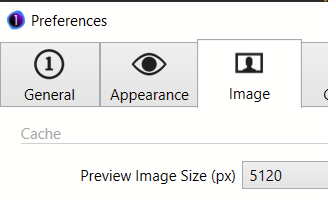
I'm not into video, but video encoding/decoding is probably supported by a special chipset in your hardware, thus cannot really be compared.
0 -
I changed the preview size from half to full monitor width (5120px), but it did not seem to slow down performance significantly. The lag is also later, not only with import. It can be a bit shorter when I deal with a set of pictures and keep looking through them one in one direction, I guess the cache predicts what I am going to do next and develops the next image? Changing direction in viewing, lag is just the same again.
The paradox remains: Fuji raw files are compressed, not much smaller, but at least 3 times faster.
0 -
I assume there is some cache prediction, yes.
Did you regenerate the previews (at least for a selection of images) after changing the preview size?
0 -
No, I didn´t. Will try later today and let you know. Thanks.
0 -
Changing Preferences/Speed Edit/Sensitivity from 0.5 to 1 helped a lot, I'm quite happy with the Panasonic files now.
0

Post is closed for comments.
Comments
13 comments