Can not open image files.

Why is it not possible to open the image files in Capture One under File / Open? And when I try to Export pictures I get a message (There are no selected activated development recipes)
-

Capture One edits in the context of a Catalog or a Session. Open with does not provide enough information to do either. I typically drag images on my hard disk into Capture One which starts the import process. Once imported I can edit the images.
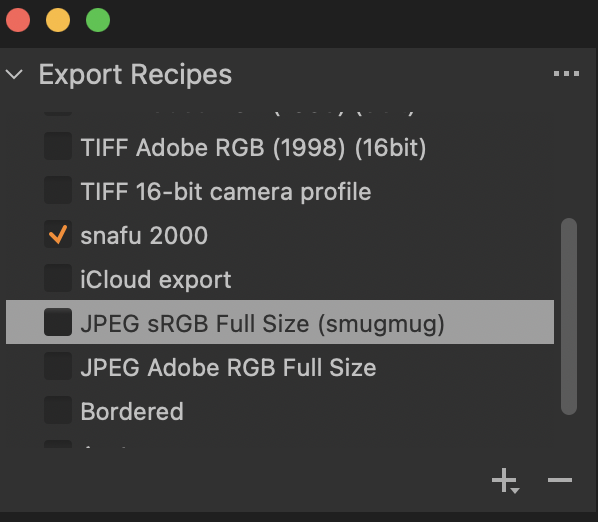
Export allows you to export multiple copies of an image, each using a different recipe. Capture one needs to know which recipe(s) you want to use. This is done by checking the desired recipe(s). If no recipes are checked you'll get the message you see.
In this example the recipe named "snafu 2000" will be used during export. The highlighted recipe is the recipe I can edit. Even if edited it will not be used because it is not checked.
 -1
-1 -
File>Open means opening a catalog or opening a session. There is no possibility of just opening an image in Capture One. (In a similar way you can't just open a single image in Adobe Lightroom either - you have to import them into the catalog. But you can open a single image in Photoshop, or similar apps.)
Ian
0 -
Capture one 21 14.3 will not open. Message=Could not read catalog data. "The Catalog was saved with a newer version of Capture One and cannot be read by this version.
I tried to open Capture one 21 14.2. says no data in catalog. Where did my catalog data go to? Why can't I open capture one and have I lost all my data???
0

Post is closed for comments.
Comments
3 comments