Capture One 21 Doesn't Recognize My Camera but CO20 does.

I shoot with a Canon 5d Mark IV for work and it connects and works perfectly fine with Capture One 20. I downloaded the new version (Capture One 21) and it absolutely does not connect to my camera. I have tried everything from new tether cords, uninstalling version 20, comparing all of my computer, camera and Capture One settings to another co-worker's (that it works fine on theirs). Nothing... I have even hooked up my camera to someone else's computer with Capture One 21 and it works. But just not mine... I have a newer MacBook Pro and using Catalina 10.15.7.
Has anyone else had this issue? Or is there another setting that I need to check?
-

I'm guessing here, but I've had similar problems where a program on my Mac wouldn't recognize devices plugged into my Mac.
Open Mac System Preferences. Open Security & Privacy. Select the Privacy tab. Scroll down the sidebar to either Full Disk Access or Files and Folders. I usually start with Files and Folders. Capture One 20 will likely be listed. If it says "Full Disk Access" then switch to Full Disk Access in the side bar. Is Capture One 21 listed? If not you'll need to click on the lock to make changes then click on the plus to add Capture One 21 as an app that has access.
In one case I had to remove Full Disk Access from an app and then add the app to Files and Folders, clicking on the Removable Volumes option after updating maxOS.
As I said, this is only a guess. Good luck.
0 -
To Macro Hyman: Attached are my settings for these two suggestions you said. Capture One 21 was in both Files and Folders and Full Disk Access. Is this what it should look like?
 (full disk access)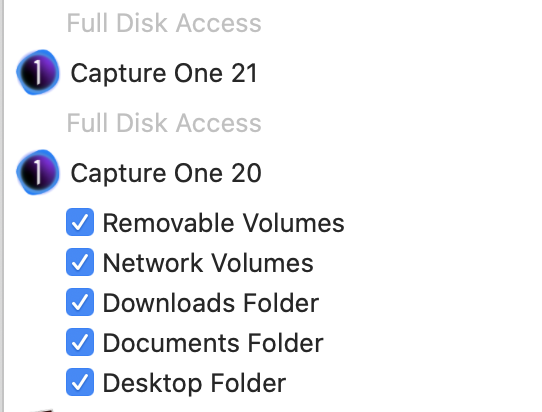
(Files and Folders)
I'm guessing here, but I've had similar problems where a program on my Mac wouldn't recognize devices plugged into my Mac.
Open Mac System Preferences. Open Security & Privacy. Select the Privacy tab. Scroll down the sidebar to either Full Disk Access or Files and Folders. I usually start with Files and Folders. Capture One 20 will likely be listed. If it says "Full Disk Access" then switch to Full Disk Access in the side bar. Is Capture One 21 listed? If not you'll need to click on the lock to make changes then click on the plus to add Capture One 21 as an app that has access.
In one case I had to remove Full Disk Access from an app and then add the app to Files and Folders, clicking on the Removable Volumes option after updating maxOS.
As I said, this is only a guess. Good luck.
0 -
More guesses because this kind of matches what I wrote in the last paragraph of my post....
Go into Full Disk Access. Unlock changes and delete Capture One 21 from the list. Go back into Files and Folders. Add Capture One 21 and check off the same boxes that are checked for Capture One 20.
Might not make any difference. Or it might fix your issue. Good luck.
1 -
This all worked!! Thank you!!!
More guesses because this kind of matches what I wrote in the last paragraph of my post....
Go into Full Disk Access. Unlock changes and delete Capture One 21 from the list. Go back into Files and Folders. Add Capture One 21 and check off the same boxes that are checked for Capture One 20.
Might not make any difference. Or it might fix your issue. Good luck.
0 -
Excellent. I wasn't sure if that would do the trick. I don't know why macOS now requires the individual checked boxes in Files and Folders where in the past Full Disk Access was enough. Oh well, as long as it works.
0
Post is closed for comments.
Comments
5 comments