Lost toolbar customizations during upgrade from 20 to 21

I recently upgraded from version 20 to 21. All my toolbar customizations are gone: the toolbars reverted to defaults that I don't recognize.
Is this normal, or did I do something wrong during the upgrade process?
How can I get back my toolbar configurations from version 20? I can't even start version 20 now in order to see what they were – the version 20 application refuses to run after the upgrade.
-
It is normal. Layout reverts to the default layout. Hopefully at some time in the past you saved your layout as a named Workspace. If so go to Window -> Workspace and select the saved workspace. If you didn't have your workspace saved or it was saved many revisions ago there may be some other saved workspaces in that menu that will restore your preferred or near preferred layout.
Right now I have these workspaces in that menu
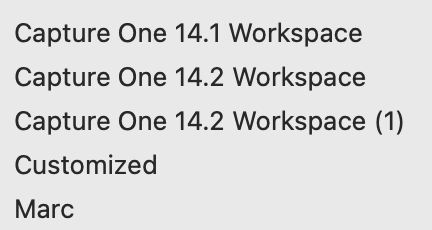
The one named Marc is the workspace I usually use and try to remember to re-save whenever I make changes.
0 -
Additionally to Marco Hyman's well based advices I like to add: If you compose a new workspace and save it, do so after every change of it, then close C1 and restart it. Otherwise you'd loose your changes after a single crash of the app. And "crashing often" apparently became a part of the feature list, just didn't make it to the official one.
0 -
And to add a little to what Joachim said, I'd suggest that you save a backup copy of your custom workspace(s) somewhere. I've had C1 corrupt one of my custom workspaces occasionally and having the backup saved me.
Last point: create screenshots or something of every element of your custom workspace(s): toolbar and each tab. Reason: if you ever need to reconstruct a workspace from scratch, it's very useful to have a model to work off of. For example, 21.3 changed Process tools quite a bit and eliminated the respective tool tabs and tools, which also effected custom workspaces that had those tools. IF (big "if" at this point) they return those tools, you might want to return them to your custom workspace (and save the revised workspace of course), and it might be useful to know what you had before the Process—>Exporter change happened.
0 -
Thanks to everyone for these excellent suggestions.
I guess I hadn't been using named workspaces and had not backed them up. (To be honest, it's very disappointing to think this kind of proactive action is even necessary in expensive software that has been around for years.) I will certainly start.
0
Post is closed for comments.
Comments
4 comments