How to remove request for help

Does anyone know how to remove a request for help? I posted my question 17 days ago and never received any reaction. (Athough it is not a very complicated problem.)
It is totally useless to let that problem being unanswered so I want to remove it. But I can't. Anyone know how to do that? It is silly to see after let say a year to see that problem is still there.
I appreciate any help.
-
Permanently deleted user
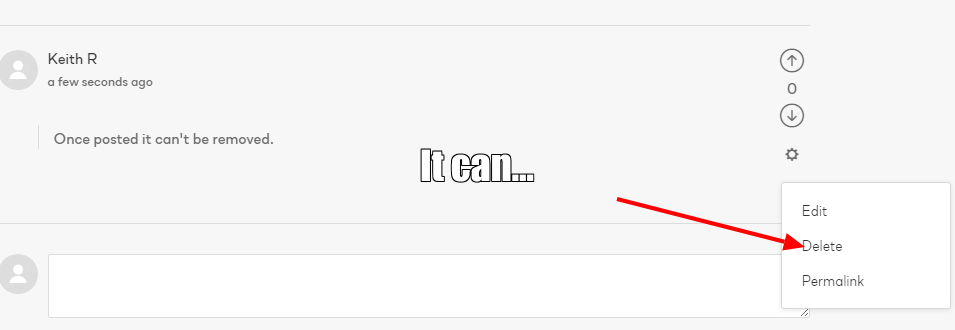
Have you clicked on the Gear icon to the right of the post and selected "Delete"?
1 -

Hendrick,
Where did you post the request?
If somewhere in this forum then it may help to know that, mostly, this is a User to User facility and very very rarely the source of official answers from Capture One.
If you have a question that requires support from Capture One use the "Submit a request" option. (see it on the top line of this webpage and on most of the Capture One Web site pages or in the footer area of Community pages articles).
Choose an appropriate general subject for the type of assistance you need (Technical, Sales, Admin, etc.) and register your request.
You should receive an email confirmation of your request and a Case Number. Your cases can be managed using the "My Activities" section that appears under your user name (visible when logged in) at the top right-hand corner of web pages in this section of the C1 website.
I hope this suggestion helps you in some way.
0 -
First I searched the FAQ's and the forum to find a solution to my problem (on tethered shooting). I couldn't find it so I posted it in the request section. Once posted it can't be removed. At least I could not find any means by which it is possible. Because it took too long to get an answer I had to find another solution (bying other software). So now I have posted another request to remove my original request. Let see how long that takes. I posted my first request 19 days ago.:-)
Thank you both for your comments.
0 -
Permanently deleted user
Once posted it can't be removed.
 1
1
Post is closed for comments.
Comments
4 comments