Histogram based on the currently active mask

I already have sent in a request but maybe this is a better way so others might respond to it.
I brought this one up during one of Paul Reiffer's Live Sessions on Youtube. I'd like to see a histogram that's based on the mask that's currently active. So, whenever you select a layer, the histogram would represent the pixels that are currently covered by the mask that goes with the layer. If the layer has a filled adjustment layer, the histogram would logically be identical to the background layer. This would obviously have to be an optional feature, by toggling it in the histogram tool or in the general settings. The way it is represented could be as an overlay, or it replaces (temporarily) the 'normal' histogram. The only problem I see with this feature would have to be the way how pixels are represented that are not fully 100% covered, because they are part of a gradient, feathering, luma range fall off, etc. If a pixel is only covered for let's say 50%, will it be treated in a binary way (it is accounted for in full or it isn't) or as a 50% covered pixel. I'd say the last one, but I can't make any sensible comment on how difficult it would be to implement such a feature. I hope I made clear what this feature is supposed to do, I know this is something more people would be interested in, so maybe the C1 Team could have a crack at it.
If you have any questions, feel free to reach out to me.
Have a nice day!
Regards
Paula Dieterman
Groningen, Netherlands
-
This would obviously have to be an optional feature, by toggling it in the histogram tool or in the general settings.
Fully agree with the above statement.
Question: If a layer picks a pixel to 100%, do you want to add this pixel to the histogram with its value after all (active) layers have been applied (even those abotve the selected layer) or only with the value taking into account the below active layers including this layer?
0 -

Paula,
What do you have in mind as a use case for this suggestion?
0 -
I think this 'selective histogram' would respect all other edits that have been done on other layers, so it would be a subset of the 'full' histogram, it would never show peaks that aren't there in the full histogram. It wouldn't make sense to me if this selective histogram woud refer to the original, unedited raw data. My objective with this feature would be to have better grasp on the mask you have created.
0 -
What do you have in mind as a use case for this suggestion?
When you only have masked a slice of the image it would make sense to only see wat parts of the histogram this slice refers to. Or, to put it otherwise: it doesn't always necessarily make sense to see the full histogram when you're editing a slice of the image.
0 -
So in effect you would like to see the specific changes for a single layer by removing the part of the Histogram that reflects the "Exposure Evaluation" histogram. I think that would remove the Base Characteristics values.
Something like that?
0 -
I'm afraid you've lost me there. All I want is an optional histogram that reflects the masked pixels on the selected layer.
0 -
Something like that:
Histogram with all adjustments (as today):
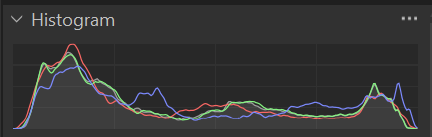
Select a layer which has masked all highlights:
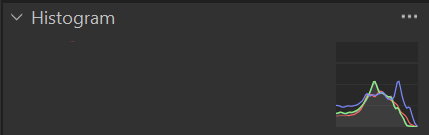 0
0 -
That's way too oversimplified. It's not that you take a slice of the histogram. It's a histogram recalculated on the basis of a selection of pixels, taking into account their level of opaqueness.
The 'normal' histogram is based on the background layer. The 'selective' histogram would be based on the selected adjustment layer. If the selected layer is a filled adjustment layer you wouldn't see any difference.
0 -
Paula,
Let me see if I can clarify my suggestion a little.
If you open a Floating tool for the "Exposure Evaluation" histogram what you get is basically the "Base Characteristics" interpretation of the source file data. So a starting point for all of the further adjustments beyond what is required to make the data look something like a photo. (There's probably a bit more to it than that but as a concept that would be the part of the histogram that is a "fixed" and onto which layer adjustments would be added.)
So to see a histogram that reflects ONLY the parts of the image changed by the layer adjustments one would need to deduct the "base adjustments" in some way to be able to see the layer changes. In fact changes for any other layers may also have to be deducted from the specific layer's histogram display to see just the effects of the single layer but in the context of the overall edit result so far.
It may be helpful if you have an example of the sort of editing you would be doing when such a histogram would be useful. Just so that people can understand and focus on the objective of the concept rather than the "mechanics" of it in isolation from the end result.
0 -
I don’t want a histogram that represents the *changes* made by the adjustment layer, I want a histogram that represents the *masked pixels* on the adjustment layer. That’s a fundamentally different concept. It might be handy for you if you take a look at Paul Reiffer’s live session of January 27 (https://youtu.be/neeXmkum1YE), start at 17:35, where Paul is addressing my question.
0 -
I have been trying to get SFA off the track with the base characteristics and "exposure evalutation" tool, because I think that is not what you meant, therefore I used a simple example (of how I understood it), but this is not way too oversimplyfied. If you want people to understand you need simple examples sometimes.
My example is based on a filled layer, with luma range (as I said "masked all highlights"),:
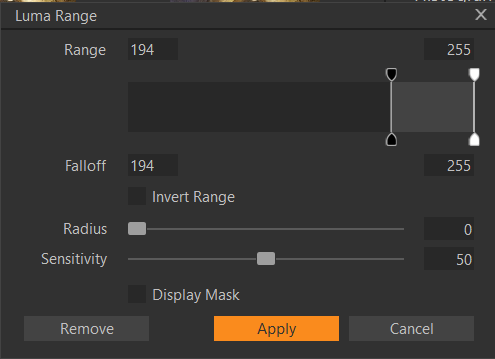
or otherwise brush-masked with 100% alll highlight areas in an image without feathering and without luma range.
If you would have a layer masking all highlights with opacity 50% then the feature would count (multiply) each of the masked pixels with 1/2, effectively reducing the vertical axis values (the pixel count) by 50%.
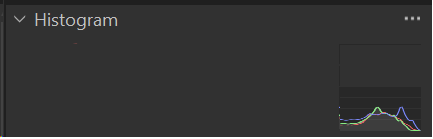
Painting other examples with a gradient is way too overcomplicated for me and probably not well understood by other users.
Which brings me to the point that such a histogram is probably not useful for me because a cognitive mapping from what I would see in such a histogram to any useful insight about the masked area is probably above my intellect (and I haven't missed such a featue either). Unless somebody can elaborate a useful example, maybe with the help of a software which can do this already (which would furthermore backup that such a feature would actually be useful) I don't buy in this request. (And frankly speaking, PR is not a reference for useful assessments for me).
But that's just me, in any case thanks for bringing up an interesting idea.
0 -
SFA, the idea is simple, the mask only defines the area of the pixels to count in the histogram, as if you would define a cropped area, with the complication that a pixel's attribution would be furthermore defined by its opacity.
0 -
The other possibility would be to divide a pixel's value instead of its count by 2 (assuming 50% opacity), thus making a half-selected bright pixel to a dark pixel in the histogram, would even be less useful.
0 -
The whole idea is getting more grip on the selected area you're working on. Paul Reiffer showed it with a very bright, masked Eiffel Tower against a dark backdrop. In a way there is a somewhat comparable piece of functionality in C1, the advanced color editor where you can select a color range and isolate it from the rest with the "view selected color range", which greys out all non-selected colours. (It should do a bit more than that I think but that's a different matter). In lots of ways I think C1 is a very capable editor, but also not very refined in its UI.
Did I miss such a feature? Well, when you mask a relatively small portion of an image all adjustments you make have a small impact on the histogram so it looses quite a bit of its usefulness, so that made me think about it. You don't always have to 'miss' a feature to think of it as being useful. There are lots of features in C1 that are utterly useless to me but will outrage others if you would remove them.
Regarding the way less than opaque pixels are represented in this histogram: a pixel that has a rgb value of (200,100,50) and is 50% opaque would end up with a (100,50,25) value.
0 -
a pixel that has a rgb value of (200,100,50) and is 50% opaque would end up with a (100,50,25) value.
This value (200,100,50) is the value after all adjustments incl. all layers are applied, right?
(100,50,25) would then shift the pixels values into the dark part of the histogram, and such a histogram tells you what?
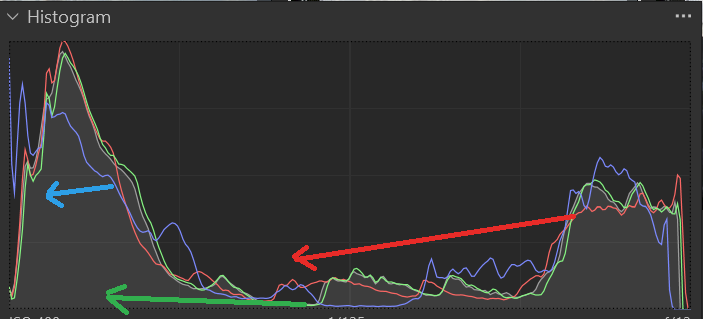
Here, for the above histogram, all rgb values have been divided by 2, simulating 50% opacity of a full area mask:
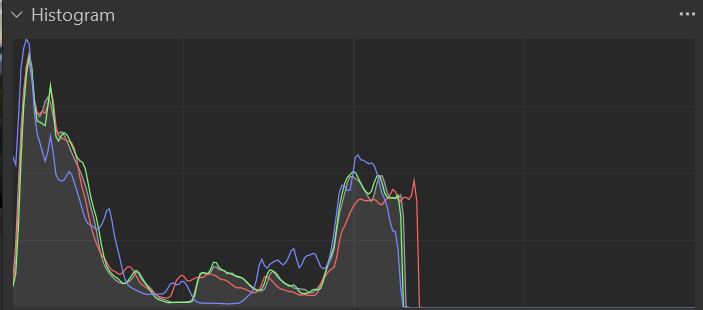
And if I imagine only a part of the image would have a mask, with some kind of feather which means varying opacity, then I even get less grip on the masked area.
I think multiplying the count with the opacity instead of the value would give a slightly better better grip.
With regards to Paul in his video, I think he struggled getting an imagination/visualisation for this idea too (as everyone would in this webinar situation).
0 -
I’ll have to rephrase myself. My example was plain wrong, you can’t treat rgb values like that. I’ll get back to it in the morning (GMT+1 that is), when I have had my coffee and can think clearly again ;-)
0 -
There might actually be one use case I can imagine, if the count is reduced with reduced opacity, or opacity is not taken into account at all, and that is you could better localize a color cast (the area of the mask), provided this area is meant to be white.
0 -
Anticipating. Good night.
0 -
I reviewed the relevant section of the PR video and fully agree with Paul that I can't see an obvious way to address the requirement AND keep the context of the edits.
If one takes an example of a single layer added to a Background layer one might be able to display the base levels as mostly grey outline (to use a very simplistic idea) and identify the adjustment values (+ or - ) that the specific layer adjustments deliver as colour indicators applied over the Background layer base values. (Base values being Base Characteristics settings plus any adjustment applied to the background layer.)
That's a fairly easy concept that would simply make visible the differences between the two "layers" as created by the "Adjustment Layer" settings for whatever tools have been applied.
However, when one has more than one Adjustment layer the adjustments may become interactive and combine the net result of adjustments for multiple uses of the same tool.
For a simplistic example let's say you have a layer that has an adjustment adds +1 for exposure overall and a second layer that reduces exposure for a range of REDs by -2.
Thinking about the RED channel on the Histogram, the net effect with both layers active would be -1 exposure for the selected REDs. But with the specifically RED adjustment layer viewed alone by turning off the overall adjustment layer the effect would be -2.
All well and good (it can get more involved if one considers luma ranges, mask opacity, and so on) but is it reasonable to expect the specific changes for a single level to be interpretable out of the overall context of all of the changes for all active layers and the interaction of the layers?
If one simply needs a stand-alone indication of the effects of a layer's adjustments with no context of a relationship to any other editing but taking into account the mask, its opacity and any luma selections that would be simpler to achieve but not necessarily very easy to relate to the effects it has on the overall image. However, one's approach to structured editing methods might be influential upon how useful the tool would be for some but maybe not so much for others.
There are some somewhat parallel considerations when applying Styles to layers.
Styles come with pre-assigned adjustment values that are to be applied. But what if the layer (Background or otherwise) already has an adjustment value applied for a particular value that the style will also adjust? Should that adjustment be overwritten by the style's value? Or, if the value is already adjusted, should the style's value be ignored.
I only mention Styles in this context as an example of the sorts of potentially conflicting requirements that might be released into the discussion about what might be useful, what might be needed and the broader context about how things work.
One other aspect is whether the way the adjustment are processed is indeed cumulative (i.e. additive with maximum and minimum possible values) or replacement. Replacement implies a processing hierarchy with position within a stack of adjustment layers being significant as well as some sort of tool hierarchy within a layer.
However, if the adjustment affects of a layer could be presented without consideration for any need to display the results in the context of the total image (e.g. as a graph with positive and negative values available) would that be useful in any way?
0 -
There might actually be one use case I can imagine, if the count is reduced with reduced opacity, or opacity is not taken into account at all, and that is you could better localize a color cast (the area of the mask), provided this area is meant to be white.
Like I said in the initial post, you could choose a binary solution - a pixel is selected or it's not. So, let's say you have a radial gradient, tapering down from 100% in the center to zero at the edge, the 'selective histogram' would cover all pixels down to edge for the full 100%. It would just mean that any adjustment made to the layer would have less and less impact on the histogram the more you reach the outer edges of the radial gradient. Maybe that's more logical in the end because it's the behaviour you are already familiar with.
0 -
Hi Paula,
Yes.
Hi SFA,
Without reading again the whole thread, my understanding of Paula's request was/is not to see the effect of the layer in the histogram, but rather use the mask to geometrically define which pixels in the image should be displayed in the histogram, and the pixels have the values of the combined layer stack incl. background layer.
If you define a rectanglular crop with the crop tool, the histogram only shows those pixels. Likewise, if the layer mask has the same rectangular shape, size and position, and opacity being ignored, this would result in the same histogram. If a layer has an irregular mask, those mask pixels would be chosen to be shown in the histogram.0 -
Thanks for stepping in BeO, was about to give an answer.
@SFA, I'm afraid we're talking past each other. As said before, the idea is simple, visualising pixels affected by the layer mask. The complicated bit is the implementation.
0 -
Hi BeO,
I agree but I don't think the "true" effect can be displayed successfully in all cases without considering it in a context that related to any other adjustments and layers.
The exception would be where the layer standing alone is provided with a sort of histogram (something like an audio equalizer bar graph type thing) that just show the adjustment values over a 0 adjustment reference line.
So if the requirement is to answer the question "How much of an effect might this layer deliver" such a graphical display might be quite usable. But if the need is see some accurate interpretation of the actually delivered effect when combined with other adjustments and layers, I think a different approach might be required.
The challenge is rather like the V22 HDR development.
It seems to me to be quite clear that there have been some specific objectives that may satisfy quite a few user's needs most of the time but not completely.
It will (and does) leave other users "cold" and they find it useless according to their perception of what should have been delivered.
Paula's suggestion (and I got the impression that Paul Reiffer was also thinking in terms of some potentially complex considerations) may have merit even in (or even only in) a nice, simple and understandable use as far as most people are concerned.
But is that enough for the most "committed" or critical users?
We may as well discuss this now rather than wait to discover whether the idea is picked up for development and then find that the solution offered is nothing like anyone was hoping for!
0 -
I think Paul Reiffer understood perfectly fine what I meant. His worries are (just as mine) how it would be implemented and whether it would confuse users or not. But that's something that is to be addressed in the interface. like I said before, this should be an optional feature, even for the 'most committed' and 'critical users'.
0 -
Yes SFA, this leaves me "cold" until they implement e.g. a decent softproofing or color contrast enhancement aka negative uniformity in the skin tool editor.
0

Post is closed for comments.
Comments
25 comments