New Export Function - vers 14.3 - is not usable - Sessions at downgrade not working

The new Export Function at C1 version 14.3 is something for consumers, but nothing for professionals! I had to downgrade to 14.2 and now I am not able to open sessions I did with 14.3., this means two days of work is lost!
Please provide a solution to convert sessions from 14.3 to 14.2
I have to write here in the Community, because the C1 support is not answering since 10 days!!
Under https://learn.captureone.com/blog-posts/we-hear-you/ I can not find a solution
I am really upset about this poorly done update
-

Hi Rainer,
not in right order:
C1 support in most cases takes some days (or weeks) to respond. Sorry, but this is normal.
If you convert an existing catalog to the next C1 version it will backup before. So you can go back with version and catalog to the state before upgrading. Sorry that I can not tell you if this works similiar with sessions.
If you open a NEW session with any version of C1 this catalog/session will NOT work with previous versions of C1. And there is no possibility to convert newer versions to older formats. (This is not a C1 characteristic but work in any software I know in the same way.)
I am a pro working fine with the new export function. The only thing I would prefer is a possibility to change and fix the export windows/box size.
Kind regards
Ernst0 -

If you are using sessions there should be a backup file in the session folder that will open with the older version.
0 -
Hi Ernst and db,
I know there are backup files. But they do not help. All the work (2 days) I did withe the new version is gone.
One of my most used function in 14.2 is to generate own recepies for export. For example PSD, jpeg with smaller resolution, jpeg full size etc.
- In 14.2, when you klick the chekboxes in the export tab for more than one recepie, C1 renders all the diverent versions. PSD - Jpeg etc.
- In 14.3, it is possible to klick more than one chekbox. But you will get allways ony one version.
In version 14.2 export processing is a Queue visible. You can pause and resume, delete single images ettc.
This function seems to be gone.
I wrote an email to the C1 support, with several questions and got a quick response, but not on all questions
0 -
......I wrote an email to the C1 support, with several questions and got a quick short but not useful response, but not all questions was answered. I have asked for answering on all other open questions. But there is no response since two weeks........
0 -
I just tried exporting simultaneous tiff and jpeg and it worked as advertised.
Check the output folder of yours recipes.
Might they be going to different folders?Looks like they will be backtracking a bit:
https://learn.captureone.com/blog-posts/were-listening/0 -
@Rainer
It is certainly true that you can't currently pause and restart the queue. (Though it sounds as though the further update they have promised may restore that.)
However, it certainly should be possible to export using two recipes at once. I have just tried this to verify it. I selected these two recipes...
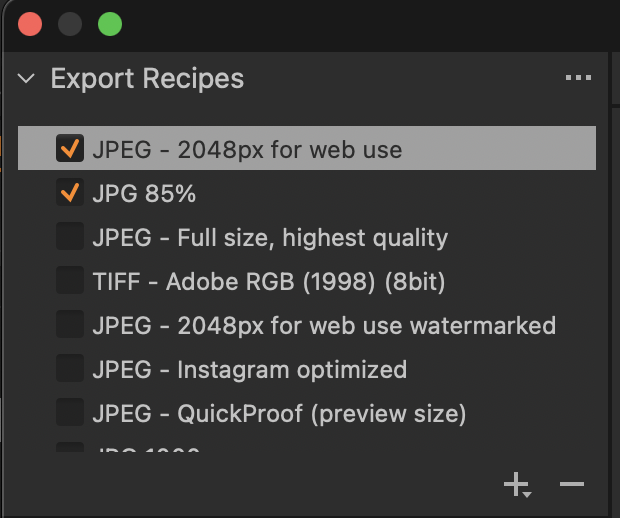
... and got this result. (The one on the left is the JPG 85% recipe and the one on the right is the 2048px recipe.)
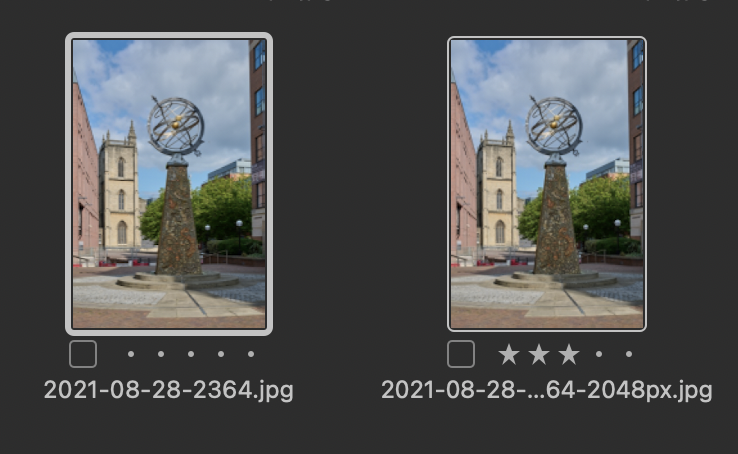
As gb says, it may be worth checking where the recipes you selected are sending the output images. I think that there was something about output locations being specified a bit differently under the new Export method. Perhaps a way of quickly checking up on that would be to Export an image using two recipes as I just did, and then use Windows file explorer to search for the output files, as one may turn up in an unexpected place. If that turns out to be the case, you may just need to reset the output locations on some of your recipes.
Ian
0 -
Hi Rainer,
could it be that you did not notice that there is a (new) option to decide whether exported images should overwrite the existing ones OR old images remain and new get an additional suffix?
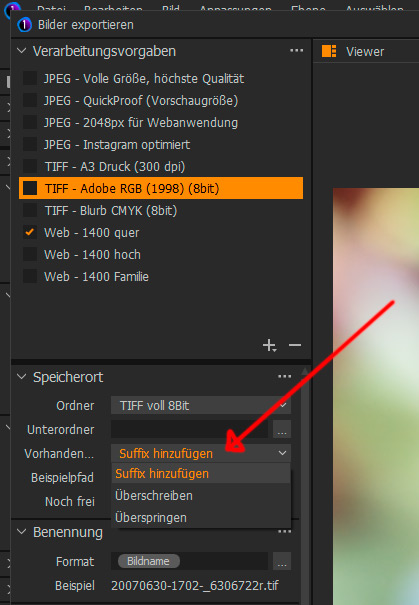
I would recommend to have a closer look into the video:
https://www.youtube.com/watch?v=H-9OHR4q0UQ&t=254s
Best regards
Ernst0 -
Hi Rainer,
sorry, just forgotten in previous post:
Can I cancel an export that I have already initiated?
Yes, you can do this by opening the Activities window (Window>Activities) and click the cancel icon (x).
How can I pause and resume an ongoing export?
You can’t do this in 14.3. In an upcoming release, we will provide this functionality. If pause and resume are critical to your workflow, we recommend using 14.2.
0

Post is closed for comments.
Comments
8 comments