Where Are the Copy/Paste Adjustment Settings Version 21

For the life of me I can not find the menu options for what will be copy/pasted in Version 21, Mac. Where can that be found?
-

If you are looking at options for the Clipboard tool they are in the clipboard tool - either the full tool or the part of it that relates to copy and paste from another tool's limited set of adjustments.
0 -
Do you mean this menu tool ? If yes, you can add it by customising your menu toolbar.
 0
0 -
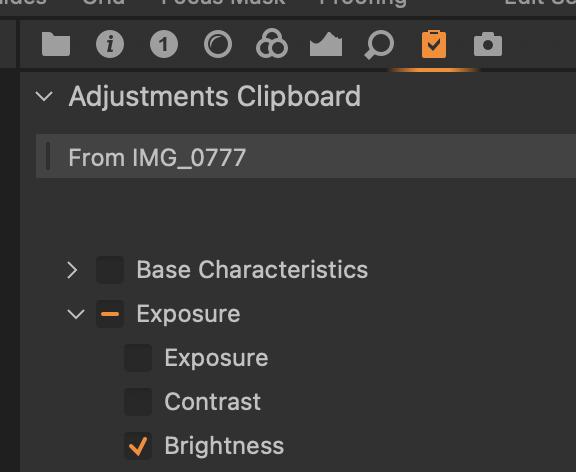 1
1 -
That's it Marco, thanks!
Thank you everyone for trying to help out.
0 -
Question related to the above.
I have made a custom crop that I want to copy from one image and apply to another and I have the Composition box checked before I click the copy arrow but when I click the paste arrow to apply to the other selected files nothing happens. I notice that when I click the copy arrow the composition box unchecked it self whereas all the other adjustments stay checked. In fact any other adjustment that I have made, exposure, color etc the boxes are all checked already but the crop box is not self checking I have to manually check it and as I said when I paste the settings to another image the composition box unchecked it self. Is this a bug?
0 -
In the three dot menu of the Adjustments Clipboard change your "Autoselect" options. I believe the default is "Adjusted except Composition". It sounds like you'd prefer "Adjusted".
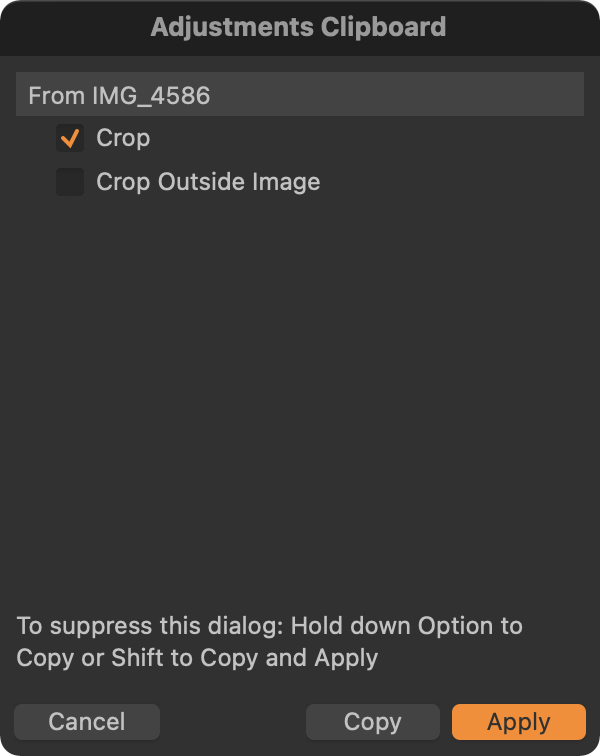
I rarely want to copy/paste a crop and/or rotate. When I do I do not use the generic copy and paste mechanism. Instead I make the crop to one image. Select it AND the other images I want to use that crop. The image with the crop must be the most selected image. Then I click on the double arrow icon inside of the crop tool. If I shift click the crop will be copied to all of the selected images. Otherwise I get a pop up window (see below) and I can use the Apply button to apply the crop to the selected images. It's easier to do than to say :-)
 1
1 -
Perfect. Well sometimes I'm doing a focus stack of a series of images so I need all images cropped exactly the same.
Thanks for your help!
0
Post is closed for comments.
Comments
7 comments