Error loading adjustments mask

In a session with approx. 1500 pictures of which approx. 500 pcs are adjusted with masks for all adjustments. Suddenly the masks can NOT be recharged.... what happens ?? This is a professional program, it must NOT happen !! What to do ? Have read her on community that it is an "old" bug that remains.... should I start using Affinity Photo instead ??
I use a MacMini with 16 GB memory Catalina 10.15.7 intern disk and CaptureOne 21 Pro Build 14.3.0.260 (716b6f1)
-

You could use Affinity Photo - although that is a completely different sort of program that, at least as far as my copy of it is concerned, has no concept of sessions or catalogs (for a start of listed differences.)
So it really depends on what you are trying to achieve.
0 -
If you're looking for another RAW converter, I'd suggest to look into DxO PhotoLab. Like in Affinity Photo, no real catalog/session part is included. There's a tiny part which lets create "projects", but only in one hierarchical level. Given the rather poor implementation of Capture One's catalog "feature", the question pops up if you'd miss a lot. DxO has a sort of browser which lets you look into folders on your harddrive, Affinity Photo still has no such feature although Serif announced it's development shortly after AP's launch, but then their priority changed to develop Windows and iOS Support.
DxO saves the masks no in a catalog, but in external sidecar files. Creates a bit of a mess in picture folders, but works as long as you don't have to move/copy loads of RAWs to other directories.
And you're right, Håkan, a so-called professional program should not come along with such nasty bugs.
0 -
Hi Håkan
How did the masks disappear ? Is it when you tried to copy them ? If it were, the last version 14.3.1 solved this issue.
I would suggest you to continue with Capture One. This software allows the best results on demosaicizing I ever obtained. And I have tried many !! The developing engine of Affinity Photo is not that good, in my opinion, and the one of DxO is good but gives a completely different rendering, that I don't like.
0 -
Robert , the last 14.3.1 version might solve one issue at the cost of slowing down all other processes. Creating thumbnails takes ages compared to 14.3.0., processing appears to be laggy. Although both acceleration options are on "Auto", C1 doesn't use all available cores.
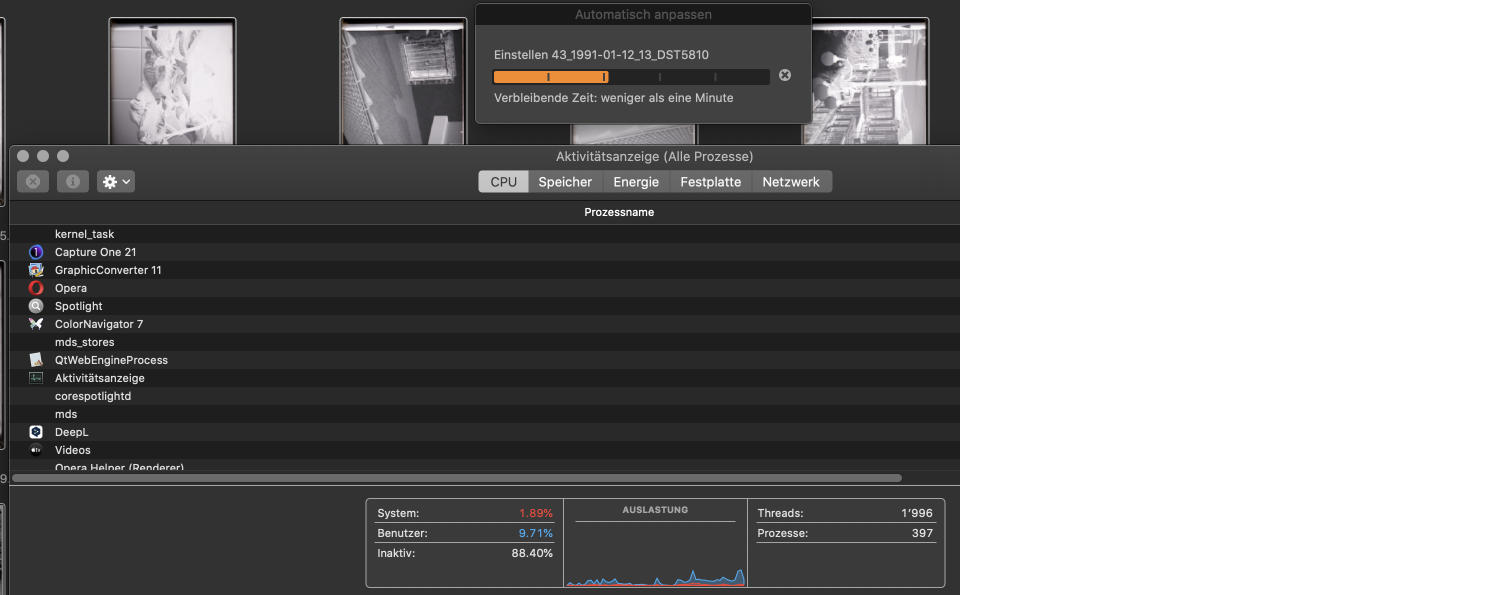 There's no other process than C1's automatic histogramm adjustment running. On 10 % processing power. No wonder the app is slower than a granny doing her needlework. An i9 has 8 cores, Capture One apparently doesn't benefit of them. Shame in 2021... Out of curiosity I just did a panorama stitch with Affinity. The CPU performance went briefly to 90%. Meaning, none of the 8 cores remained sleeping.
I agree with "different rendering", but for some cameras I prefer the DxO results by far. And as it is always "give and take" I get much better denoising results and a couple of other "better than in C1" features – like a well written manual in various European languages whereas Capture One simply ignores other languages than English and leaves the translation of their incoherent commands and options to the users. I also consider DxO support better and more interested in feedback than C1's. In short, I was very surprised about a user-experience I was not expecting to be that good.
Meanwhile I suspect Capture One is living from it's reputation and being a (complicated to learn) professionnel tool simply doesn't mean "better results" per se. Professionals don't have to time to constantly compare differences between apps, plus: a change of the main app has solid monetary consequences if the other app turns out to be bad decision in the long term. As conservative as pros are and have to be, they are not the first to know there are better/quicker/more reliable ways to get better results. To me, I'm happy to be able to use both systems parallel for different cameras. So, if I have to switch because C1 delivers more weaknesses, flaws and bugs than value, I can do it rather pain- and effortless.
0 -
OK, thanks for answers. First of all..... I prefer NOT to change programs. Has been using CaptureOne since the time of scanner backs......
Have now updated to 14.3.1 but it did not help me with my problem.
How do I update my sessions to re-upload any changes I made? My layers that I have are completely empty and nothing changes when I click in and out of the box.
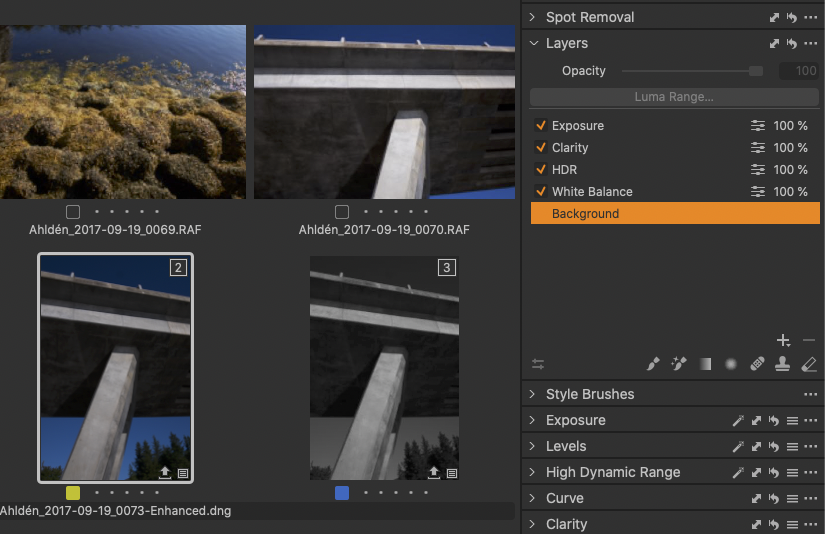
If I make new layers on a "new" image and turn off the program, all layers work as they should but still not the "old" images....(see image example).
I back up my sessions when I have finished working for the day, but why should you do it when it still does not work when you open the program again ??
0 -
Now back to the missing adjustments masks :) In the catalog, they are saved in the "Adjutsments" folder. I don't know much about sessions as I'm not in the target group using this feature, but I guess there's a folder of C1 in each folder you're storing your pictures in. Did you maybe delete one of them? And did I mention the word "backup!"? No? Now might be the time to use the backup...
One of the reasons I dislike the concepts of "sessions" Is the problem in front of the screen, being clumsy me. And I don't need to have my files as mobile and portable as possible.
0 -
I back up my sessions when I have finished working for the day, but why should you do it when it still does not work when you open the program again ??
Good question, but as sorry as I am, I'm not familiar with your workflow ;) I think, my next question is pointless. Could it be you connected C1 to the backup drive with the pictures without masks? I remember C1 sometimes offered me catalogs to open which were on my backup drive, never connected to C1 but somehow still in the list of "last catalogs". And if I hadn't read the file path because it appeared longer than usual, I would have had the situation to work with an outdated catalog and wondering why no adjustment I could remember of was visible.
This also could happen with exporting files. Don't ask me for the reasons, but I learnt the hard way, C1 should not being trusted all times. Especially with the series of crashes coming up in with 14.2 and 14.3.
0 -
I have backup of my session... but how do you open it ??
0 -
Håkan,
I would suggest to submit a request to the staff, as I can't help you that much, not being in front of your screen and not using frequently sessions. You'll find the link at the top right corner of this page. Usually, they ask you your logs and an example, and they answer you very fast if the issue is not complicated to them......
0 -
Håkan, I'd like to help you, but "sessions" is nothing I really know well - and guesswork is not helping. I agree with Robert, get in contact with C1 support and hopefully they will find a solution.
0 -
@Håkan Ahldén
Using the Session concept all of the edit information is saved in Subfolders under the folder that contains the original images being edited.
You should be able to find a "Capture One" folder in the same folder as the images. In that folder you should a "Cache" folder that will contain the thumbnail files and the Preview files and one or more "Settings xxx" folders depending upon how many different versions of C1 have been used to access the images in the parent folder. There will likely be 2 file types to discover in the Settings folder. One for the edit instructions and one for a Mask definition where one or more masks have been created for layers associated with the image edits.
So, as a first step, see if you can find the mask files (.comask) saved there. The files will be named for the image to which they relate.
0 -
SFA
YES😃 I have found two different files .cos and .comask
0
Post is closed for comments.
Comments
12 comments