Over exposure when auto adjust? (fujifilmf)

Hello All,
Looking for some help and advise.
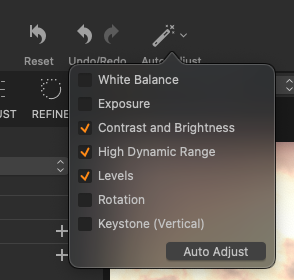
Some times for quick edits where I want something fast I usually use the auto adjust (Features selected: exposure, contrast and brightness, High Dynamic Range and Levels) it almost hit the mark except I notice most of the time is over exposure by 0.25 - 0.35...
Questions:
A) is there any way to tweak the auto adjust to under expose a bit? a configuration setting?
B) I notice it worst with certain film simulations (Classic Chrome, Classic Negative) the auto adjust do not come close, however for other films simulations like Astia or if i turn it to lineal response it gets to job very very close... Is this normal in your experience?
Love to hear some feedback and tips
Thanks,
Kenneth!
-
ohh ohh Bonus, is there any way to tweak the auto white balance to leave it more cool / warm (thinking about how Fujifilm auto white balance curve works in camera where you can tweak it)
Thanks,
Kenneth0 -
Hi Kenneth,
For the exposure: You can only configure the Levels tool auto adjustment to some extent in the preferences.
You could also use the Curve tool. When you tweak the curve, the tools you selected for your auto adjust will still do the same as if the curve had not been tweaked, i.e. they will not try to counteract against the curve in order to automatically correct your tweak. So, if you set a tweaked curve as the default for your camera, it would always be applied (on new images), or you could define the tweaked curve as a preset and apply it when you feel it should.
WB: no idea.
Cheers,
BeO0 -
P.S.
WB: Use the Color Balance tool to cool down, save this as a preset, maybe as the camera default (though camera presets would affect all images from your camera), maybe better together with the Curve adjustment as a Style, and apply when appropriate (on the fly or on import).
0 -

Hey Kenneth did you ever find a resolution to this request?
I'm in the market for both toning down the level of auto exposure adjust, and slightly cooling WB in my edits. I would love to know what you did to resolve this.0 -
Hello James,
No sadly I haven't found a way for a systematic aproach, so as workaround I deslect the exposure auto adjust and then fix the photos manually on my own - I do it because I'm 90% close lo the exposure on the first take and that have worked for me.
Hope this helps.
 0
0 -
Hi Kenneth,
Did you ever try my suggestion, and if you did why didn't it work for you?
0

Post is closed for comments.
Comments
6 comments