Crop Tool - Broken & Poor Design

- The tool doesn't allow me to change the displayed dimensions nor the unit (px, in, etc) of the desired crop.
- The initial readings of the dimensions (uncropped photo) are incorrect. My uncropped, full frame DNG from a Leica M10 Monochrom should be 7864 x 5200 but C1 displays them as 3000 x 1984 px.
- I've read thru the online manual (no help) as well as many comments in the community and it seems like the crop function has been a source of many comments (unfavorable) over a long time. This is VERY disappointing. I'm a new user and like a lot of what I'm seeing, but the lack of an intuitive, fully functioning crop tool could be a deal breaker. This is a basic, everyday tool. It needs to work.
-

Here is a possible solution to your item 1 and you want to use the Export tool and in the drop down you will see the dimension option section. At the moment the Process Tool has been replaced.
1 -
The dimensions displayed by the crop tool reflect the dimensions you will get from your currently selected output recipe. If you have a recipe selected that will output a JPG 3000 pixels wide, for instance, then the crop tool will display 3000 pixels. If you have a recipe selected that will output a JPG at 100% scaling then you will see the actual pixels displayed by the crop tool.
So with this recipe (note that the scale is set to Long Edge = 2048 pixels)...
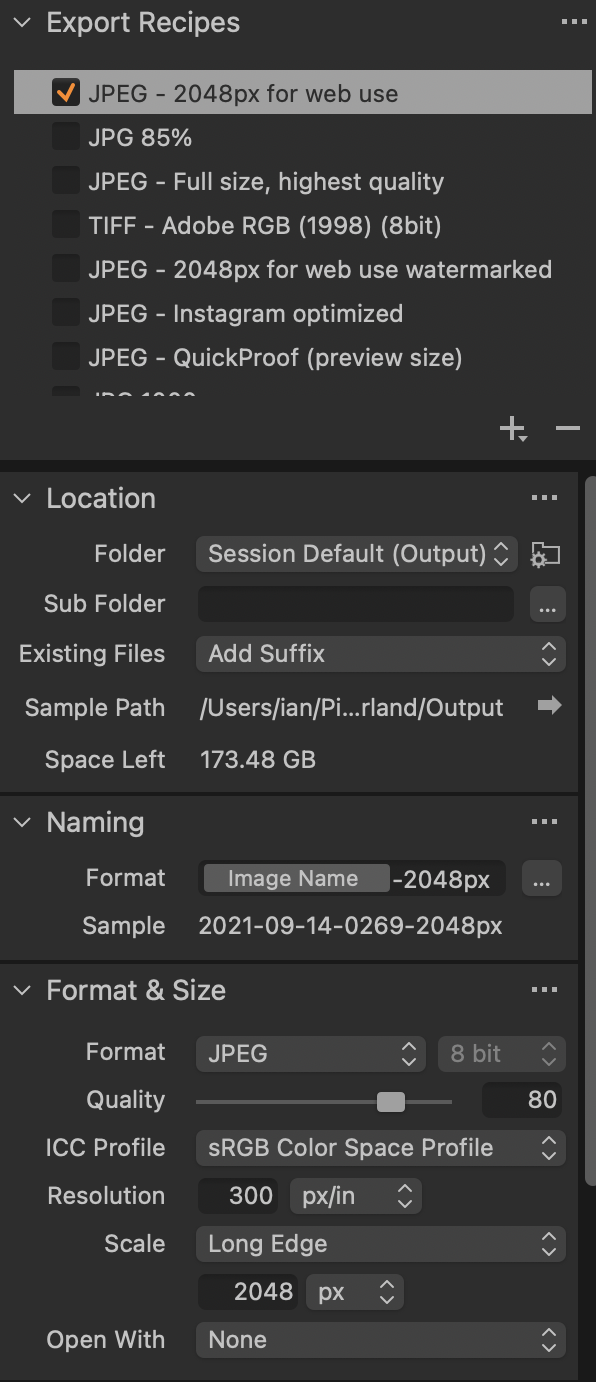
...the crop tool will always show the long side as 2048 pixels.
But with this recipe (note the scale = 100% setting)...
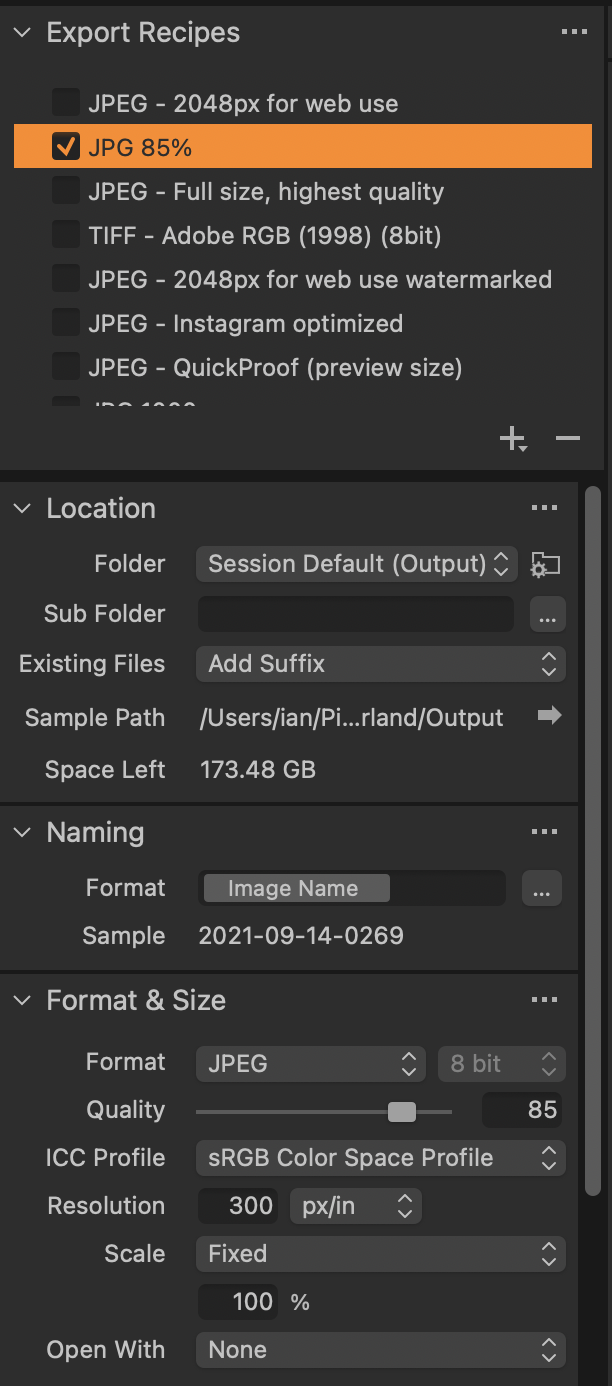
...the crop tool will display the actual pixel size of your crop.
Ian
1 -
Dear Michael & Ian: I followed the above and it resolved the issues - I can see the correct dimensions in pixels for the full size image and the crop. Thank you.
For C1 Developers: This is extremely counterintuitive, and something I would never have guessed on my own. The crop tool should have its own defaults - apart from any export recipes - that can be controlled right from the tool.
0 -
Whether it is counterintuitive is partly a matter of what you are used to. I find the crop tools in some other apps counterintuitive - for instance often when you drag in another app, the crop frame stays in one place and the image moves, whereas in C1, the image stays in place, and the crop frame moves. Either way works, but I got used to the C1 way before I met the other way which seems strange to me. Also in some other apps (Photoshop of Affinity Photo, for instance) I sometimes forget that I have to hit Enter or click an Apply button or I will lose the crop I have just set.
Ian
0 -
Re Counterintuitive: I was referring to the fact that the tool dimensions/units are controlled by some process recipe you used previously to get to a specific output. Everything should be controllable in the tool itself. The crop frame behavior is fine.
Alan
0

Post is closed for comments.
Comments
5 comments