Option to turn off basic Tool Tips?

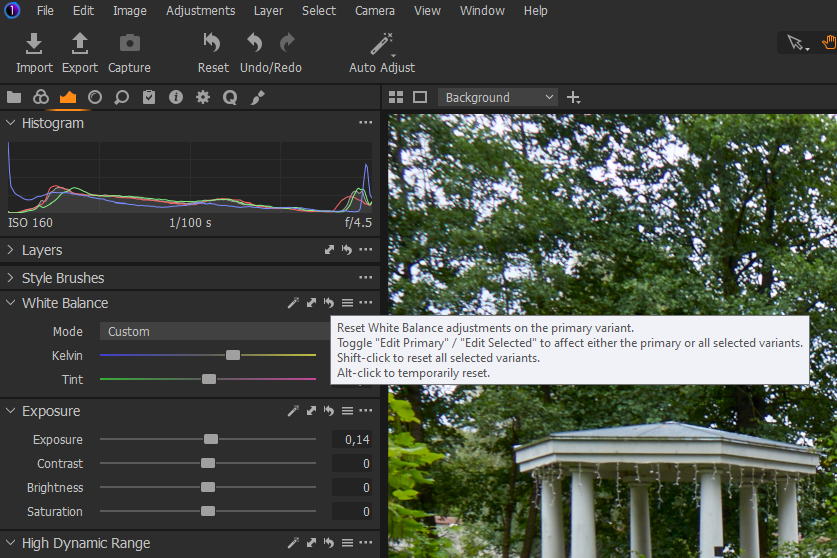
The popup basic tool tips in C1 are really visually annoying and useless for experienced users.
Any chance of adding a Preferences option to disable them completely like you can with the Enhanced tool tips? (This with Windows 10).
Photoshop has this option in it's preferences.
-

I support this request, those tooltips / popups can be useful at the beginning, but they become quite annoying after a while, also because they cover some values that the user wants to see.
Same topic was discussed here:
https://support.captureone.com/hc/en-us/community/posts/360012209497-Tooltip-pop-ups
1 -
The large ones like you show above Andrea are doubly annoying.
Apart from the flash, they don't stay on long enough to read all the text in one go anyway (not that I want to).0 -

As far as I remember this can't be disabled in C1 as it's the default Windows behaviour showing tool tips in the system and aplications and thus must be disabled in the OS (registry hack). But is it really that disturbing since they're vanishing after a very short while, as you say.
0 -
Okular, as I said you can turn tool tips off in Photoshop preferences so it cannot be correct that it is an OS thing, or at least something that cannot be worked around.
If users find them distracting they are distracting. It should not be up to others to decide.0 -

As far as I can tell the tool tips only appear if one hovers over the elements of the top line of a tool or some control element that appears not on the top (Name) line of the tool but at a different location within the tool window. Or in the function menus.
I rarely see a pop up when working in C1, especially if the cursor is being used on tool sliders, etc. So they do not bother me. In some cases - for example which tools are deployed as part of a Style - they can be somewhat useful occasionally.
My personal observation is that they do not bother me at all and I would rather have them readily available should I wish to use them once in a while than turn them off and have to go searching when I want a reminder about available options or, sometimes, newly revised options for recently added functionality.
I have grave doubts about the main body or users being deemed capable of wisely allowing or denying themselves access to tool tips according to their knowledge and experience.
0 -
@Okular, definitely there is no connection with wathever setting related to Windows os. (the eventual "registry hack" is about Win itself tooltips - explorer, taskbar, ... - not about applications).
@SFA your comment last statement assumes that most of the C1 users are dumb...
0 -
@Andrea D'Orazio
You are free to interpret my comment any way you like.
More to the point I suspect that most users do not have objections to the tooltips working as they work now but, given an option, might well turn them off and then forget about their existence.
In a development environment world where regular releases are implemented and may well involve basic changes to the way things work if any progress is to be made, the tool tips are a ready-made way to provide timely information access during an adjustment period.
Users may not be used to such an idea and simply leave them off having forgotten about them, then suffer the frustration of "not being assisted" to learn about the changes.
It's just what we users tend to do. It has always been that way.
Tooltips aid learning for those that use them. They offer nothing if they are turned off. I very much doubt that most users who, for some reason, had decided to turn off tooltips would ever turn them on again. They might well miss out on a lot of useful learning that would assist their use of the software and improve their experience.
Nevertheless, I suppose if enough people feel that turning off basic tooltips is an important development feature C1 will likely consider adding the option to disable them.
0 -
SFA said: "I have grave doubts about the main body or users being deemed capable of wisely allowing or denying themselves access to tool tips according to their knowledge and experience."
So a lot of C1 users are not intelligent enough to decide for themselves whether they need tool tips or not? Sorry, that just comes across as elitist nonsense.
0 -
Somewhat like an experienced user saying that the tools tips are visually annoying?
Think of it more along the lines that many users are quite casual users, may not know what they are missing out on in terms of functionality (especially if recent converts) and so would not necessarily be well served by the action of turning off the assistance available.
One could try to help out by re-activating the tooltips with every update, often a good place to reinstate them when something has changed. However, that would likely bring howls of complaint from experienced users being forced to go to a setting somewhere and deactivate once again.
This is a perennial no win situation from a support point of view.
0 -
@gb
Well, I know that some hints in Windows can be changed/disabled, so it seems reasonable to assume that these tooltips can also be edited with it, as there is obviously no setting for this in C1. Since these tips do not bother me, I have not tested it.
Your statement about Photoshop is not entirely correct. I don't own Photoshop but from what I have read about it, it is comparable to C1 (and probably the majority of applications) at this point: Rich tooltips can be turned off in preferences but regular tooltipps are still shown, at least the tool name. The only difference may be that C1 displays more information, which, as SFA has pointed out, can also be helpful.
Btw, I have not programmed C1, only tried to show a solution. If the answer does not meet your expectations, don't rant with me, then ask the question directly to C1 and not here in the forum!0 -
Okular said: "your statement about Photoshop is not entirely correct."
I do have Photoshop and I can assure you
there are check boxes for both basic and enhanced tool tips in Photoshop preferences.
With these unchecked there are no tool tips (not even tool names) shown, so please stop spreading misinformation about this.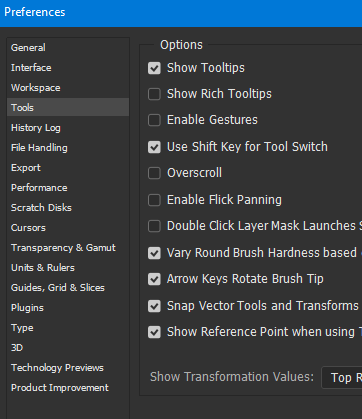
I'm not ranting at anyone, just getting the facts straight.
0 -

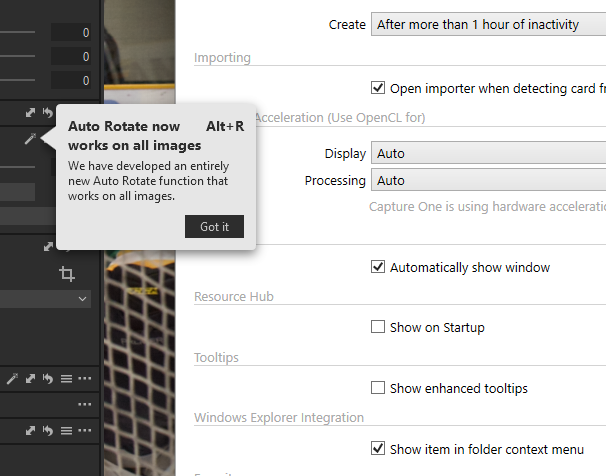
How do I get this tip and every other tip[ to not show up! I have the enhanced tips turned off.
 0
0
Post is closed for comments.
Comments
12 comments