Can't Process/Export! 14.3.0

Ever since updating to 14.3.0 with the redesigned exporter, I have been experiencing an issue where quite frequently, I'm shown the "Capture One can't process" error when attempting to export images, or export a web contact sheet.
Merely quitting C1 doesn't help, however the restart does solve it - at least temporarily. The problem repeats at least once any given day.
I can't seem to find any common thread between the different sessions that I am trying to export, and this seems to be a new issue that has arisen after updating to 14.3.0 (also 14.3.1) as I have never seen it before recently.
I'm often exporting many versions a day so it is not viable to be constantly restarting my iMac to solve the problem.
Any ideas?
-

Hey James did you get any help with issue? I have the same problem but even a restart doesn't help it. The last project I had to do a screen shot of the image and then send the raw to the retoucher to try and make the same moves I did while shooting. I can't figure it out.
0 -
Hey Todd - didn't get any help from this ticket, although I haven't had the issue since the 14.4 update which brought back the export tab (and I haven't used the export tab either, still using the export window from 14.3). Is it happening for you with every session/catalog? Or just the one
0 -
This is happening to everyone one of my sessions that have been brought up to v21. Its not letting me go back to 20 either.
I'm in 14.4 but I don't know what the export tab is. Since moving from 20 I only get that new window with the button on the bottom right. Is that what you're referring to?
0 -
So there's the export window which is File > Export > Export... (which has the button on the bottom right)
Or there's the tab which can be added if it's not already there, by right clicking in the top section of the tool tab bar and > Add Tool Tab > Export. From memory this used to be called process recipes or something to that effect.
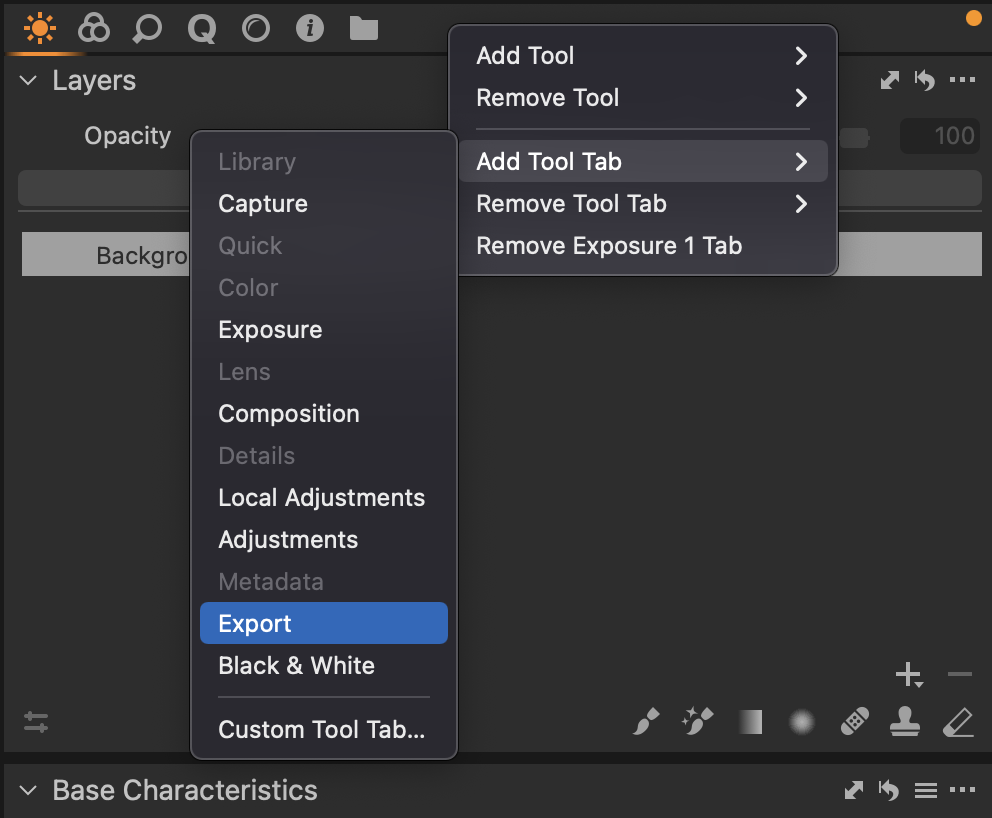 0
0 -
That seemed to work. Thanks for the help. Not sure where you are but I owe you a beer if you're ever in SF
0 -
No worries! I'm in Sydney but I'll make sure to hit up this thread if I'm in SF :)
0
Post is closed for comments.
Comments
6 comments