capture 21 pro for fugifilm

Just purchased the 21 pro version just for fujifilm ($199). Nowhere in the menus do I see a layers drop down with all the options for opacity etc, What am I missing or are these advanced layer options not available for this software
-
What options are you looking for? Layer opacity and luma mask are in the layer panel:
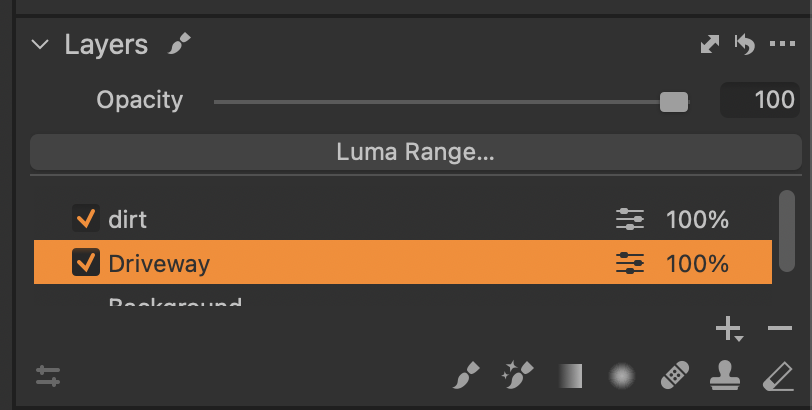
In this example the Driveway layer is selected so the Opacity slider will effect that layer. Ditto the Luma Range... button.
Capture One is not a bit level editor. You don't get things such as blending modes. Your only options are to paint the mask (several tools), modify the mask using a Luma range..., or lower the opacity (effects) of the adjustments made to the masked layer. Someone will correct me if I've left something out.
0 -
I just discovered I can create a floating layers window by choosing Window, Create floating tool, layers. Then I can move to the menu categories on the left. I don't understand why they are not there in several places to begin with. I very much appreciate your reply. All the YouTube videos show the layers panel in the color, exposure and other places in the groups shown near the top left of the screen. I use affinity photo and Luminar ai but have a fujifilm xt4 so I thought it might be the best option to start working raw files in capture one
0 -
You can create your own tool tabs with only the tools you like and put them in whatever order you desire. I do that. Then I use use Window -> Workspace -> Save Workspace... to give the layout a name. You can save multiple different workspaces and switch between them as you like.
You can also add tools to or remove tools from any of the "standard" tool tabs. You can re-order tools, too. Remember to save your changes as a named workspace or the next time you update Capture One the changes will be lost.
0
Post is closed for comments.
Comments
3 comments