Layers – Adjustment / Luma Range in C1 21

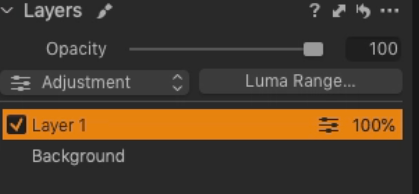
I haven’t played with layers recently but now I seem to have lost the ‘Adjustment’ option which I used to see as shown here -
All I see now is ‘Luma Range’.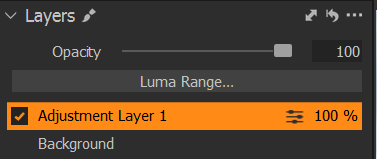
Is this due to changes made in recent versions? If I change my Workspace setting to an earlier version it still shows only ‘Luma Range’. All layer adjustments seem to work OK with the exception of ‘Auto Adjust’ in Levels which is greyed out. Manually adjusting levels works. I‘ve done a fair bit of searching to try to identify what I’m doing wrong but no luck so far. Anyone help please? J.
-

Adjustment, in previous versions, related to the layer type selection. Options were Clone and Heal for example.
When the dedicated Heal and Clone brushes were introduced they came with their own dedicated layer types so there was nothing more to select and the need for a Layer type "change" option became obsolete.
Be careful using your old Workspaces in that respect. You may want to reassess them.
0 -

"....with the exception of ‘Auto Adjust’ in Levels which is greyed out."
AFAIK the Auto Adjust of any tool does not work on a layer.0 -
gb is correct.
In general ,Auto Adjustments require the data for the entire image to make any sense of using them. Results based on local date related to a masked area would probably not deliver useful results very often.
0 -
Thank you SFA and gb. You have clarified matters. I only reverted briefly to an old Workspace setting just to check what the Layers tab looked like. I'm not quite sure what is meant by the comment - "You may want to reassess them." I assume there isn't any risk if I don't do adjustments while in an old Workspace? J.
0 -
Hi Jeremy,
Old workspaces, where some significant changes may have been made to functionality, might sometimes end up causing some internal conflicts or confusion depending on what the differences are.
It's difficult to be precise about what, where and how.
If the tailored workspace is carried over several times the potential for causing issues will likely increase.
In the case of the Layer functionality the changes involved were quite significant operationally and for that window involve more than just the elimination of the Layer Type change option. So there are other somewhat important things there that will be missing if and when you make use of layers.
It would be a good idea to amend the Workspace to include the changes and then re-save it.
On the other hand if a workspace is simply a re-grouping of some tools that have not changed then it can be left alone.
The Release Notes for any new release are usually a good source of information about significant changes that you may find could affect existing personalised workspaces in ways that may mean it would be best to update them.
If you ever need to revert to an earlier version of C1 where the older functionality still applies you should find that the older Workspace is retained for that version - so long as no steps have been taken specifically to remove it from the computer's file system.
0 -
Many thanks SFA for your clear and comprehensive explanation. J.
0
Post is closed for comments.
Comments
6 comments