working in the wrong session

Hi, I've made the mistake of working on the content of a previous session (B) from a current session (A). The result is that the corrections that I've made on on session B can't be read from within session A. How can I correct this ? thanks
-
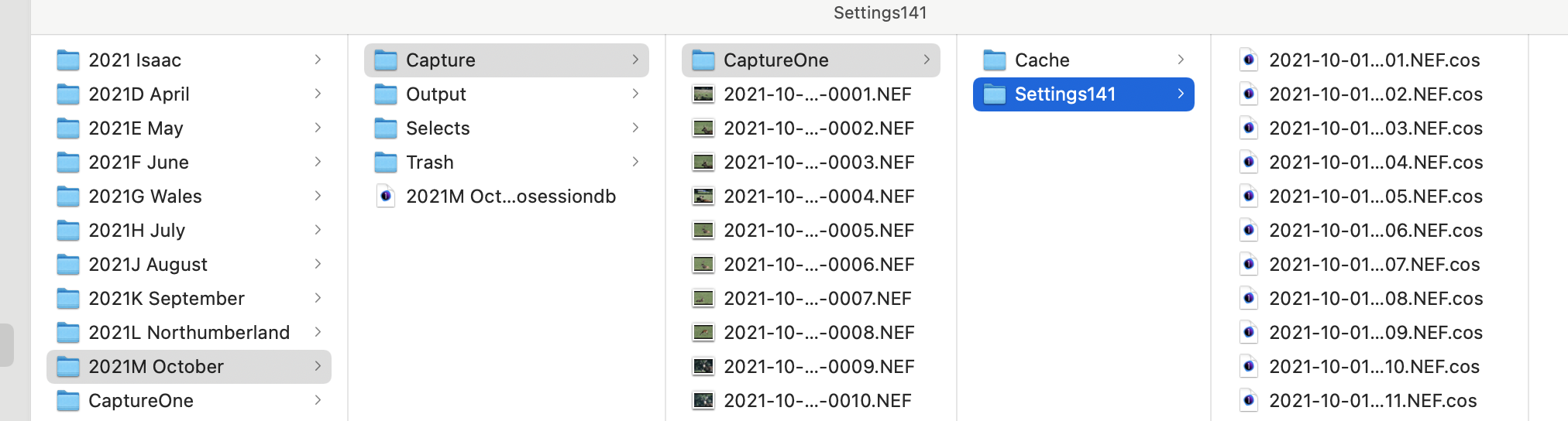
If you truly mean a session and not a catalog, you should find that edits you make when you have either session A or B open (or even another Session C) are seen when you view the images from any session. This is because the edit information is stored in subfolders of the folder where the images are. So in this screenshot, edits to the images in the Capture folder are stored in the .cos files in the Settings 141 folder shown. Capture One's sessions should see them always and display the images as adjusted.
But it is different if you are actually working in a catalog, not a session.
Ian
0 -

John,
Are the 2 sessions in question in use by different versions of C1? (Or different releases of a version that has had a major update during its existence)?
To use Ian's reference screen above - the highlighted Settings141 folder. There may be other folders for earlier versions - Settings131 for example for V20. This prevents conflicts in the case the functionality has changed, affecting the edit values perhaps, but one might still wish to use the images with an older version for some reason. Also as a precaution should problems occur during an update for any reason. Loss of power for example.
0 -
Thanks to you both for your answers. It appears that the problem was effectively that I had edited in a later version without updating the old one. So now they are syncing and all is well !
0

Post is closed for comments.
Comments
3 comments