How to avoid a separate .xmp sidecar file

I am a long time Lr user where I convert all files to .dng on import. And all the metadata of the files (IPTC as well as edit info) is stored inside the .dng file. Basically no separate .xmp file is generated. This helps me keep count of the files in the backend folder where the original files are stored...I like it that way.
Is there a way in C1 to NOT general separate .xmp sidecar files, and have them stored inside the .CR2 files?
-

The simple answer is "No".
C1 has a principle of never changing a source file, raw or otherwise.
0 -
Have you tried creating an Export Recipe specifying DNG format and including whatever IPTC data you want? I just did that and the result was a DNG file with metadata.
If you're talking about sidecar files created during processing, I don't have that at all. C1 retains adjustment details in its database. If you want to export files with adjustments, you'll use Export Originals, which will generate a folder containing the image files and a second folder (inside the first) that has adjustments. Importing that top-level folder into Capture One will restore the original adjustments.
0 -
Thanks SFA and Abbott.
After a bit of research online, I did realise that such an option may not be available in C1.
0 -

I'm confused about this and if anyone is still out there I'd love some help. I am a long time C1 user and until recently C1 never created separate XMP files, all data was stored in CR2. With the latest update there seems to be a bug that C1 cannot export labels & ratings in the PSD format: fine, I switched to TIFF processing and can wait til this bug is sorted out. However it took me a while to find out there was a bug and in the meantime I messed with settings and now C1 is creating sidecar XMP files and it's driving me totally crazy (for the same reason as the OP) as well as my adjustments don't seem to be saving! I've got preferences set to embedded XMP and have tested out various combinations but it's still creating separate "sidecar" XMP files. Help?
0 -

> Karen Epstein: ...it's still creating separate "sidecar" XMP files
Disclaimer: I still use C1 v20, the newer v21 and v22 may be different.
A sidecar file is C1's way of communicating an image's metadata with other applications. Creating/updating a sidecar typically happens on command and/or automatically. On command via a menu in the Metadata tool and automatically if it is switched on in a Preferences->Image setting.
C1 will not update metadata (already) embedded in an existing image file. C1 can embed metadata in an image file that C1 creates (exports).
0 -
@Karen
As OddS says, Capture One only uses .xmp files to sync metadata with other applications.
With preferences set to embedded XMP, or to sidecar XMP, you are just telling Capture One what to do if there is a conflict of metadata - for instance you have assigned 3 stars to an image in Capture One, and 4 stars in some other app, perhaps Lightroom. The setting determines whether it will update Capture One to say 4 stars in its database, or update the XMP file to say 3 stars.
If you don't want it to create XMP files at all, you must also set the drop down list in Preferences to None. (The other options are Load and Full Sync.)
Ian
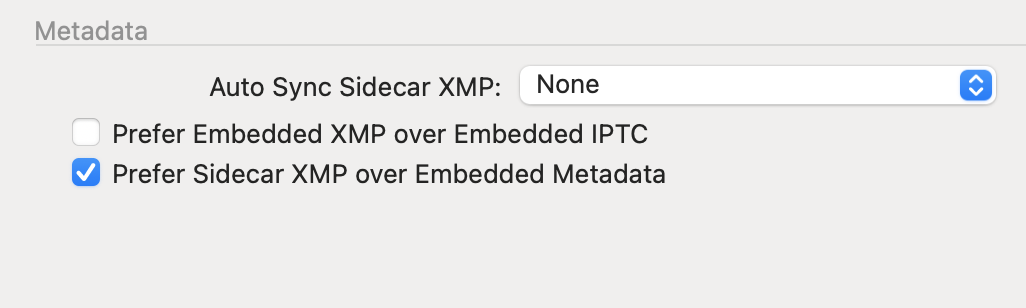 0
0

Post is closed for comments.
Comments
6 comments