When I export JPEGs I get this extra folder

Every time I process a bunch of images to a folder I get this extra folder inside.
It's called Capture One and contains a further folder called Settings131.
I don't want it and would like it to disappear.
Any thoughts on how I can stop this appearing ? 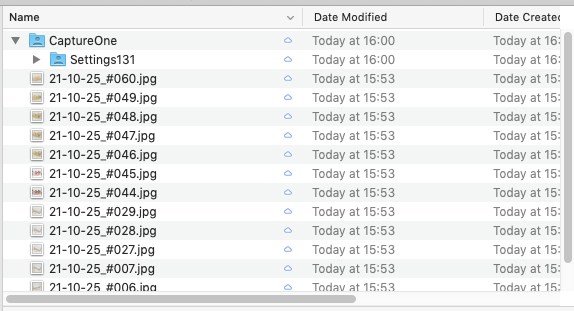
-

That was a bug in one of the versions of Capture One 20. Make sure you are running the lastest version of 20 in the Update tab of Preferences. I think it was fixed before 21 came out.
0 -
That's interesting.
Certainly the version of C1 v20 that I run on my new MacMini 13.1.1.24 (for the new M1 processors) doesn't have the problem. But my Mac Pro running 13.1.4.15 does seem to have the problem, and without upgrading to C1 v21, I can't download any other updates.0 -
Perhaps my memory was wrong and it was the last version that had the issue as 13.1.4 is the last of the Capture One 21 versions.
There is a link to download Capture One 20 version 13.1.3 on this page ==> https://support.captureone.com/hc/en-us/articles/360014022217-Capture-One-20-13-1-3-release-notes
If the link is still valid perhaps that version will solve your issue. Good luck.
0 -

David,
Are you using sessions?
If so, are you making the output files and then viewing them using Capture One?
0 -
Yes, I use sessions and output to a desktop folder which I forward to clients.
I have to remember to remove that extra folder each time.0 -
If you look at the date modified, the jpgs are 7 minutes older than the folders.
I suspect you clicked on the Output collection in C1 seven minutes after you have output the jpgs, thus consequently C1 session creates these folders just in case you want to edit your output jpgs. If you click on any folder (which has images in it) within your session's lib tool, C1 will create these folders.
0 -
!! ??
Don't think so
I simply output (Process) my images to a folder and then send via email or upload to my Google drive for use by my clients. They often come back to me and ask what this extra folder is for. Usually now I delete the Capture One folder before it confuses my clients.
I don't try to reopen the output folder from C10 -
I'm with BeO on this.
David, do you always use the same folder name on the desktop? And also only one session for all projects perhaps?
As an experiment you might want to try making an export using a different folder name to see if you get the same issue.
If you are not knowingly opening the desktop output folder one might start to wonder whether some other process is. For example if you have a folder with that name on the desktop identified as a "Favourite" for the session opening the session and finding that folder (by, for example, viewing "All IMages" or something similar) might well discover the folder, find the images and see that they are valid for editing. In which case it will prepare them in readiness.
Maybe not that exact scenario in your case but there could be something similar going on.
Have you got any Applescript processes running?
0 -
I usually put the folder on my desktop and name it something appropriate to the project.
For every job I do I create a new session.
Must say that your reasoning has got me thinking : I think that maybe in the process settings there is perhaps a folder defined in the "Root Folder" settings that may cause C1 to look into it and include those images in the "All Images" display.I will go into the settings and have a closer look.
0 -
Hmmm.
Just processed 5 test images to a folder I defined in the process:In Output Location I selected "choose folder" and then defined a new folder named "Test Output"
I notice that "Output Location is selected as the Root Folder
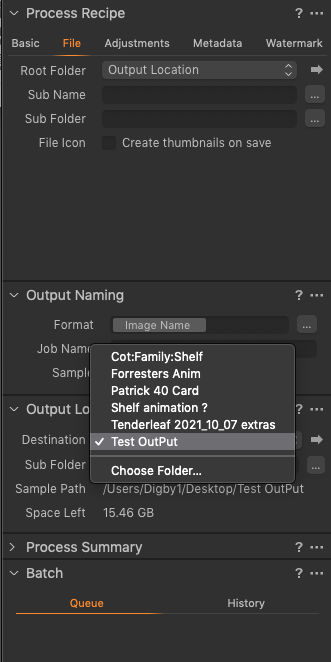
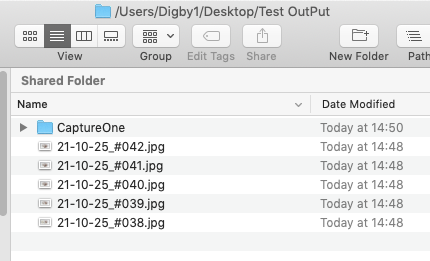 You will see from the above that the capture one folder has been created again without me touching any other controls.
On further inspection I also notice that if I select to view "All Images" I now see the JPEGs alongside the RAW files - something else I don't really want. The Capture file just contains the RAW images and generally that's all I want to see in the C1 interface.
Do you think it could be something to do with me referencing the Root Folder as Output Location that maybe causing the problems ?
0 -
Just done a simple test on my other Mac (An M1 MacMini running C1 13.1.1.24)
Imported 6 Raw Files into C1 having set the Capture Folder as the destination.
When I inspect the folder structure on the desktop I notice this: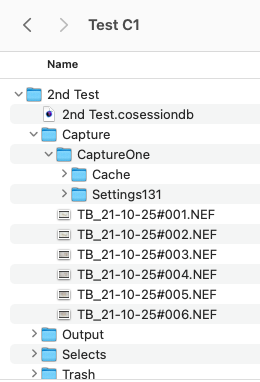
A Capture One Folder has been created with Cache and Settings131 subfolder.
Is that normal ?
This of course is the same folder that appears when I process my images0 -
Instead of using Process I am trying Export
This doesn't come with the problems I have observed previously ... or am I missing something ?0 -
A Capture One Folder has been created with Cache and Settings131 subfolder.
Is that normal ?That's the whole point of a session vs. a catalog, the keywords, settings and adjustments (masks) of your "original" images are stored alongside the images on the file system. (Maybe that's not the only point, but an important one).
This concept extends to all images you look at with C1, including jpgs, including the jpgs in the output folder. In theory you can add additional keywords or do additional adjustments, makes not much sense imo but that just seems to be how C1 works.
You can use Export, why not.
Cheers
BeO0 -
Interesting, but why would I want to store these image adjustments alongside the JPEGs ?
I have the RAW files and the adjustments inside my Session - and that is the only place where the adjustments have any validity.
Plus I don't want C1 to produce extra JPEGs and put them in my output folder.
It's too easy for a hard drive to bloat with unnecessary and unwanted files.
The RAW images are all I want inside my work Sessions (and their adjustments.)
I'm sure I'm missing something obvious here.
Export looks like the only way to move forward but the lack of recipe choice (within V20) is deterring me.0 -
David,
You really do not want the jpgs to have their own edit file options (not the RAW files edits, the jpgs file edit, preview and thumbnail files that would be created if one opened that session folder with Capture One). C1 assumes that opening a folder using C1 means that any supported file types the folder contains are editing opportunity candidates and prepares the required files so that one can start editing.
That is not a normal result of simply creating a folder of exported files.
When I process an output batch in a C1 session I normally do so to subfolders under the session's "Output" folder and no "Capture One" subfolder(s) are created automatically.
If, for some reason, I choose to select one of the subfolders to view the newly created files in Capture One then C1 will assume I may want to edit them and create the folders but so long as I do not try to open the files in C1 no sub-folders are created. If using a Catalog the files would need to be "Imported" to make them known to the catalog database and that is the equivalent of opening a folder in a session.
So if your "Desktop" or the "Output" folder you create on your desktop is somehow set up as a "Capture" folder in C1 and you open a session for "All Images" it may be possible that the session will see the desktop and the folder and discover the images in it, concluding that they need to be made available for editing in the session. Or something like that. It's about the only way I can think of that a newly created Output folder would be automatically available for further editing without some sort of intentional process. For example, externally editing an image in, say, Photoshop would involve creating an intermediary file (TIFF, jpg, whatever), making edits in the PS, and then saving back to a revised version of the intermediary file ready for further attention in Capture One. In such a case one would expect the intermediary file to be recognized and prepared for Capture One to use. But a regular Output ready for external use of the files would not normally be automatically prepared for further editing.
Do you use a new session for each set of images you process?
If so, how do you create the session? Is it based on a previously created and saved Session Template?
0 -
David,
I think the key to understand is the double role of jpgs for C1. Files in jpg format are of course output files, but they can be input files for C1 as well, think about jpgs off camera or off phone you want to edit or manage in C1.
Plus, the edits you do in C1 to any raw or other "input" file are always stored on file system, there is nothing "in" the session.
JPG as output file
Of course, if you export an edited raw to a jpg file, the jpg is created according your adjustments and the keywords are embedded in the jpg file. Full stop.
JPG as input file
C1 never modifies input files (this also applies to jpgs, not only raw files), so your adjustments you might possibly be doing in C1 are stored as sidecar files.
C1 Sessions are obsessive
Whenever you browse to a folder (or have a favorite defined for it) having recognized image formats the C1 session wants you to edit them, C1 treats them as "input" files, even if you do not explicitly import them into the session. Hence it prepares the side folders already.
0 -
Thanks SFA
It is slowly becoming clearer to me but it does seem unnecessarily complicated.
When I process to an external (Desktop) folder, after sending the files off to my client I usually delete the JPEGs, they are of little use to me if I have retained the RAW files, but then when I open All IMages there are all the JPEGS listed there, sometimes with big grey question marks overlaid indicating that C1 has lost track of them (I deleted them).Makes for a very messy interface.
PS: I open a new session for every new job - can vary between 20 and 1500 pictures0 -
BeO
see what you mean but it does seem that C1 is too keen to want to control every image I have.Sessions works brilliantly for 90% of what I do and I suppose this is quite a small niggle really but I would have thought it easier to solve it.
If I could get a way to import more recipes into the Export dialogue I would probably use it without a further thought.
From what I have seen from C1 v21 the Export dialogue is much more detailed, but that's a high upgrade price to pay for that functionality.0 -
Your 13.1.1 version nor my Windows 13.1.3 version has this issue, so maybe it is a bug in 13.1.4 as Marco mentioned.
Can you create an executable script which searches for the correct CaptureOne folder and deletes it, and start this script by configuring "Open with" in the recipe?
0 -
Hi BeO
That sounds a bit beyond my capabilities !
0 -
A small relief for the mess in All images: Menu View>Global Filters>Always Hide JPG
0 -
Now that is useful !! Thanks
Will set that up immediately.
0

Post is closed for comments.
Comments
22 comments