Exporting images with Recipes

Hi All, I have been having an issue with exporting my RAW files to TIFF or PSD. I'm pretty sure I didn't used to have this issue, but after a few upgrades I've noticed some issues. I'm also pretty sure it could have something to do with the Recipes, firstly I ask can we export without using Recipes somehow, as I keep getting the error message if I try exporting without selecting a Recipe first? Secondly, I've noticed that when I save as a jpg recipe my image looks identical to what I view in C1, however, when I export using TIFF or PSD my file will look different, it is a slight flatter colour/vibrancy change ( I have uploaded an screenshot to demonstrate, the left is jpg, centre is C1, right is TIFF). This is a bit of a drama for me, as I prefer to save my files under TIFF, and currently I'm at a loss...If anyone can help with my situation I would be much appreciated.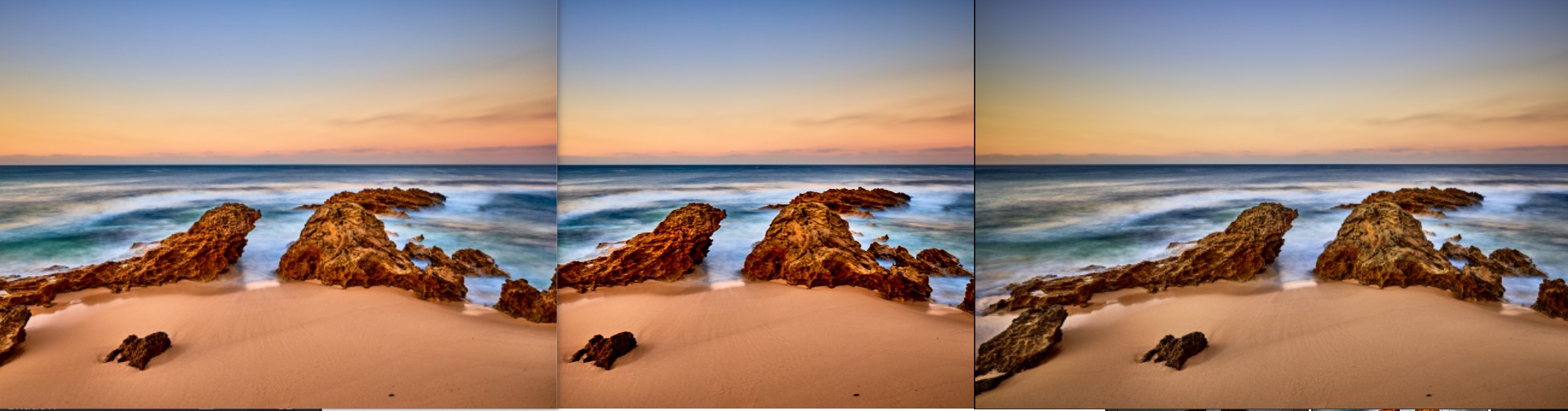
-
*Update*
I have just experimented with trying different recipe combinations and I got one to save identically under TIFF! I have to select sRGB IEC61966-2.1 ICC profile, as it seems I get the problem when adobeRGB is selected. I think I have this sorted now, thanks all for reading.
0 -

Which image viewing software do you use to look at the jpg and tiff files? If it doesn't care about color profiles like sRGB and adobeRGB, it will just interprete the color numbers as sRGB and display wrong colors if the image is encoded in another profile like adobeRGB. In that case, the image is fine and would display as you expect in a more capable viewer. If you give the images to somebody else it is indeed the best idea to stick to sRGB as you don't know which software they will use.
adobeRGB might become useful if you want to print those images. That is, if they contain colors, that can't be encoded in sRGB although your printer or lab is capable of reproducing them. Occasionally I come across some saturated reds and turquoise tones that can only be displayed in adobeRGB but not in sRGB.
You would have to familiarize yourself with color spaces and should have a calibrated wide gamut monitor to really make use of that. If you don't want that, just use sRGB for everything and be happy ;-)
0 -
@ Alexander von Grafenstein thanks for your reply to the issue I was experiencing, I was in fact using a program called Image Eye to view the images and was giving the discrepancies. Thanks again.
0 -
Chris,
The question is also for what purpose do you export to TIFF or PSD. If you export using sRGB you are cutting off those colors which are outside the sRGB color space (out of gamut) (not really cutting off, better: transforming them according to the preference setting "Rendering Intent"), provided the respective image actually has colors outside sRGB.
So, e.g. for archiving purposes, or if you want to edit further in PS or alike, this might not be the best color space, better use adobeRGB.
Whenever you use adobeRGB, use 16bit.
If the image does not have colors out of the gamut of sRGB or you don't want to use them, then sRGB is ok.
If you want to export to adobeRGB, use adobeRGB as the viewing (proofing) profile in C1 when editing or viewing. You shoud use an adobeRGB-capable and calibrated or profiled monitor though, if you want to assess the colors when viewing or editing.
I fully support Alexanders last two sentences too. Color spaces and color management might be a complex matter (and I am not an expert in it) but it is worthwhile understanding at least the basics of it.
0 -
Thanks BeO, my intention on exporting the TIFFs was for archiving/printing, so I will be using the adobeRGB 16bit profile. The software I use to view images from now on will be changing to one that can interpret the adobe colours however, unfortunately not image eye...
0 -
Some things never change, color spaces like adobeRGB exist since ages, and still operating systems / apps have not a good support for this, it should be built-in. Reminds me of the climate change conferences, 1990 was the first one with 100+ countries and thousands of participants (which means the motivation for such a conference and the preparation was a few years prior to it) and still only little has changed in 30+ years, factually, as well as in many heads.
0

Post is closed for comments.
Comments
6 comments