Capture One 21 express fuji - how do I pin the tools? they always disappear

Hello world, I really need your help:
I am new to capture one, I got it, because I finaly got a fujifilm camera. I shot a couple of fotos and am overall pretty happy with capture one express. However, there is one thing that drives me crazy:
The tools on the left side of the screen always disappear. Wich means that I am not able to sort my photos into my collections.
I found the "automatic disappear" option under view-->tools - but it does not change anything.
I am running Capture One express 21 on my macbook Pro with the M1-Chip, 16gb ram.
I appreciate any help
-
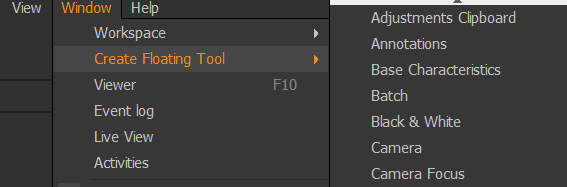
I don't have the version 21, also not Express (but the pro version) and also not a Mac. But as a workaround, try if the Express version has the feature to create floating tools and select the Library tool:
 0
0 -
Thank you - I do not seem to have that feature. But low and behold - I found the solution. It's a shortcut, Apple-Key and T. And now everything works.
I do feel stupid, just a bit.0

Post is closed for comments.
Comments
2 comments