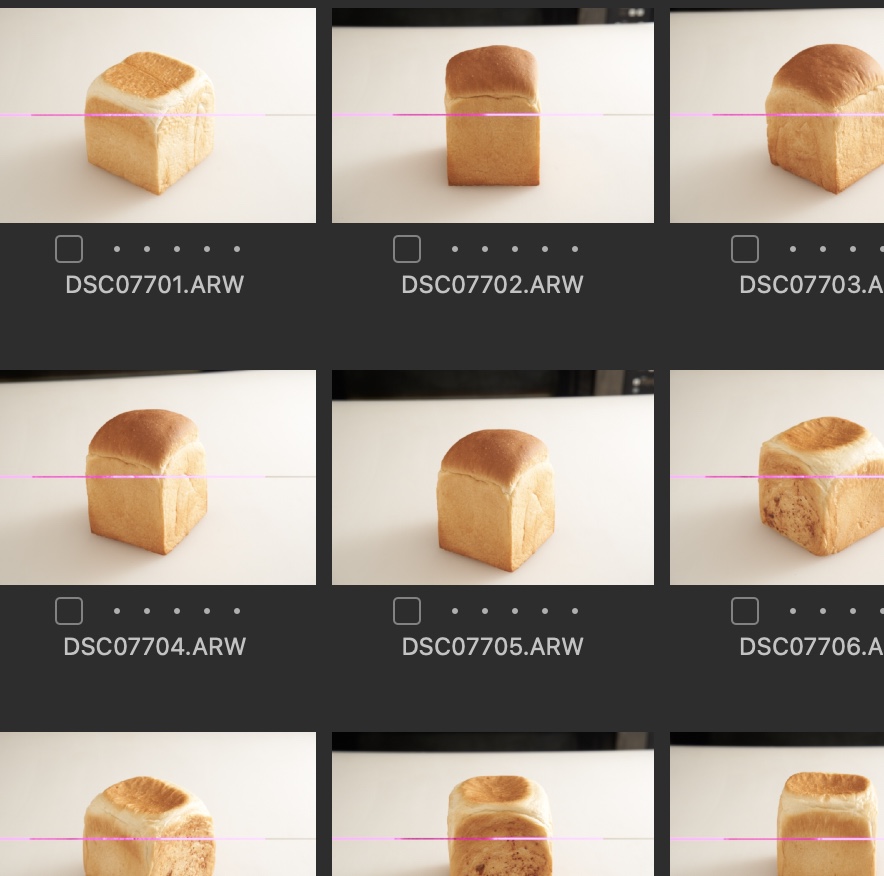
Purple lines across top of images upon importing to library

When I import an image from an SD card, I get an image-like error.
Sometimes there are no errors.
This line appears even after exporting.
This line does not appear in the case of tethered shooting.
Does anyone know the solution?
Camera: α7Ⅲ
Version: Capture one 21 14.4.1.16
SDカードから画像を取り込むときに、画像のようなエラーが出ます。
エラーが出ない時もあります。
エクスポートしてもこの線が出ます。
テザー撮影の場合はこの線が出ません。
どなたか解決方法わかる方いらっしゃいませんか。
カメラ:α7Ⅲ
バージョン:Capture one 21 14.4.1.16
-

Try a different SD card. That one may be dying.
1 -
解決しました。
SDカードのRAWデータを一度パソコンに映してからインポートすると、この現象は現れませんでした。
SDカードは別のものを使用しましたがダメでした。
solved.
This phenomenon did not appear when the RAW data of the SD card was once projected on the computer and then imported.
I used a different SD card, but it didn't work.
0 -
I get exactly the same thing. It’s not related to the SD card, or the card reader. I’ve even tried importing directly over USB from various cameras. All imports have files with these lines.
Tried turning off hardware acceleration. Still there. For months now, I have had to copy the files manually onto my computer, then synchronise the folder. It’s a pain.
0
Post is closed for comments.
Comments
3 comments