Capture One 21 (14.4.1.16) exports black pixelated artifacts when "Structure" is applied

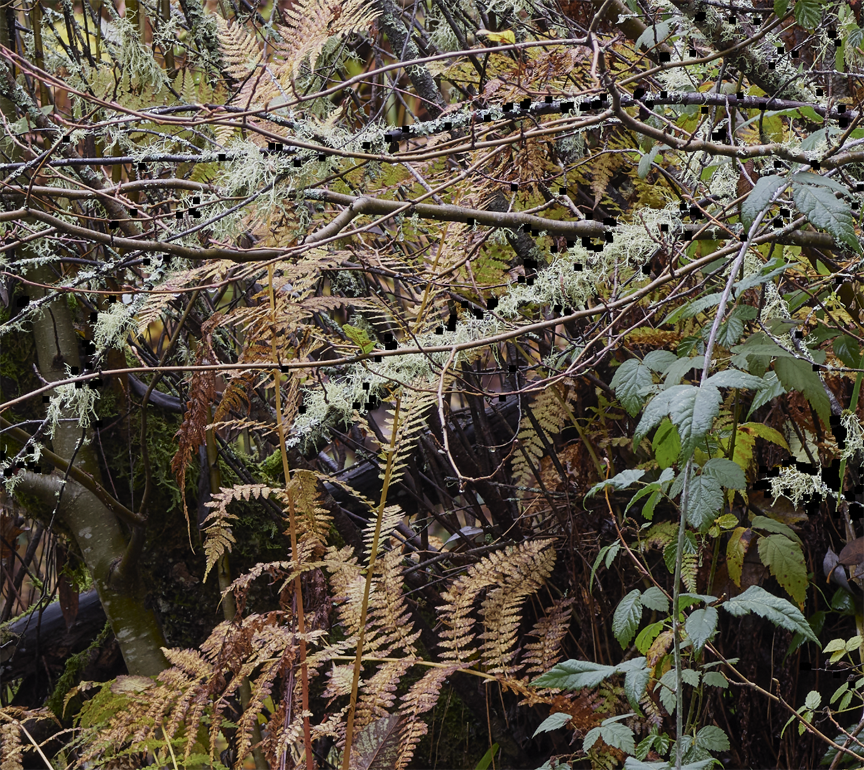
After C1 21 latest update to 14.4.1, I have noted a problem in the exported TIFF file that appears whenever I have added Structure to an image file for export. Pixelated black squares appear along some contrast edges within the displayed image of an exported file but only appear erratically when zoomed in while still in Capture One viewing the raw .IIQ 16-bit file and is not visible in the raw prior to export. The pixelation artifacts render the TIFF file unusable. Exporting the same raw file without adding structure does not produce these artifacts, and it does not seem to matter whether the structure is applied to an adjustment layer or the background. I have not experienced this problem until after the latest C1 software update, and have made no other software changes to my system, running MacOS 10.13.6 and Photoshop 21.2.4. This is very bothersome as I often include a low level of structure as part of my pre-output sharpening process. In this case the structure amount is 7. I have attached a screenshot of a small section of a TIFF file showing the artifacts when opened in Photoshop, present at any zoom level. Anyone else experiencing this issue? I have submitted to C1 support, but nothing back from them in their typically slow or no response.
-
Permanently deleted user
Turn off hardware acceleration.
1 -
Thanks Keith, that did the trick!
I turned off HA for processing but left it on for display as a trial, applied a high level of structure as a stress test and the exported TIFF does not have the artifact.
Thanks!
0
Post is closed for comments.
Comments
2 comments