Wrong colors after export - FUJI GFX50s

Hey, I have a serious problem and I guess other have/had it too but I haven't found any solution yet. When I export my files like I always did (PSD / 16 bit / ARGB) the blue and green tones have other saturations, the hue is slightly different and the contrast is a bit different. I checked all possibilities of data files, bit, another Mac, the version 20 and so on.
No difference.
now I need HELP!
please....
here you can find a raw file: https://we.tl/t-VpagiUTObe
Thanks in advance!
-

Hi Michael,
If I understand well, the RAF you give through WeTransfer is the exported picture, right ? Or is it the original file direct from your camera ?
How does this picture look on the C1 viewer ? Be careful that your original RAF file is characterised by a much larger colour space than Adobe RGB. I suspect what you see is just a colour space/profile issue/misfit.
0 -
Permanently deleted user
Post some example images, Michael - downloading your file won't tell us what differences you're seeing.
0 -
Hey, this is the original file from the camera.
The camera is also set to adobe RGB.
Here is another preview in Photoshop and in C1.
left is PS
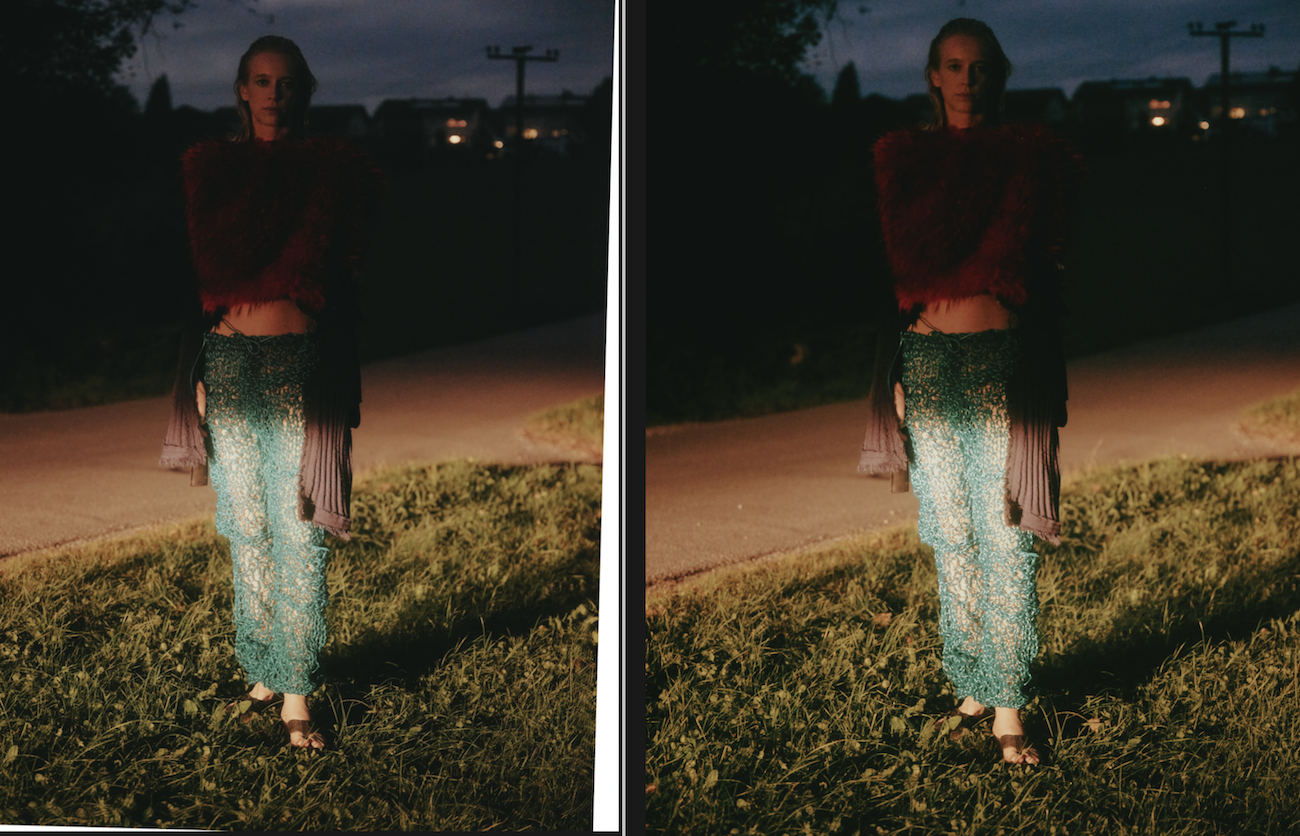 0
0 -
Michael,
If your camera is set to Adobe RGB, it seems to me you are shooting JPEG rather than RAW. Accordingly, the colour management is poor. In the two last pictures you posted just above, I can't see huge differences, except in the sky. And in both cases (the RAF you provided and the pictures above), your exposure settings are not that good. In my opinion, it's a problem of camera settings rather than of Capture One.
0 -
If you compare the rendering of the in-camera JPEG conversion to the RAW->JPEG conversion in Photoshop and CaptureOne - there will be a few or a lot of differences.
CaptureOne and Photoshop (that is the AdobeRAW engine) have different algorithms, use differnt curves etc. And since neither factory profile is properly calibrated, it won't be true to life either.
0 -

If the in-camera jpgs are set to be produced in ARGB that means the embedded jpg preview in the RAW file as viewed through a RAW file compatible viewer is also likely to be ARGB.
The interpreted RAW and Preview in C1 will only be using the ARGB colour space an output profile for ARGB is selected AND Proofing is on OR, maybe, ARGB has been preselected as the default profile.
In most cases seeing the difference between the settings may be difficult but when an image has areas of colour that are not equally supported by different colour spaces the differences will likely be more visible.
So the question arises - are you Proofing the image to a PSD Output recipe and seeing a big difference between the proof shown in the C1 viewer and what you see in Photoshop AND what you might see through another viewer or browser when looking at the output image PSD file?
0 -
Hey SFA.
Thanks for your thoughts.
First of all, I never shoot as JPEGs. :) So we're talking about RAWs in color range of Adobe RGB.
The proofing preview was selected.
The output files are in all viewers the same as PSD, JPG, TIFF and so on.
So for me it seems that C1 is cutting off some colors in the export process, which does not make any sense to me.
0 -
Michael,
By definition, a RAW doesn't have any colour space/profile. So, I can't understand what you mean by "RAWs in color range of Adobe RGB". As mentionned by SFA, only the embedded JPEGs are affected by Adobe RGB colour space, not the RAWs.
The best way to have colour consistencies through the whole process is to select the same colour space for all your applications (input/output). Otherwise, you could get colour discrepancies when going from an app to an other. It would be better to choose a large colour space for all apps, i.e. ProPhoto.
0
Post is closed for comments.
Comments
8 comments