Can't import RAW from A7r III (Capture One 20.0.4)

Hello,
I just bought a new Sony A7r III (NOT A7r iiia) and I can't import the RAW files. I own Capture One 20.0.4 for Sony. As far as I know, support for the Sony A7r III was added with CO 10.
I can still import RAWs from my A6500 alright.
Can anyone help? Much appreciated.
-
 Permanently deleted user
What actually happens when you try? Error messages?
0 -
Hi there, thank you for your reply. No, no error message. CO doesn't even see the files and doesn't show them in the import window. I thought the files might be corrupt but that doesn't seem to be the case. I can import the jpegs and I can open the RAW-files in the Windows picture preview, where they look perfectly fine.
0 -
Permanently deleted user
Weird - this camera has been supported since release 10.2.1.
Just for thoroughness: it is definitely an A7r Mk III? (I don't doubt it, but it has to be asked.)
Does it have (say) a compressed Raw format with a different extension that you need to enable in Capture One?
Could you make a Raw file available, please? Just to see if we can replicate the behaviour away from your desktop.
Aside from that, I guess you need to talk to Capture One: https://support.captureone.com/hc/en-us/requests/new
0 -
No worries for asking, this whole thing really smacks of a dumb mistake on my part. But they definitely sent me the A7r iii, not the A7r iiia and not the A7r iv.
I have also tried compressed as well as uncompressed files – neither of which works.
I think it would be a good idea to try if someone else can open the file. I can’t attach RAW-files but you should be able to open this link:
https://www.dropbox.com/s/gtuvq22u6u18ruy/_DSC0297.ARW?dl=0
If not, let me know.
0 -

> Hannes Stelten: If not, let me know
I can confirm that the browser in my C1 v20 does not show the file.
Other software (Photo Mechanic and Affinity in this case) both tell me the image is from a model 3A camera.
0 -
Thanks for checking! Although that is not really reassuring :-)
What do you mean by 3A camera? I've opened it with Denoise and it shows A7r iii.
0 -
> Hannes Stelten: What do you mean by 3A camera?
Arabic number 3 == Roman number III. Did the Romans ever write the number 3 as "iii"? If that is what you do, then my "3A" says that the image is not from your camera as you claim it is "not the A7r iiia" model :-)
0 -
Ok, got it. So you are saying that the file is from the A7r IIIa instead of the A7r iii. That makes sense.
I just checked my invoice and I definitely ordered the A7r iii. However, it does seem as though they did send me the wrong camera. Like I said, a dumb mistake was the most likely explanation.
Thanks for your help, much appareciated!
0 -
Permanently deleted user
So you are saying that the file is from the A7r IIIa instead of the A7r iii. That makes sense.
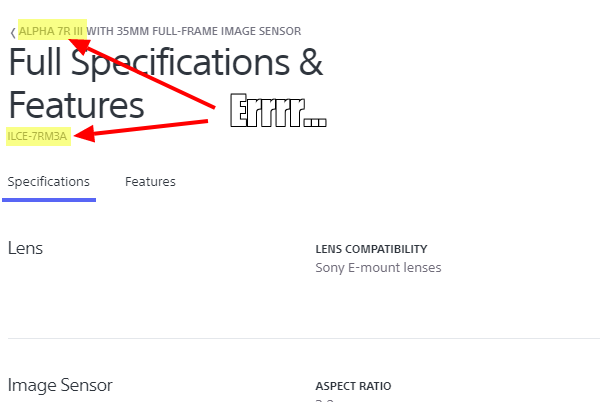
Not really: yes, the file's Exif shows "ILCE-7RM3A", but a quick Google suggests that this is indeed the code name of the α7RIII.
https://helpguide.sony.net/ilc/2050/v1/en/contents/TP1000195217.html
 0
0
Post is closed for comments.
Comments
9 comments