Tethered File Naming - Not working

After several emails to Capture One's Customer Support and being ignored, I was wondering if someone here knows how to fix the Tethering naming issue in Capture One
The issue is that when in Tethering mode, Capture One renames the files with a "name" and a "camera counter" tokens. I removed those tokens and replaced them with just the "original file name" token; unfortunately, all the files that get imported into Capture One and my file explorer are still named "EmptyName". All I want is to have the images imported with their original file names and not renamed by Capture One, like for example seeing DSF_2345 on the library, just the same file name the camera generates.
*Running Capture One 21 (Paid version) on Windows 10; the cameras that I used were a Canon 5D Mk II and a Fujifilm GFX50S, same renaming issue with both.
Please let me know if someone has a fix for this,
Thanks
-

Jose,
If you are using full tethering (i.e. not the "Hot Folder" monitoring options), then Capture One is controlling the camera and creating the name using the values you set.
There is NO in-camera generated file name.
So if you ask C1 to use the "Original File name" token there will be no Original File Name to use - so you get the default "EmptyName" as a reminder (and something that you could quickly and simply rename via the Batch rename tool later). That's better than nothing at all, or at least I would think it is.
-1 -

Hi Jose, If you like the naming format from your camera, typing in 'DSF_' as name token and add the 4 digit counter token afterwards, will give you the same result. You can set the counter value to begin at the number you prefer and your files will match the naming format they would have had, if you shot them to your memory card in camera. You can also save this naming format as a preset.
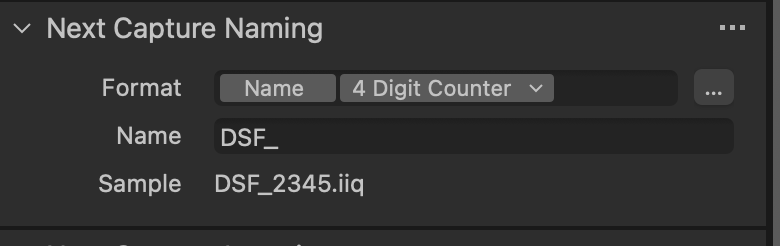 -2
-2
Post is closed for comments.
Comments
2 comments