The out folder does not exist

Hi, after I bought the full-version of CO, the program stops to recognizing the export folders, it shows me always a "the out folder does not exist" message, and I can't go forwards, this is the most annoying issue I get since I use this program and I don't want to talk about the others issues because I don't have time for this.
-
Hi, after buying the full-version of CO you did what? Entering the full-version license key and after that CO stopped exporting files because it didn't recognize the output folders anymore, which was not an issue with the trial or camera specific license key?
0 -
The app do not exports my files... It can't find the folder even when I do a new one directly fron CO,, the app is correctly installed tho!
0 -
Something changed, right, other than just time has passed by and it can be helpful to understand what you changed.
You said you "bought" the full version and then it stopped working. Assuming C1 did not connect to your bank account, what has actually changed in addition than just paying money? Did you put your new license key in, or did you do a fresh install, did you eventually download and install a different major or minor version? Anything else changed on your computer?
0 -

The app do not exports my files... It can't find the folder even when I do a new one directly fron CO,, the app is correctly installed tho!
The arrow to the right of "Sample Path" takes you to the export folder.
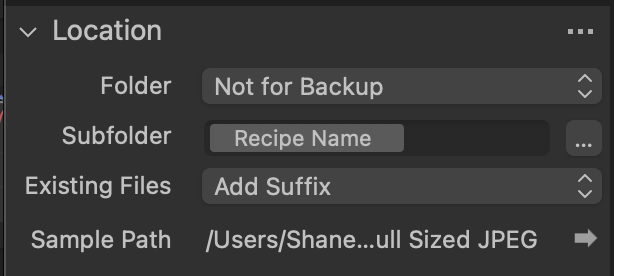
Does that work for you?
0 -

Does not work, I was using this last week without issue, what has happened since then....So frustrating....!
0 -
I had the same problem. For me, when I looked at the files, I saw a circle question mark which showed me that C1 was having a an issue locating the original. I am in the middle of sync so I need to double check my catalog location.
Try right clicking on the folder that your photos are in and choose locate and make sure its pointing to the correct folder. Then click on ok / locate to see if that fixes it, sometimes that alone will fix it, but for me, After I did a locate, I had to right click on the folder and choose synchronize and allow it to delete the old location info and then re-import the correct location. Once I did this, I was able to export the photos.
0 -
Are there any solutions to this? I'm having the same problem. I get that the output file does not exist no matter where I choose, even places like the desktop and home folder. For me, however clicking the arrow at "Sample Path" does open the folder. Also, when I right click the image locate and show in finder is greyed out. This happened very suddenly where nothing has changed with the installation or the disk. There seems to be absolutely no way to get anything out of capture one
1

Post is closed for comments.
Comments
7 comments