C1 22 still slow loadng

I still find it very slow to load, I have a catalogue with 16,792 images and from when the programme has loaded to when the numbers of images appear is 27 secs, it was the same with C1 21, with version 13.1.4 it managed it in 11 secs and my PC goes like a train. Will someone tell me why this is so
-
Is it the first time you started v22? Then it will do some hardware accel / OPENCL checks, presumably slowing down everything.
-2 -
No It was not the first time as I tested all my catalogues and I have always allowed the time for all the checks to be finished, also I always do a complete clean out and re-install with new versions as I have had problems in the past, as I mentioned this problem did not crop up till after I was using C1 21 version 14.3.1 with no problems, I then loaded version 14.4.0 and since then the load times have got slower, I did have a brief conversation with Alice about a month ago where I explained it, I have to say it is very weird considering I have a powerful machine with 64gb of RAM and all my catalogues are on NVME's.
0 -
Understand, with v14.4 it got 3 times slower, and the issue still persists in v15.0.
Don't know who Alice is, this here is a user to user forum. If Alice is from C1 maybe you "submit a request" on top of this page?
I looked at your numbers again. It's not that I don't believe you, but is it actually a correct observation that a catalog with 16k images only needed 11 sec to fully load?
I am running v13.1.3, my biggest catalog is 8k and load time (to make the pie complete) is minimum 30 sec.
11th gen i7 8-core on new motherboard with C1 on NVME, catalog on SSD (but my past tests on a slightly older PC showed that NVME vs. SSD did not make much of a difference).
Where can I buy your computer? :-)
0 -
You cant as I have always built my own PC's since the 1080's this one is
Motherboard Gigabyte Z390 Aorus Pro
Processor Intel Core i5-9600K 3.7 GHZ (Overclocked to 4.5 GHZ
Graphics card AMD Radeon Pro WX7100 8GB Gddr5
Power Supply Corsair RM650x 80 Plus Gold Fully Modular
Memory Corsair Vengeance LPX 64 Gb (4x16GB) DDR4 3000 Mhz XMP2
Cooler Corsair Hydro H100x 240mm Radiator Dual 120mm Fans
SSD Samsung MZ-V7S1T0BW 970 EVO Plus 1 TB M.2 Internal NVMe
SSD Kingston SA2000M8500G 500GB M.2 2280 NVMe
SSD Samsung 860 EVO 1 TB
SSD Crucial CT1000MX500 1TB
SSD Crucial CT500BX100 500GBMaybe I will just see how it goes for a few days and have a bit of a fiddle.
0 -

Michael,
Does the i5 still have a significant limitation of potential throughput compared to the i7, i9, etc.?
I don't think SSD performance is something that matters as much as we would like to think in terms of speed perception unless comparing to to older spinning platters. Great for short bursts with large files - not so obviously fast (once you are used to the base performance) with a lot of small files or as large file transfers progress.
Load handling capability across multiple Applications may be more of a benefit but systems seem to have rather variable perceived performance characteristics dependent on the interconnecting components just as much as or possibly more than the "headline" components.
0 -
I think a lot of what you say is true but it seems strange for it to show this slowdown now as it never occurred in the last couple of years I have been using this setup, I have it for various other applications ie video and rendering. In the past I have tried lots of component configurations and as you know they all have their good and bad points if not we would have one PC for every application.
0 -

Hi Michael,
try to stop synchronisation with XMPs in the preferences. Let ist know if this helps you.
Regards
Ernst0 -
It does not affect it, I have it set to none anyway
Mike
0 -
If it is slower loading the catalog since 14.4 maybe it has to do something with the performance improvements for already opened catalogs, maybe C1 loads more in advance and take some additional time for it, just speculating though.
Release Notes 14.4 (bold face from me):
Catalog Performance Improvements
• Windows
Loading any collection in an already open Catalog is up to 600% faster.
0 -
David Grover said that Windows users would have a whole new experience - I can't argue with that.
Haaha (lol). Funny.
Not what he had in mind, probably. :-)
Did the upgrade, for whatever reason, eventually set the XMP to Full Sync?
0 -
I have to say that I have set up C1 with ver 21 and then with ver 22 the speed loss is ridiculous, same catalogue one can manage 7 secs while ver 22 takes 23 secs and as has been mentioned I cannot do anything while this is happening, Why did you set XMP to Full Sync, I thought that would make it even slower
0 -
Yes, Full Sync is supposed to be slower. I asked this question (if maybe v22 upgrade changed xmp to full sync without you knowing) just to rule this out as a root cause for the performance drop.
The following is not an excuse, but I think it is worth mentioning. During beta testing C1 asked for feedback about the Windows performance improvements. I have seen no feedback from anybody, at all.
Myself, I didn't take the time to install v22 beta on my main machine to test performance on my bigger catalogs, I focussed on pano functional testing only.I can imagine performance drop have not been observed in their test environment, it might have helped if real users catalogs were tested on real users machines. But as said, no excuse , nor accusation to anybody.
No matter if you are upgrading or downgrading and try to get money back, it will certainly help in the long run if you report a bug and provide materials, e.g. log files, when they ask.
just my 5 cents
0 -
I see what you mean.
And, despite this whole matter ain't funny
...and when I need a bug that CO v21 can't provide I'll go to ON1 2020.
it's good to see you still have a sense of humour .. :-)
btw, if I want a slow reacting image adjustment on Windows, I'll go and edit with darktable :-)
I didn't upgrade yet (still on v20) and wait until the new features are mature, and see which direction they go with C1. Recent design decisions (which they partially rolled back) like out processing tools, don't speak for a good product management (and even more off topic, and maybe not a big deal for most, but I still didn't "forgive" them they took away the B key shortcut for brushing on a heal or clone layer. My gaming mouse has only a limited number of keys).
Cheers,
BeO0 -
Salut !
Just to react to @michael, just wanted to say that i've the same problem with C1 2022 !!
Even worth than 21 ! I've an archieve catalog with 70k pictures and many folders and smart albums !It takes a very long time to open one, and a very long time at the beginning for C1 to open my SSD folders...
The whole day with @BeO to find a solution..
I went back to the 2021 version and it worked much better !! Almost 3 time quicker...
I'll ask a refund, no time to loose..And, as said, if i would have liked to live with bugs, i'd play with ON1 !!Ciaooo e.v
JF / best regards0 -
Well, it was 21 days ago I first posted this and it sems like a lot of others have found the same problem, Clive, I have to say that I have used Photomatix Pro for all my HDR work and I think that the C1 programmers would have to go some to beat it with a simple tool, I wonder if they were just trying to attract some new people with the extras, perhaps they should get back to how it was just one version ago, I like to skip between catalogues and that is not possible with the speed restraints we have now. Can I ask you what is Darktable, is it one of those Dark Web get arounds........
0 -
Clive,
I used to select any layer and B and E let me quickly change between brushing and erasing (actually B and N) on the keyboard. or two dedicated mouse buttons.This was muscle memory and without the potential risk that C1 auto-switches to a different layer. Only radial and gradient needed special attention.
Now it's really painful as (1) I have to remember 3 brush keys instead of one and (2) I'm always in doubt which layer C1 thinks I want to brush to. I don't use the gaming mouse that often anymore (now rather my pen&tablet) and the keyboard.
I once tried AHK, but for this use case (first select the layer in the layers tool or in the viewer) dropdown box) AHK cannot help me as it does not know about the context (layer) when I hit B.
Ya, C1 full screen on Windows. ALso no auto-hide browser or tools as on Mac.
With 'out processing tools' I mean the process recipies etc., instead of Export dialog, which they removed and then brought back after too many dissatisfied users.
---------
I really want to like darktable, which I invested a decent amount to learn just recently. Apart from the bad performance when moving any slider I don't like the noise reduction with high ISO images, C1 is far superior I have to say (despite all the demosaic algorithms, including the new 3.8 one, and wavelets fiddling).
Also the brushing is much more fun in C1 (seriously, Aurelien P., one of the lead developers of darktable, doesn't like to spend time with darktable, he likes brushing with Krita :-)
Sharpening without halos? No. Maybe with the new wavelet diffuse or sharpening module with roughly 20? sliders...
Ah, another one: If i want to see myriads of sliders and options for simple tasks, I'll go to darktable. :-)
But I'll keep an eye on it.
Cheers Clive, Ciao JF
BeO0 -
I see your new posts. Darktable has both, sidecar files for all adjustments AND catalog functionality. That means when the catalog breaks, all your adjustments are still there.
That is missing in C1, a perfect synthesis of catalog and session, sidecar files but catalog functions, synchronizing edits regardless of where you do it, it the session or in the catalog. Imo.
0 -
Clive. I have never tried sessions, I came from LR to C1 in 2015 and already had several catalogues and to be honest I never had a problem till now, one of the projects that I have been working on for several years was scanning in nearly 9000 negatives dating from the 30s till 80s and to be honest C1 was the best processing tool that I had ever used for this, obviously I also have loads of digital material that I shoot now but it was very good and I found the User Collections invaluable to sort everything.
I looked up the Darktable and I see what you mean, don't think I will change to anything else just yet though...
0 -
Clive,
Have you looked at the log files and compared them between the two systems to see where there may be differences and how the timings between steps compare?
For a complete comparison you may need to be sure that both systems are opening C1 when there are no other influences (i.e. other applications) operational on the systems.
Also that any parameters, like the Preferences settings, are the same.
If you try both versions on the same computer under the same conditions the Log files should be able to record somewhat comparable process steps and timing that would help to narrow the number of variables that might be of interest.
0 -
I noticed that switching between workspaces is much faster in v20 compared to earlier versions, I don't know when this was achieved. Maybe they preload them.
Between v21 and v22 I don't know. Do you use the latest v21 version? The tool names are probably either the old output tools in the output tool tab, or the new ones after the re-introduction. Do you use the export window or the export (formerly output) tool tab?
Do you have many user defined workspaces?
Do you have old workspaces with the old output tools?
Can you delete them?
Can you test the simplified workspace?Your only performance problem is the startup time?
0 -
The old output tools:
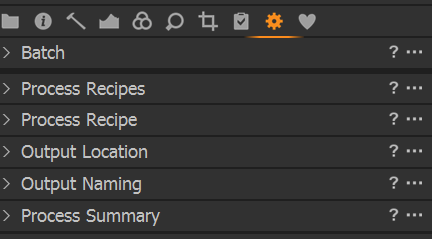
These were replaced with Export tools. Maybe the v22 log indicates that there is a workspace using these old tools, but they no longer exist. Maybe it's even a workspace which comes with C1 and not a user defined.
From the times in log file does not look that this is causing the delay, but if you delete all workspaces which you don't need this might not hurt either.
0 -
Clive,
The two folder in Appdata were probably the one that saves the dynamic user configuration information file(s) - typically a different file for V21 and V22 so that with either version opened up you get back to where you were with active settings for various things including exactly how a session or catalog was configured the last time you used it.
The second folder should contain all of the user created variable for a whole load of things like preset and styles, keywords, etc.
Where required (and technically viable taking any application changes into account) these settings are carried forward and will have a new sub folder for each version and update release - again to allow a smooth return to a previous release if you need to take that step. (This may be more important for those who offer editing facilities as a service to others and may need to work with different versions of C1 on a regular basis.)
My initial reaction to seeing your observations from the Log files (good work BTW.) was to wonder if you might have something like Proofing active on V22 loads (based on a setting in the user config file) but not on the V21 load. Other things that might be influential in adding load and extending elapsed would be things like needing to adjust the "fit" of images to a screen if the saved Preview size was either too large or too small. That would normally be more of a possibility if opening on different systems since there could be a requirement for recalculation.
The other thing that may be different - and might be more evident if switching versions regularly - is how the assessement of OpenCL capability is performed.
Normally this would be a "run once and build a kernel to use for the system configuration" activity. If anything about the system changed - GPU drivers, new hardware, Windows update, etc., etc. - it may well be run again. Starting up a different version of C1 always used to require re-assessment but if I recall correctly the more recent releases successfully keep records of prior decisions based on version and release and so can avoid extended re-assessment. This is good because the Intel GPUs seem to take ages to go through the process (several minutes) where as dedicated third party boards seem to take a few seconds. There are log fies for those activities as well if you want to briefly check whether they contain any entries from the same period as the start up process. Probably not, butit would be interstgin to know.
0 -
20 seconds startup but a fast catalog? If also the collections were faster, and if opening an additional catalog or session (whilst already running C1) is fast I'll probably take the fast catalog.
0 -
Happy New Year!
I usually open another catalog or session in a new window without closing the current one from within C1. Sometimes I close the current one after the other one is opened.
Collections are faster than they were, very much so. But not yet sufficient.
I thougt you want to decide between v21 and v22, so as long as v22 is faster than v21 it doesn't matter if it is "sufficient" in terms of "meets my general expectation/desire", for the decision in question.
0 -
Hi Clive,
Yes, File>Open recent
together with preferences 1st page:
 0
0 -
Ok. Thank you Clive.
By the time I'll have 2x 44k images I will have an organic super computer anyway :-)
0 -
Happy New Year to you both, BeO I also open one catalogue after another if I am building a web page but normally I will close one and then open the next, I do not see any significant difference in timing from either option.
As a matter of interest, over the last couple of days I have built a copy of my largest catalogue which has 17k of jpegs and I have noticed a slight improvement on times but that could be because I have not asked it to produce previews of all the images and just to clear something up, when I was talking about times to load in my original post, 27secs now and 11 secs before that was from when the program has loaded till I can see the numbers of images and can work on it, with the new copy it is down to just about 24 secs, I will keep on trying though but I think I do not have the tech savvy that you both have regarding this piece of software.
0 -
I am quite happy to share any info if it may help us to sort this out, what you describe is exactly the way I have been timing. If you give me the info to see the log file I will try and do it either later or tomorrow as I am a bit busy at the moment.
0 -
Happy New Year to you too Michael.
If you know your user name you can just paste your user name into the path below and paste this into the Explorer input box
C:\Users\your user name\AppData\Local\CaptureOne\Logs
even without making the hidden files and folders (e.g. AppData) visible.
 0
0 -
Hi BeO & Clive, At last I have had time to sort this out, I told you a day ago that I built a copy of my collection and from the logs this is what I have found, new copy opening time 21.09 loaded time 20.43 which is 26 secs , old copy times 26.44 & 27.16 which is 32 secs so there is a difference, just as a side thought, I have a AMD Radeon Pro 7100 GPU using Radeon Pro software, yesterday I was checking on it and it would not load due to incorrect driver, this has happened to me before and since I had Win 11, it is caused by windows update loading an old driver without me knowing, after some searching I find that this has been a problem for a while and you can read about it here Disable Windows 11's driver update to avoid downgrading your GPU (windowsreport.com) As you can imagine this results in the graphics being down graded and possibly losing Open GL performance, I need to do some more checks to see if this had any effect. Typical Microsoft, just doing updates without us having control, I now have the software mentioned in this article on my PC so fingers crossed but I do not think this is the main culprit in the slow load times...........We live to fight another day
0

Post is closed for comments.
Comments
37 comments