Artifacts in HDR created image

Hi, started with C1 '22; very strong artifacts appear in HDR images I am trying to create, like the lines in the rock outlines pictured. Anyone else seeing analogous stuff? (OS X Big Sur, C1 Pro)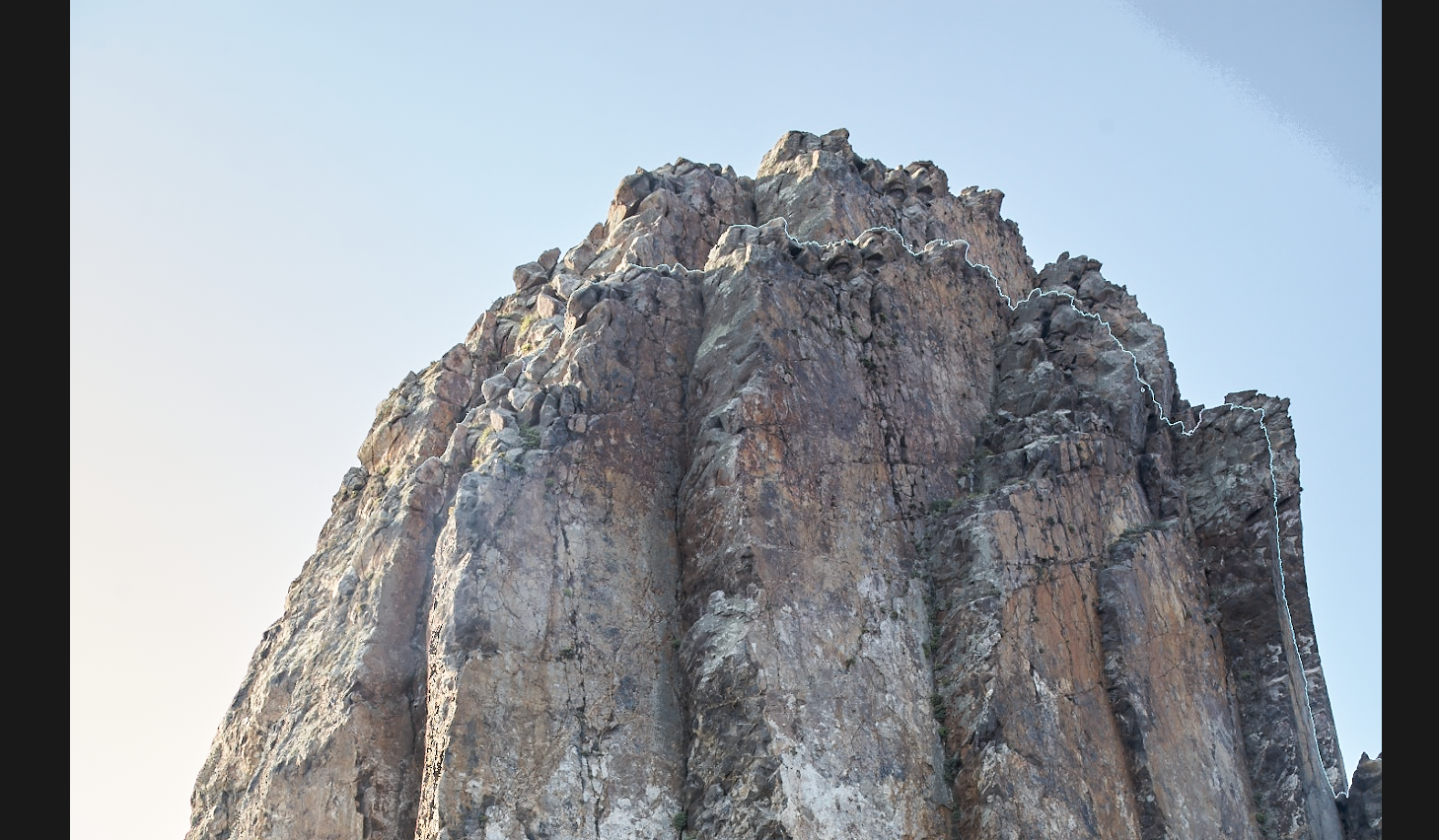
-

Just curious. Were you handholding your HDR shot, or using a tripod?
The line looks like an identical skyline transition as the true skyline. Like the image was shifted a bit. I'm wondering if C1 had problems figuring out how to overlay the two images. If they had been aligned properly, maybe you wouldn't see the artifact.
Jim
1 -

Have you tried it with Auto Align on and also off?
If so was there any difference?
How many images? What range of exposure differences? Which exposure setting changed to provide the alternatively exposed images?
1 -
I was on a sailing boat, so there was movement involved.
This was Auto-aligned only, will check off as well.
Bracketing was -1,0+1
0 -

This shot it should, in theory, be able to do fine, but the HDR algorithm has no deghosting tools at all - so any motion in the scene (water, clouds, etc) will have a massive amount of artifacts. Honestly, this feature is unusable in its current incarnation.
3 -

Unfortunately it looks like there are some significant bugs in present in the current HDR and stitching tools.
0 -

Indeed, CO does not appear to do any deghosting with some moving elements (clouds, foliage, water) when blending HDR.
But at the same time, I blended some architecture shots that included moving pedestrians, and somehow those were blended correctly, as CO removed the duplicates from one shot to another (I did not have in the final image, for instance, 3x the same guy at different locations in the scene). The algorithm is certainly imperfect and cannot be controlled, though. There is virtually no option other than align images (and auto adjust is no different than clicking the magic wand afterwards).
Arfifacts are not limited to blended shots that include motion, either. I've noticed really bad noisy, blocky patches in blends where there was a really good S:N ratio and where the images of static elements were perfectly stacked (taken with a tripod with a remote and shot with mirror lock-up and electronic first curtain). These artifacts are *created* by the blending, not some "leftovers" from any motion. Sadly.
1 -

I have been experimenting with the HDR merge feature. As others have noted, the absence of de-ghosting can be limiting. For instance, I am seeing white outlines along arms and legs that were almost certainly in motion. OTOH, the overall look of the merged images is outstanding, IMO. Very natural and not HDRish along with tremendous detail and beautiful color. Once Capture One adds de-ghosting, the HDR merge feature will be excellent for those who like a natural look to their images. It's a shame that they did not have it ready at the time of the initial release of v22. Those who prefer a strong HDR look will have to use other software, possibly one of the dedicated HDR programs, for best results.
I should add that the auto-align function seems to work very well. I have a series of exposures that were poorly aligned, and the output was perfect. It's a small sample size, but I am impressed.
1
Post is closed for comments.
Comments
7 comments