New auto rotate function

Hi there,
from what i understand the multiple auto rotate function is one of the big new features of c1 22.
Does anyone can make good use of it? Even with a sample wher I would assume that it is quite easy for the software to auto rotate, the result is only that the horizon line worsenes:
Before:
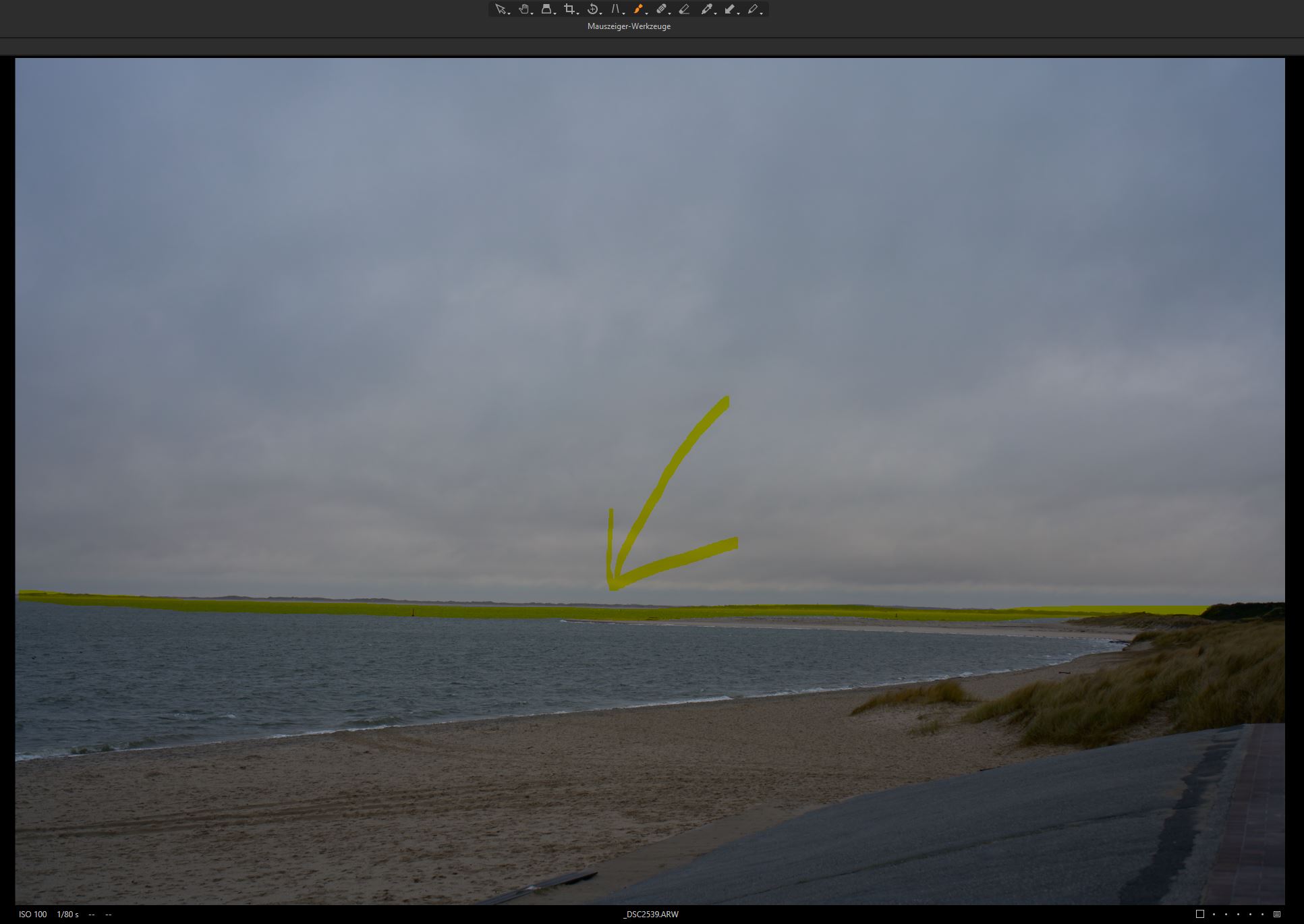
And after:
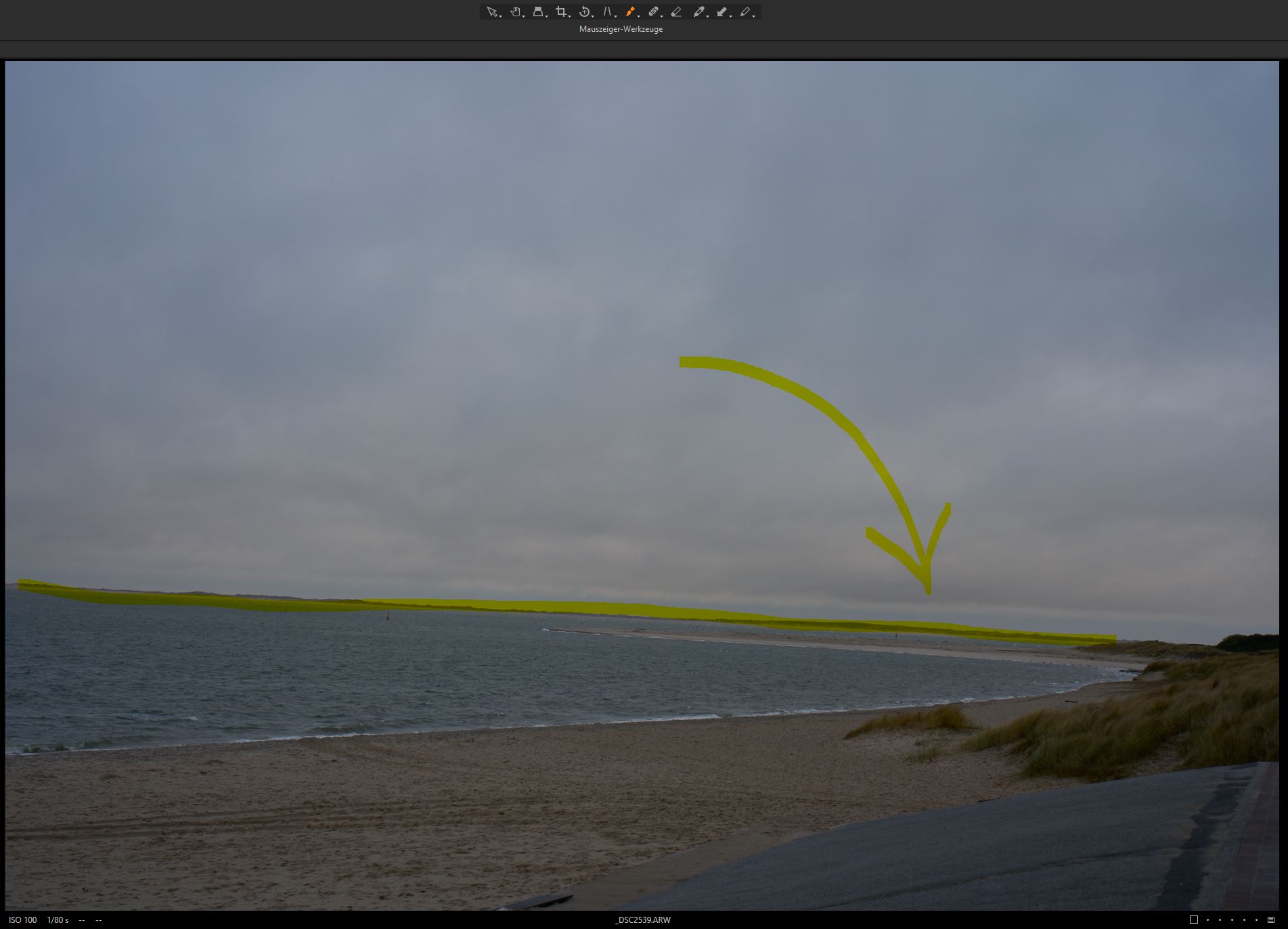
I think that my example picture should be easy to straighten the horizon automaticely but what happened is that the image turned in the wrong direction to an even stranger angle. I am confused. Maybe I am totaly wrong about the function of auto rotate at all?
Maybe someone has same or differing experience?
Greetings
Alex
-
Sorry in advance for posting this possibly in the wrong sub forum but I did not saw a general C1 22 Topic in the menu...
0 -

Alex,
I have seen exactly the same results as you have described when working with very similar seascape images.
I think the problem is that we, as humans, know what we understand as the "Horizon" line that we expect to be level but an AI engine may need far more data on which to base its decision.
Based on my impressions of what happens with the seascape images I have worked with I think the AI may need to be biased more towards the middle of the image - once it has decided where the middle might be.
When an image has very obvious and well defined horizontal lines the auto rotate works well. Also if it sees what appears to be vertical lines it will work well. A mix of the two, where an "obvious" vertical line may not be so useful for the particular image, may not produce such good results.
The seascapes tend to have multiple, relatively well defined, more or less horizontal line candidates. For example a Horizon AND a shore line and, maybe, some other sort of structure included that could be interperted as a strong line that maybe should be horizontal. Even a line of waves may offer the "best" option to AI analysis.
I do not know for certain but my impression is that multiple possible horizontal lines, with no single one of them being considered as a clear "winner", may be "averaged" in some way according to some formula in an attempt to offer a result. I have one or two images where there is no obvious way to assess how a rotation might be analysed and these are simply ignored. Nothing happens. I think that is completely the right decision.
To be realistic I can accept that such images are unlikely to be easily auto-rotated. They are, after all, the sort of images that people may not easily assess accurately using a self assessment process in some cases.
The challenge for the user is to understand when to make use of Autorotation and when to avoid it. This is especially true if hoping to batch process everything.
Some cameras may save data that identifies whether any non-level rotation data and that could be applied as an automatic correction if it is accessible to the software. However, technically correct "level camera" images may still not deliver entirely level images as humans interpret them. Whether AI analysis can really overcome such problems in a batch process scenario (which is where the most time-saving gains might be available) remains to be seen.
If the long-term solution is to "analyze more images" in order to enhance the AI rules, then it might be useful to have some sort of extremely simple process by which users could submit images for assessment and so build up the knowledge base.
Even that needs careful management in order to avoid skewing the results towards common problems which may not have common causes (but look like they have) while missing some of the less common but more solvable situations. Or the other way around.
For example, I know that when hand-holding (i.e. most of the time) - especially with one of my cameras - I tend to be 1 or 2 degrees off horizontal for most images. Often that will not matter much, sometimes it does.
It would be useful to be able to either tell the AI assessment process locally that this situation might be found or have it look for such a pattern in the images I present to it. For a batch process to work successfully for me I have the impression that such information would be necessary more often than not.
However, if one was seeking to develop a totally AI analyzed system all of that would need to be contained within the AI discovery side of the data analysis - by the software and not by the humans creating it.
0 -
Yes, maybe you're right with your assumption:
"I do not know for certain but my impression is that multiple possible horizontal lines, with no single one of them being considered as a clear "winner", may be "averaged" in some way according to some formula in an attempt to offer a result."
That seems to be the problem with my example picture as it is rotated to the middleground between horizon and shoreline.
My guess is that the function as a batch tool does not really bring that much of an advantage. In the end we will manually adjust the failures of the algorithm in mor than 50% of a batch... I still haven't found a real advantage in C1 22 which does make it superior to C1 20 ;)
0 -

this new tool does simply not work reliable enough to make it useful even with clear horizontal and vertical lines. when you apply it to a punch of images with some of them already perfect aligned c1 rotates this images and makes them miss aligned ! so their first step into AI is a big failure.
0 -
@Al St
"My guess is that the function as a batch tool does not really bring that much of an advantage. "
Agreed BUT there may be some who find a huge advantage for their work.
For example, where an image does have unambiguous horizontal or vertical features that are usable (i.e. are not subject to and Keystone correction needs.) the auto adjustment seems to work pretty well most of the time. I may be the odd 0.01 of a degree out here and there according to one's personal assessment (which will take into account the resulting "look" in a way that any generic AI driven assessment will not be able to do).
Fir shots like your example (and my very similar examples that I first used to test the feature) they seem to fail completely. But then those sorts of shots are actually much easier for a human to recognise and make instant decisions about (usually right but sometimes wrong) than it will be for AI UNLESS one can always set an AI rule that asserts something like the central 20% or 30% of the shot, horizontally or vertically, takes complete precedence for analysis over the rest of the image when deciding any degree of corrective rotation.
(As an aside, the same "rule" would be very useful in stitching panoramas as well. HDR, for seascape images with strong wave definition and constant movement is something of a lost cause no matter what one does ... although the "only use the centre for alignment" rule may still have a place.)
The alternative would be to use camera-sourced data when available (as one might be able to do with a phone camera for example). If I recall correctly many of the Phase digital backs offer data that can be used for auto rotational purposes when required - hence the existence of the option for some years. I have no idea how many other cameras might be able to provide the same information. I would guess not many and that there might be more information required than is available to make the IMAGE look correctly rotated to a human "eye" rather than simply being technically corrected. There would seem to be little point in heading down the AI route if correction data was a better option and the camera manufacturers were being pestered by their customers to make it available.
But then again, photography and the results of photography tends to be a bit more nuanced than simple technical proficiency can provide.
0 -
Agreed BUT there may be some who find a huge advantage for their work
fanboys like you which hobby seem to defend every crap this company releases ?
0 -
No CSP.
I do appreciate that you often find it hard to understand what is written here but nevertheless, your constant criticism and, more recently, personal attacks on a number of posters, is tiring.
I'm really not sure why you are still around wasting your time here.
Surely it would be better for your health and your sanity to spend the time more constructively?
Unless, of course, you take pleasure and gains from this type of activity as some sort of hobby. Or, possibly, some sort of job or internet-based revenue stream?
Who knows?
Who cares?
It's a free world still - well, some of it.
It is still possible to ignore your rants. (Or not, should one choose to respond.)
0 -
you are right SFA I should not react to user like you as no argument, experience or image samples like in the keystone discussion makes you stop praising and defending broken or not working features in this software.
0 -
As I said in my previous post, CSP, you seem to find it hard to understand what is written here.
0 -

I agree with you Alex, the auto rotate function is almost unusable.
A lot of time it requires more time to review & correct them rather than saving time.
0
Post is closed for comments.
Comments
10 comments