Capture one 22 - Process recipe

Where has the Process Recipe cog wheel (button) moved to in Capture One 22 ? Is it not possible to set the process recipes now?
-
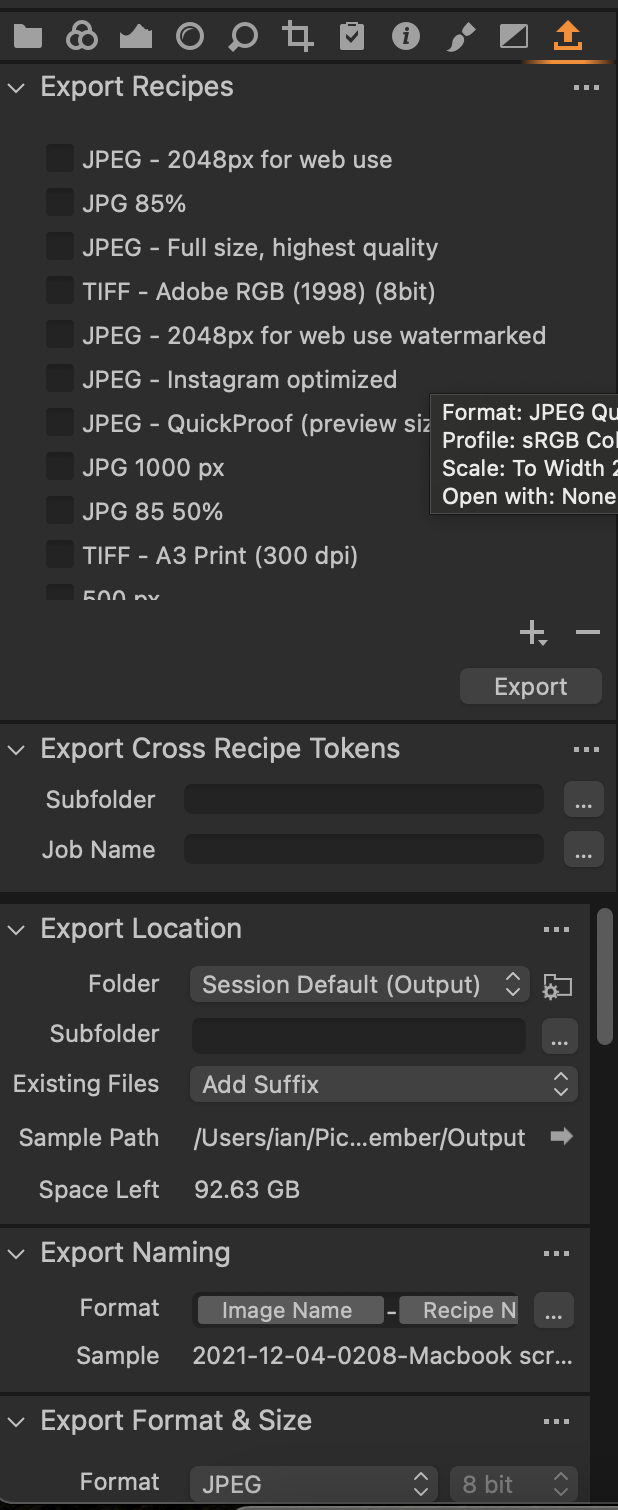
It's replaced by the Export tool tab. It isn't shown on the default workspace...

... but you can add it. (Right click the tool tabs and choose Add tool tab.

You get all the stuff you used to get.
Ian
1 -

Hello I have set up the export tab - but after selecting a specific export recipe I am unable to export files?
None of the selected Files are being queued for processing and export. The files I am exporting are files which have been generated using "Merge to HDR" feature and I am looking to convert DNG to Jpeg for the output process with sRGB and Long edge to 2400 px using the DNG files generated by the HDR engine. Please advise?
0 -
This has rectified itself and is now working.
0 -
Well, thank you for asking what the matter is with "you people". I'm quite well, thank you.
This is a forum of your fellow users of the software, and taking out your frustrations on us will get you nowhere at all because we are not Capture One and we can do nothing about anything you dislike about the software.
If you want to, you can contact Capture One using the Submit a request link at the top right of this page.
Ian
1

Post is closed for comments.
Comments
4 comments